Note: This article is written for web publishing, based on real publicly available information about the TypingCat Pixel 6 Pro palmtop project, related Android/Linux tools, 3D printing practices, and the modern pocket-computer trend. No source links or citation placeholders are included.
Every few years, the tech world collectively remembers that typing long messages on glass is not exactly a spa day for the thumbs. We love our smartphones, sure, but when it is time to write code, answer emails, take notes, or pretend we are hackers in a late-night cyberpunk movie, a touchscreen keyboard can feel like trying to play piano on a dinner plate.
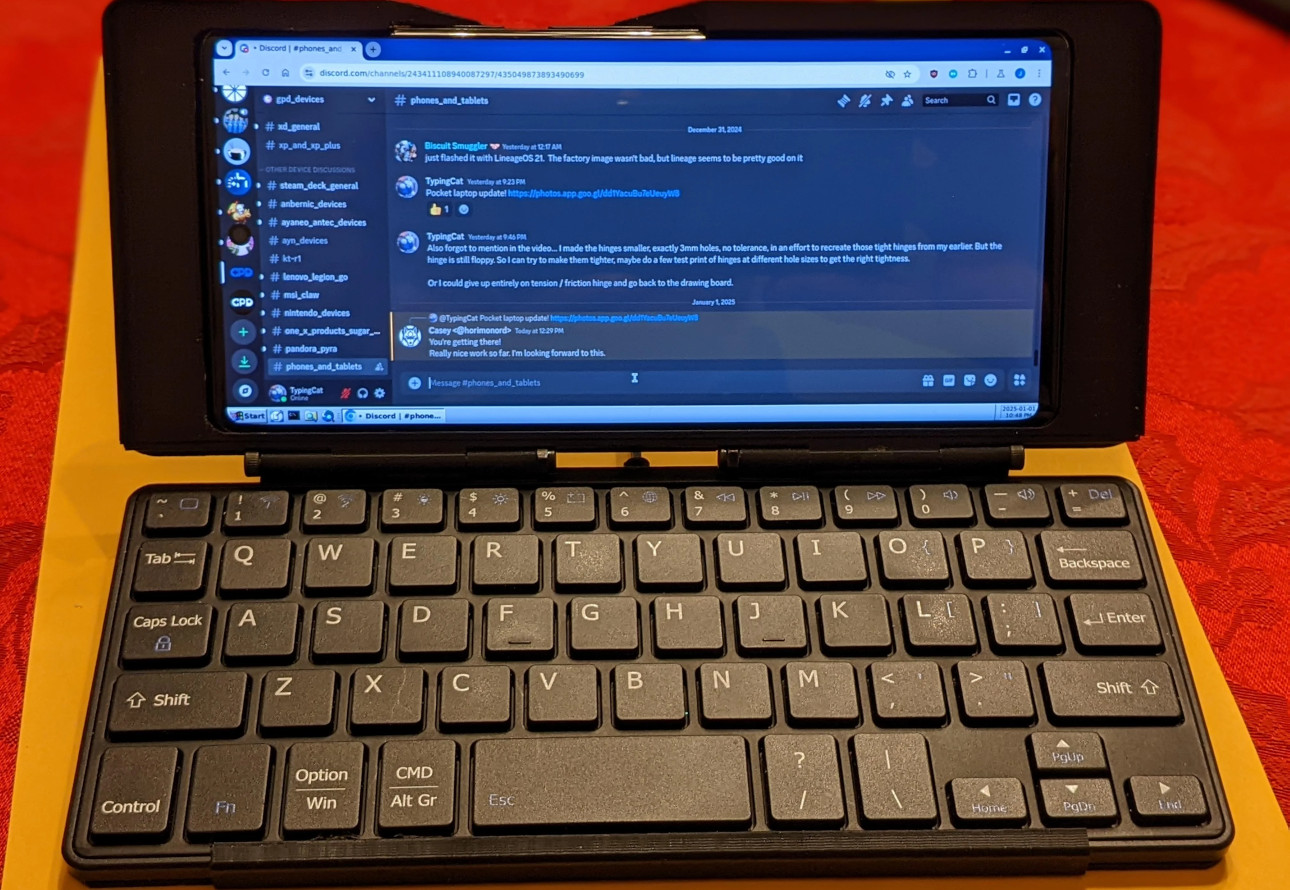
That is why the project known as “3D Printed Case Turns Pixel 6 Pro Into Palmtop” has caught the attention of makers, retro-computing fans, and productivity nerds. Created by the maker known as TypingCat, the design uses a 3D printed chassis to combine a Google Pixel 6 Pro with a compact Bluetooth keyboard. The result is a clamshell-style handheld computer that looks part mini laptop, part PDA, part pocket cyberdeck, and entirely like something that should have existed years ago.
At its core, the idea is refreshingly simple: take a still-capable smartphone, give it a real keyboard, wrap both pieces in a custom 3D printed case, and create a modern palmtop computer. No giant backpack. No external monitor. No desk required. Just a phone, a keyboard, and enough plastic filament to make your 3D printer feel useful again.
What Is the Pixel 6 Pro Palmtop Project?
The Pixel 6 Pro palmtop is a do-it-yourself 3D printed case project that turns Google’s 2021 flagship smartphone into a pocketable clamshell computer. The design pairs the Pixel 6 Pro with a small Bluetooth keyboard, holding both in a hinged printed chassis. When opened, the phone becomes the screen and the keyboard becomes the main input device. When closed, the whole setup resembles the old handheld PCs and PDAs that business travelers used before smartphones flattened everything into shiny rectangles.
The project is especially interesting because it does not require exotic electronics. There is no custom motherboard, no soldering marathon, and no “first, build your own operating system” nonsense. The main components are the Pixel 6 Pro, a compatible compact Bluetooth keyboard, printed case parts, and fasteners. That makes it approachable for people who already have access to a 3D printer or a local printing service.
The project also leans on Android’s flexibility. With apps like Termux and Termux:X11, a Pixel phone can run a surprisingly useful command-line or Linux-style desktop environment. That means this little clamshell device is not just a novelty for typing shopping lists. It can be used for SSH sessions, coding experiments, note-taking, writing drafts, file management, and lightweight development tasks.
Why the Google Pixel 6 Pro Is a Smart Choice
The Google Pixel 6 Pro is not the newest phone on the block anymore, but that is exactly what makes it attractive for a maker project. Used units are more affordable than current flagship phones, yet the hardware remains powerful enough for serious mobile productivity.
The Pixel 6 Pro features a large 6.7-inch QHD+ LTPO OLED display with a refresh rate of up to 120Hz. That screen size matters because a palmtop computer lives or dies by readability. A tiny display may be charming for retro collectors, but if you are editing text or using a terminal, you want characters that do not require a magnifying glass and emotional support.
Inside, the phone runs on Google’s first-generation Tensor chip with 12GB of RAM. For normal Android apps, writing tools, terminal work, web browsing, and remote server access, that is still plenty of power. The Pixel 6 Pro also has a USB-C port, Bluetooth support, solid wireless connectivity, and a battery large enough to make the whole idea practical for short mobile work sessions.
A Second Life for Older Flagships
One of the best parts of the project is sustainability. Many people upgrade phones while their older devices still have useful life left. A 3D printed palmtop case gives a retired Pixel 6 Pro a new job instead of letting it nap forever in a drawer beside mystery cables and one lonely earbud.
This is where DIY hardware culture shines. Instead of waiting for a big company to decide that physical keyboards are trendy again, makers can build the device they want. The Pixel 6 Pro becomes more than an old phone. It becomes a compact writing machine, a portable terminal, or a retro-inspired mini workstation.
The Appeal of a Physical Keyboard
Touchscreens are fantastic for scrolling, tapping, swiping, and accidentally liking posts from 2016. But for serious typing, a physical keyboard still has major advantages. Tactile feedback helps users type with more confidence. Dedicated keys make shortcuts easier. Long-form writing becomes less frustrating. Coding becomes possible without wanting to throw the phone into the nearest lake.
The Pixel 6 Pro palmtop taps directly into that need. It restores a feature that many older mobile devices had: real keys. The design echoes classics such as the HP Jornada 720, Nokia Communicator series, Psion organizers, and other clamshell computers from the 1990s and early 2000s. Those devices were not always fast, but they had personality. More importantly, they understood that typing matters.
Today’s phones have vastly better processors, screens, cameras, and connectivity. What they often lack is a comfortable input method. This 3D printed Pixel 6 Pro case solves that gap in a wonderfully maker-friendly way.
How the 3D Printed Case Works
The case design uses multiple printed parts to hold the phone and keyboard together. The top portion is based around the Pixel 6 Pro, while the bottom section houses the Bluetooth keyboard. A hinge mechanism allows the device to open and close like a miniature laptop.
The project is designed around a specific compact Bluetooth keyboard, which helps keep the build manageable. When a case is engineered for known dimensions, the fit can be tighter, cleaner, and more reliable. The trade-off is compatibility. If you use a different keyboard or a different phone, you may need to modify the 3D model.
That limitation is not a flaw so much as a reminder that 3D printing is both magical and mildly picky. A model that fits one phone perfectly may not fit another phone at all. Camera bumps, curved displays, button placement, thickness, and case tolerances all matter. One millimeter can be the difference between “beautiful custom build” and “why is my phone wedged in there like a pickle jar lid?”
Printing Considerations
For a project like this, material choice matters. PLA is easy to print and widely available, but it can soften in hot environments, such as a car parked under summer sun. PETG offers better heat resistance and toughness, though it may require more careful tuning. TPU can be useful for flexible phone cases, but a hinged keyboard chassis usually benefits from stiffer materials.
Print orientation, layer adhesion, hinge strength, screw holes, and tolerances are all important. The case must survive opening, closing, carrying, and the occasional “oops, I dropped it on the couch” moment. Builders should expect some test fitting and possibly a little sanding or tweaking. That is part of the fun, assuming your definition of fun includes calipers.
Software: Where Android Meets Linux
The hardware is only half the story. What makes this Pixel 6 Pro palmtop genuinely useful is the software ecosystem. Android already supports Bluetooth keyboards well, so typing in standard apps is straightforward. But the project becomes more powerful with Termux, a terminal emulator and Linux environment for Android.
With Termux, users can install command-line packages, run shells, use text editors, manage files, connect to servers over SSH, work with Git, and even experiment with programming languages. Add Termux:X11 or related desktop tools, and the phone can get closer to a lightweight Linux desktop experience.
This does not magically turn the Pixel 6 Pro into a full laptop replacement. There are still Android limitations, app compatibility questions, display scaling issues, and performance differences compared with a traditional computer. However, for mobile coding, remote administration, writing, and learning Linux commands, it is more capable than many people would expect.
Who Is This Pocket Cyberdeck For?
The Pixel 6 Pro palmtop is not for everyone, and that is part of its charm. If you only use your phone for videos, photos, chat apps, and doomscrolling with Olympic-level dedication, a 3D printed keyboard case may feel unnecessary. But for certain users, it makes a lot of sense.
It Is Great for Writers and Note-Takers
Writers who like to draft on the go may appreciate a physical keyboard. Whether you are writing blog outlines, meeting notes, journal entries, or the first sentence of a novel you will definitely finish this time, a compact keyboard can make the process smoother.
It Is Useful for Developers and Tinkerers
Developers can use the setup for SSH, Git, scripting, and quick edits. It is not a workstation, but it can be a very handy emergency terminal. Need to restart a server from a coffee shop? Need to edit a config file while traveling? Need to look extremely mysterious in an airport lounge? This device has range.
It Appeals to Retro-Computing Fans
For people who miss the HP Jornada, Nokia Communicator, Psion Series 5, or other clamshell machines, this project scratches a very specific itch. It brings back the pocket-computer form factor using modern smartphone hardware.
Strengths of the Design
The biggest strength is practicality. Many DIY cyberdeck projects are delightful but enormous, with wires, screens, batteries, and boards packed into cases that look like they belong in a science-fiction submarine. The Pixel 6 Pro palmtop is much simpler. It uses hardware most people understand and a phone that already has a screen, battery, processor, wireless connectivity, speakers, cameras, storage, and operating system.
Another strength is affordability. If someone already owns a Pixel 6 Pro or can find one used, the remaining parts are relatively modest. A small Bluetooth keyboard, screws, and printed parts are far cheaper than buying a niche keyboard phone or mini laptop.
The design also shows the power of modular thinking. Instead of building a computer from scratch, the maker builds the missing piece: the form factor. The phone provides the computing platform. The keyboard provides input. The 3D printed case provides structure. It is a clever combination of existing tools.
Limitations and Trade-Offs
Of course, this is still a DIY project. It will not feel like a mass-produced laptop. The hinge may not match commercial hardware. The keyboard layout may be cramped. The phone angle may not be perfect for every situation. And because the design is built for the Pixel 6 Pro, owners of other phones will need modified models.
There is also the question of pocketability. A phone plus keyboard plus printed case is thicker and bulkier than a bare smartphone. It may fit in a jacket pocket, but skinny jeans will probably file a complaint. This is a device for people who value function over slimness.
Battery life depends on both the phone and keyboard. Bluetooth keyboards are usually efficient, but running terminals, desktop environments, or development tools can drain a phone faster than casual use. Heat can also become a factor during sustained workloads.
Why This Project Matters
This 3D printed Pixel 6 Pro palmtop matters because it proves that smartphone design does not have to be limited to what big manufacturers sell. Modern phones are incredibly powerful, but their shape has become predictable. Slab, screen, camera bump, repeat. The maker community asks a more interesting question: what if the phone could become something else?
That question is important in an era when many devices are difficult to repair, customize, or repurpose. A 3D printed case gives users agency. It invites people to modify, print, adapt, and experiment. It also encourages longer use of older hardware, which is good for wallets and better for electronic waste reduction.
The project also highlights a growing desire for focused devices. A palmtop computer is not trying to be everything. It is designed for typing, tinkering, and portable productivity. In a world of endless notifications, that focus can feel surprisingly refreshing.
Experience Section: Living With a DIY Pixel 6 Pro Palmtop Concept
Using a device like this is less like using a normal phone and more like carrying a tiny workstation with a personality disorderin the best possible way. The first thing you notice is the mental shift. A regular phone invites quick actions: tap, swipe, reply, close. A palmtop invites sessions. You open it, place your thumbs or fingers on the keys, and suddenly the device feels built for doing rather than just consuming.
For writing, the biggest improvement is rhythm. Touchscreen typing is fine for short messages, but it can interrupt longer thoughts. A physical keyboard gives your hands a place to settle. Even if the keyboard is small, the tactile feedback helps. You can draft an article outline, write a few paragraphs, clean up notes, or answer longer emails without feeling like your thumbs are running a marathon on polished glass.
For terminal use, the experience can be surprisingly satisfying. Open Termux, pair the keyboard, increase font size, and the Pixel 6 Pro becomes a tiny command center. SSH into a server, check logs, edit a file in Vim or Nano, push a small Git change, or run a Python script. Is it as comfortable as a 14-inch laptop? No. But it is far more portable, and for quick technical work, it can be enough.
The clamshell design also changes how the phone behaves in public. Instead of holding a phone upright and pecking at the screen, you can set it on a table like a mini laptop. That makes it useful in coffee shops, classrooms, trains, hotel rooms, and anywhere a full laptop feels excessive. It is the kind of gadget that will attract questions from curious people nearby. Some will ask if it is a tiny laptop. Some will ask where to buy it. One person will absolutely say, “Is that a Game Boy?” Smile politely.
There are quirks. The keyboard may feel cramped during long sessions. Android apps vary in how well they respond to keyboard shortcuts. Some desktop-style Linux workflows require patience. The hinge angle may not be ideal for every posture. And because the case adds bulk, you must decide whether the added typing comfort is worth carrying a thicker device.
Still, the experience has a special charm. It makes computing feel physical again. You open it, type on real keys, and interact with your phone in a more deliberate way. That is the real magic of the Pixel 6 Pro palmtop. It is not just a case. It is a reminder that old ideas can become exciting again when paired with modern hardware, open software, and a 3D printer that has finally stopped making decorative dragons long enough to do some work.
Final Thoughts
The 3D printed case that turns the Pixel 6 Pro into a palmtop is more than a clever weekend project. It is a glimpse into a more flexible future for mobile devices. It combines the power of a modern smartphone, the comfort of a physical keyboard, and the customization of 3D printing into one compact machine.
For most users, it will remain a niche curiosity. For makers, writers, developers, and retro-computing fans, it is something better: a practical idea with personality. It shows that the dream of the pocket computer never really died. It just waited for smartphones to get powerful enough, keyboards to get cheap enough, and 3D printers to get common enough.
Maybe the future of mobile productivity is not a giant foldable phone or another expensive tablet. Maybe it is an old Pixel, a small keyboard, and a printed hinge. Sometimes innovation does not arrive in a glossy keynote. Sometimes it arrives layer by layer, smelling faintly of warm filament.