For years, JOBY has been the brand you grab when your camera needs a better grip, a more stable tripod, or a flexible “wrap this around literally anything” solution. Now it’s coming for your audio chain, toobecause nothing says “I’m a serious creator” like a crisp voice track and the sudden urge to say “We’ll fix it in post” with a straight face.
In its Wavo lineup refresh, JOBY introduced five microphones aimed squarely at streamers, podcasters, vloggers, and anyone who has ever recorded a brilliant take… only to discover they were using the laptop’s built-in mic the whole time. [1] The new models cover the major “creator audio” scenarios: a desktop USB mic for home studios, two camera-mounted shotguns for run-and-gun shooting, a wireless kit for two-person content, and a pro-grade lav for interviews and hands-free talking.
What’s In The Five-Mic Launch?
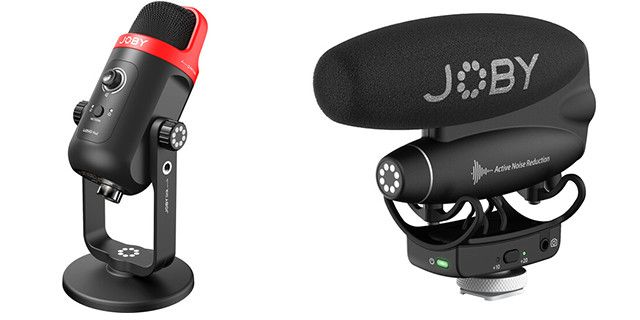
The five models are: Wavo POD (USB desktop condenser), Wavo PRO (flagship on-camera shotgun), Wavo PRO DS (streamlined on-camera shotgun), Wavo Lav PRO (wired lavalier), and Wavo AIR (two-person wireless system). [1]
Think of it like a “choose your own adventure” for audio: the POD is for the desk, the PRO/PRO DS are for the camera, the AIR is for the people who move around, and the Lav PRO is for when you want the mic to disappear (unlike your background laundry pile).
Why This Launch Matters For Streamers and Podcasters
Audio is the fastest way to make your content feel premiumor painfully amateur. Viewers will tolerate a slightly soft image, but they’ll bounce instantly if your voice sounds like it’s echoing inside a cereal box. JOBY’s strategy here is simple: offer a cohesive ecosystem where your stability gear, lighting, and audio feel designed for the same workflow. [2]
Another smart angle: the lineup isn’t only for “studio podcasters.” It’s built around real creator patterns: streaming at a desk, filming on a mirrorless camera, doing two-person interviews, teaching fitness classes, shooting food content, or walking-and-talking in unpredictable spaces. [3]
Quick Comparison Table: Which Mic Fits Which Workflow?
| Model | Best For | Connection Type | Standout Feature | Typical Price Tier |
|---|---|---|---|---|
| Wavo POD | Streaming, podcasting, voice chat, remote work | USB-C (digital) | 24-bit/48 kHz + cardioid/omni modes + monitoring | ~$100 [1] |
| Wavo PRO | Pro vlogging, filmmaking, high-end run-and-gun | 3.5mm TRS + USB-C | Active noise reduction + app control + 2nd mic input | ~$300 [1] |
| Wavo PRO DS | Creators who want a simpler shotgun mic | 3.5mm TRS + USB-C | Streamlined controls + high-pass filter + long battery | ~$250 [1] |
| Wavo Lav PRO | Interviews, talking head videos, tutorials | 3.5mm TRS (wired) | Omni capsule + long 8.2 ft cable for clean placement | ~$80 [1] |
| Wavo AIR | Two-person interviews, mobile creators, instructors | 2.4 GHz wireless + 3.5mm output | Two transmitters + TRS/TRRS cables + quick setup | ~$250 [1] |
Deep Dive: The Desktop Choice Wavo POD
If your content lives on a deskTwitch, YouTube commentary, podcast episodes, Zoom calls that should’ve been emailsthe Wavo POD is JOBY’s “plug it in and sound better immediately” play. [4]
What makes it streamer-friendly?
- High-resolution capture (24-bit/48 kHz) and USB-C connectivity, with included cables for Type-C and Type-A setups. [4]
- Two pickup patterns: cardioid (focus on you) or omnidirectional (capture a small group around the mic). [4]
- Zero-latency headphone monitoring via a 3.5mm jack, plus onboard gain/volume control and a one-click mute. [4]
- A design detail that’s genuinely helpful: a visual cue on the grille to guide you to speak into the correct side of the mic. [4]
Practical example: if you’re a streamer with a clacky keyboard, cardioid mode helps keep the mic focused forward. For a two-person podcast sharing one mic (tight space, tight budget), omni mode can be a lifesaverjust keep everyone close and resist the urge to lean back like you’re in a lounge chair.
Deep Dive: On-Camera Shotguns Wavo PRO vs Wavo PRO DS
Shotgun mics are for creators who want better audio while keeping the setup fast: mount on camera, point at subject, hit record, go. JOBY’s two shotguns share the same general goalbroadcast-ready voice capture in the fieldwhile splitting the experience into “I want advanced control” vs “please keep it simple.” [2]
Wavo PRO: the flagship with smart features
The Wavo PRO is positioned as the premium option for demanding creators, with a hybrid analog/digital approach and more “do it now so you suffer less later” featuresespecially for movement-heavy shooting. [3]
- Active Noise Reduction (ANR) to reduce self-generated handling/structural noise during on-the-go capture. [3]
- A companion app (iOS/Android) for monitoring and deeper control, including EQ and other settings. [3]
- Secondary 3.5mm mic input so you can run a second mic (great for interviews). [2]
- Safety track (-10 dB) style recording to reduce the chance of clipped audio ruining your best take. [3]
- Long battery lifeup to about 60 hours on the internal rechargeable batteryplus USB power options. [5]
Creator scenario: you’re vlogging outdoors, walking, turning, talking, filming B-roll. Handling noise and sudden volume spikes are the usual villains. The PRO’s ANR + safety track approach is basically JOBY saying, “Let’s do fewer re-takes, and fewer ‘why does this sound crunchy?’ moments.”
Wavo PRO DS: simplified controls, still serious audio
The Wavo PRO DS trims away advanced features (like ANR, app-based control, and the extra mic input) to keep the workflow simple, while maintaining a creator-focused set of essentials. [5]
- High-pass filter / bass roll-off options to reduce low-frequency rumble (traffic, HVAC, handling). [3]
- Safety track support to protect against distortion. [3]
- Long rechargeable battery life similar to the PROuseful for long shoot days. [5]
If you’re upgrading from a camera’s built-in mic (or from a tiny on-camera mic) and you’re not ready to manage app settings, the PRO DS is the “cleaner audio, fewer knobs” choice.
Deep Dive: Wireless For Two People Wavo AIR
Wireless audio is what you buy when you’re tired of being chained to your camera. The Wavo AIR kit is designed for two-person shootinginterviews, co-hosts, instructorsusing two transmitters and a dual-channel receiver. [6]
Why streamers and podcasters should care about wireless
Even if you don’t think of yourself as a “field creator,” wireless is incredibly relevant for modern content: multi-cam podcasts, behind-the-scenes segments, IRL streams, cooking videos, and fitness instruction. You can keep your audio consistent while moving around, turning away, or stepping back from the camera.
- Works in the 2.4 GHz spectrum and supports quick setup (including being pre-paired in some retail packaging). [6]
- Includes TRS and TRRS cables so you can connect to cameras and many mobile setups. [6]
- Up to ~164 feet line-of-sight range (real-world range varies with walls and interference). [6]
- Up to ~6 hours on internal batteries, plus USB-C for charging/power. [6]
- Transmitters can use included lav mics or their built-in omni capsules for clip-on use. [6]
Real-world example: two-person podcast filmed in a living room. A desktop mic might force you to sit awkwardly close to one spot. With Wavo AIR, each person gets their own mic channel, and you can keep a natural, camera-friendly distancewithout sounding like you’re shouting from different corners of the room.
Deep Dive: The Wired Interview Workhorse Wavo Lav PRO
Lav mics are the “invisible heroes” of creator audio: small, close to the mouth, consistent sound, minimal setup. The Wavo Lav PRO is JOBY’s pro-grade wired lav, aimed at interviews and speaking roles where you want clean voice pickup without a mic in the frame. [7]
- Omnidirectional pickup for consistent sound even if the speaker turns their head. [7]
- Long 8.2-foot cable designed to give flexibility in interview setups. [7]
- 3.5mm TRS output compatible with camera mic inputs and the Wavo PRO’s secondary input. [7]
- Includes a foam windscreen to soften plosives and light wind noise. [7]
Simple but powerful use case: talking-head YouTube videos. Put the lav on your shirt, keep the cable tidy, and you’ll typically get clearer speech than a camera-mounted shotgunespecially in echoey rooms.
How to Choose the Right JOBY Mic (Without Overthinking It)
Pick the Wavo POD if you:
- Stream, podcast, voice chat, or record voiceovers at a desk.
- Want an easy USB setup with monitoring and quick controls.
- Need cardioid for solo work and omni for simple two-person recording.
Pick the Wavo PRO if you:
- Film on the move and want features that reduce handling noise and protect takes.
- Like having app-based monitoring/EQ and more control over your capture.
- Plan to run a second mic into the system for interview flexibility.
Pick the Wavo PRO DS if you:
- Want strong shotgun performance with fewer “advanced audio” decisions.
- Need a high-pass filter option for rumble control.
- Prefer straightforward, fast setup for daily vlogs and creator shoots.
Pick the Wavo AIR if you:
- Record two people on camera (or need hands-free audio while moving).
- Create fitness, cooking, interview, or IRL-style content.
- Want compatibility across cameras and many mobile workflows.
Pick the Wavo Lav PRO if you:
- Do interviews, tutorials, or talking-head content and want consistent speech pickup.
- Prefer wired reliability (no pairing, no battery anxiety for the mic itself).
- Need a compact mic that’s easy to hide on camera.
Setup Tips That Make Any Mic Sound Better
1) Distance is your secret weapon
The easiest “upgrade” is placing the mic closer to your mouth. A $99 mic placed correctly can beat a $399 mic placed poorly. For desk mics, keep it within a hand’s span; for shotguns, keep the subject close; for wireless/lavs, clip at upper chest height.
2) Control room echo like it owes you money
Bare walls and hard floors make voices sound thin and distant. Add a rug, curtains, or even a strategically placed blanket off camera. Your microphone will thank you by making you sound like you know what you’re doing.
3) Use filters like a grown-up
High-pass filters (or bass roll-off) help reduce rumble from footsteps, traffic, desk bumps, and air conditioning. If your voice starts sounding too thin, ease upbut don’t be afraid of filtering when you’re shooting in the real world.
4) Monitor whenever you can
Headphone monitoring catches problems immediately: clipping, clothing rustle, wireless dropouts, and the dreaded “mic muted” situation. If your gear offers monitoring, use iteven if you feel cool enough to raw-dog the audio. (You’re not.)
FAQ: JOBY’s Five New Microphones
Are these microphones only for pros?
No. The lineup is intentionally tiered: POD and PRO DS aim for approachable ease-of-use, while PRO and AIR offer more capability for advanced workflows.
Can Wavo AIR connect to phones and cameras?
Yeskits commonly include TRS (camera) and TRRS (mobile) cables for broad compatibility, plus USB-C charging/power. [6]
What does “safety track” actually help with?
It’s protection against clipping. If you laugh loudly, shout, or spike a phrase, a lower-level backup track can save the take. Think of it as an audio seatbelt: you hope you don’t need it, but you’re glad it’s there.
Is a lav mic better than a shotgun mic?
It depends. For stable talking-head content, a lav can sound very consistent because it stays close to your mouth. For general run-and-gun shooting where you can’t mic talent, a shotgun can be more practical. The best choice is the one that keeps your voice clean with the least friction for your workflow.
Creator Experiences: What It’s Like Using Mics Like These (And What People Learn Fast)
After you’ve recorded enough content, you start to recognize a pattern: creators don’t “upgrade audio” because they’re bored they do it because something painful happened. Maybe a perfect podcast episode had a constant hum. Maybe a vlog sounded like wind and sadness. Maybe a collab video turned into a “two people sharing one mic from across a table” situation that felt fine in the moment and terrible afterward.
Desktop mics like the Wavo POD tend to create an immediate “wow” moment for streamers, mainly because they fix the most common beginner problem: distance. When you go from a laptop mic (far away) to a desk mic placed correctly (close), your voice suddenly gains warmth and clarity. The next “aha” is monitoringhearing yourself in real time is how you catch clipping, mouth noise, and the classic “my mic is pointed the wrong way” mistake before you’ve recorded 40 minutes of content. And yes, you will forget to unmute at least once. Everyone does.
On-camera shotguns like Wavo PRO and PRO DS can feel like freedom because they simplify rigs: one mic, one mount, one less thing to manage. The tradeoff is that they teach you the hard truth: shotguns don’t magically ignore rooms. If you’re filming in an echoey kitchen, the mic will still hear that echo. In practice, creators learn to treat shotguns as “best when the subject is close, and the environment is controlled.” Outdoors, they learn wind protection is non-negotiable. The first windy day you forget it, your audio will sound like you recorded inside a tornado’s sweater. That is a formative experience.
Wireless kits like Wavo AIR are where workflows get exciting. The most common creator reaction is: “Wait… I can move?” Fitness instructors can step back, demonstrate full-body movements, and still sound present. Food creators can pivot between counter and stove without volume swings. Interviewers can stop doing the awkward “lean toward the camera mic” dance. The learning curve is mostly about signal discipline: keep transmitters secured, avoid rubbing fabric, and remember that walls and crowded Wi-Fi environments can reduce range. People also learn that “two-person audio” is less about distance and more about consistencyeach voice stays stable, which makes editing and leveling feel dramatically easier.
Wired lavs like Wavo Lav PRO are the quiet workhorses. Creators love them because they’re reliable: no pairing, no dropouts, no “why isn’t this connecting?” panic. The lesson is cable managementroute it cleanly, reduce clothing rub, and place the capsule thoughtfully. Once you nail placement, you can turn your head, gesture, and speak naturally without your audio falling apart. And that’s the real goal: gear that disappears so you can focus on performance and storytelling.
If there’s one universal takeaway from creators who’ve lived through audio pain: pick the mic that matches how you actually make content, not how you imagine you’ll make content someday. The best microphone is the one you’ll set up every timebecause consistent, clean audio beats “premium gear” that stays in a drawer while you record another episode on your laptop mic and whisper, “It’s fine,” like it’s a prayer.
Conclusion
JOBY’s five-microphone Wavo launch is a practical, creator-first lineup: desktop capture for streamers and podcasters, shotguns for camera work, wireless for two-person content, and a lav for clean interviews. The bigger story is the workflow: JOBY is trying to make audio feel as approachable as stabilizers and lightsso creators can spend less time troubleshooting and more time publishing.
Footnotes (sources used for the bracketed facts):
- Model list + MSRP pricing + core feature summary: see common coverage/spec listings. [1]
- Launch context + ecosystem positioning + product naming: Wavo lineup announcement coverage. [2]
- Wavo PRO/PRO DS and Wavo AIR highlights (ANR, app control, high-pass filter, range claims): announcement coverage and industry notes. [3]
- Wavo POD specs (24-bit/48 kHz, patterns, monitoring, controls, included accessories): retailer spec sheet. [4]
- Wavo PRO/PRO DS long battery life + feature differentiation: retailer spec sheet and announcement notes. [5]
- Wavo AIR kit contents + TRS/TRRS + 2.4 GHz + ~164 ft + ~6h: retailer spec sheet and coverage. [6]
- Wavo Lav PRO omni + cable length + TRS + use-case: retailer spec sheet and coverage. [7]