Note: This guide discusses adult Sims customization in The Sims 2 for private, responsible gameplay. It does not encourage sexualized content involving teen, child, toddler, or baby Sims, and it does not recommend sharing explicit custom content publicly. Keep your game ethical, legal, backed up, and free from creepy goblin behavior.
Introduction: The Sims 2, Nudity, and the Famous Pixel Blur
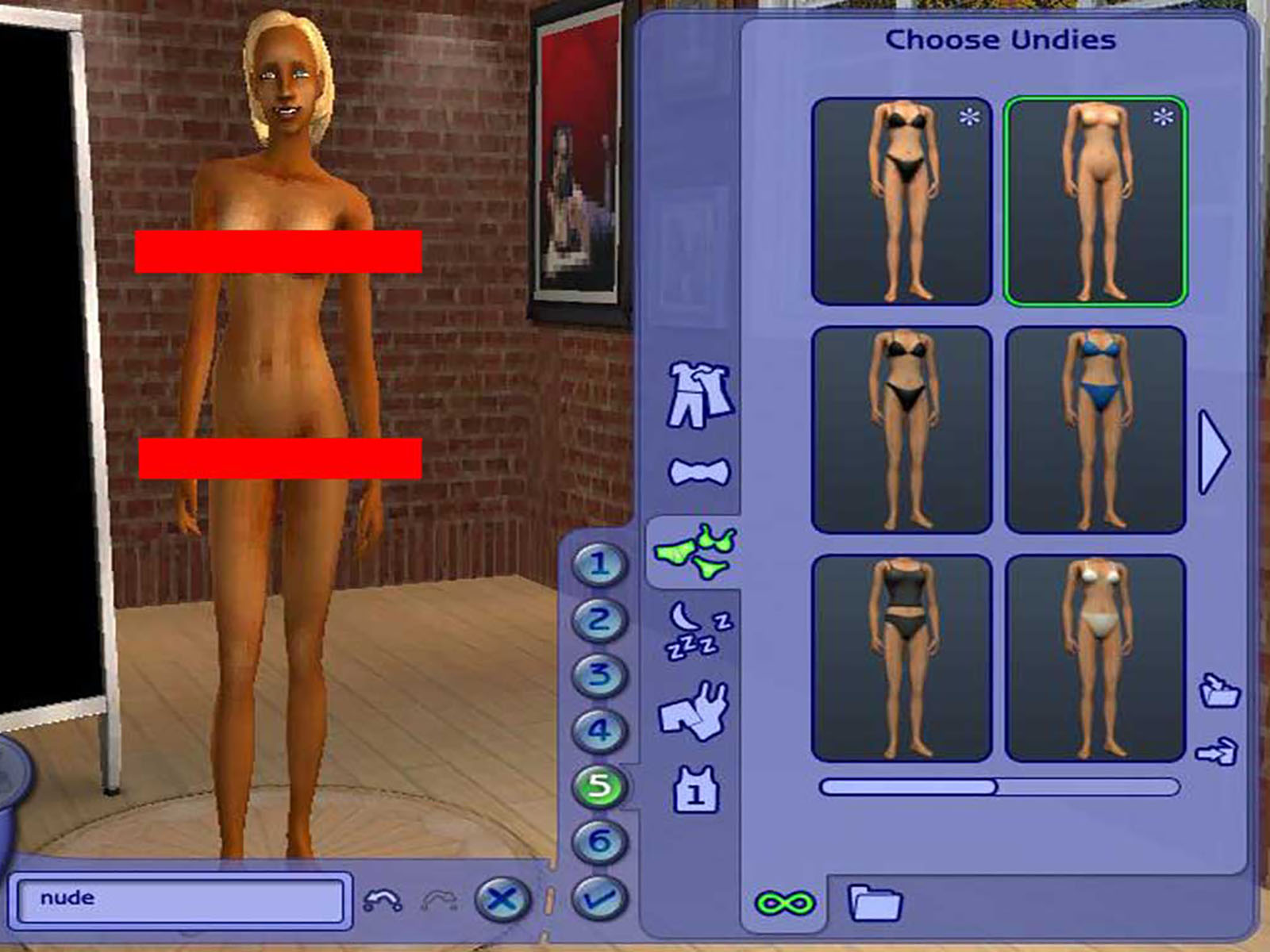
If you have ever sent a Sim to take a shower in The Sims 2, you already know the game has a dramatic sense of modesty. The moment your Sim changes clothes, bathes, uses the bathroom, or otherwise becomes unclothed, the game covers them with a mosaic censor blur. It is less “artistic realism” and more “someone spilled a bowl of square cereal on your screen.”
That blur has led many players to search for one specific question: how to make Sims nude in Sims 2 with cheat code or Body Shop? The answer is a little more complicated than a single magic command. Some early versions of The Sims 2 allowed a cheat that reduced the censor grid, but later patches and expansion packs disabled it. Body Shop, meanwhile, is a powerful Create-a-Sim utility, but it is not a simple “nude mode” button. It is mainly used to create Sims, edit textures, design custom clothing, modify genetics, and package custom content.
So, can you remove the blur? Sometimes. Can Body Shop create adult custom skins or clothing? Yes, with limits. Is there an official modern cheat that works in every version? No. This guide explains the difference between cheat codes, Body Shop projects, custom content, and no-censor mods, so you can understand what works, what does not, and how to avoid turning your game folder into a haunted junk drawer.
First, Understand What “Nude Sims” Means in The Sims 2
In The Sims 2, a Sim is not usually shown with detailed nudity by default. When the game considers a Sim unclothed, it displays a censor mosaic. Under that blur, the default body textures are basic and not designed as explicit adult content. This is important because removing the blur does not automatically install detailed custom anatomy. It simply removes or changes the censor effect.
That means there are three different ideas people often mix together:
1. Removing the censor blur
This makes the mosaic disappear during showers, baths, toilet use, and clothing changes. It does not necessarily add detailed body textures.
2. Creating custom skins or clothing
This uses Body Shop or other tools to create new textures. Players may create realistic skins, fantasy skins, underwear, swimwear, historical clothing, or other adult-appropriate designs.
3. Installing adult custom content
This involves third-party files made by creators. It is not officially supported, can conflict with other mods, and should be handled carefully. Never install files from suspicious download pages, and do not add explicit content for non-adult Sims.
Can You Make Sims Nude in Sims 2 with a Cheat Code?
The most commonly mentioned cheat is:
In early The Sims 2 installations, especially the base game and some unpatched University-era setups, this cheat could reduce the censor grid to zero. In plain English, it made the pixel blur disappear. However, this cheat is not reliable in most modern versions of the game. If you are playing with later expansion packs, patched versions, Ultimate Collection, Super Collection, or the newer Legacy Collection, the cheat may not work.
To try it, open the cheat console:
Then enter:
If your version supports it, the blur may disappear. If nothing happens, your game version probably disabled the command. Congratulations: your Sims are still being guarded by the pixel police.
How to turn the blur back on
If the cheat works and you want to restore the censor grid, try a larger value such as:
Some players also use values like 10 or 16. The exact appearance can vary depending on resolution, expansion packs, and game setup.
Why the cheat may fail
The cheat was effectively disabled in many later game configurations. That is why so many players search for “Sims 2 nude cheat not working.” The problem is usually not your typing. It is your version of the game. The later your installation, the less likely this cheat is to work.
Can Body Shop Make Sims Nude?
Body Shop is often misunderstood. It is not a gameplay cheat tool. It does not directly remove the mosaic blur from Live Mode. Instead, Body Shop is a separate utility used to create Sims, edit appearance parts, export textures, modify them in image software, and import them back into the game as custom content.
In other words, Body Shop is less like a cheat console and more like a tiny digital tailor shop run by a sleep-deprived llama.
What Body Shop can do
Body Shop can help you create or modify:
- Custom clothing
- Skin tones
- Makeup
- Facial hair
- Accessories and appearance details
- Packaged Sims for sharing or backup
What Body Shop cannot do by itself
Body Shop cannot automatically remove the in-game censor blur. It also cannot safely replace every body mesh or texture in your game with one click. If you create adult custom textures, they still need to be imported correctly, placed in the right folder, enabled in-game, and tested carefully.
How to Use Body Shop for Adult Custom Skins or Clothing
If your goal is adult-only custom skin or clothing creation, Body Shop is the cleaner, more creative route. You are not simply switching off a blur; you are making custom content that appears in Create-a-Sim or Body Shop previews.
Step 1: Open Body Shop
Depending on your version, Body Shop may appear in your game installation folder, Start Menu, or extras package. Mac players using The Sims 2: Super Collection may need Aspyr’s Body Shop and Package Installer tools. Players using The Sims 2 Legacy Collection should check whether their version includes Body Shop or whether a compatible separate installer is needed.
Step 2: Choose Create Parts
In Body Shop, select Create Parts. This is where you can start a new project for genetics, clothing, makeup, facial hair, or other appearance items.
Step 3: Export the texture
Choose the part you want to edit, then export the selected textures. Body Shop creates a project folder containing image files. These are usually edited in external graphics software such as Photoshop, GIMP, Paint.NET, or another image editor that handles layers and transparency well.
Step 4: Edit responsibly
For adult Sims, you may create realistic skin details, modest underwear, body shading, fantasy markings, tattoos, or other visual changes. Keep the content adult-only, do not make explicit content for younger age groups, and avoid distributing anything that violates platform rules or community standards.
Step 5: Refresh and import
After editing the texture files, return to Body Shop and refresh the preview. If the result looks right, import the project to the game. Your new file will usually appear as a custom content package in the appropriate folder.
Step 6: Test in Create-a-Sim
Launch The Sims 2, enable custom content if needed, restart the game, and check whether the skin or clothing appears. If it does not, check your Downloads folder, file format, custom content settings, and whether the file is zipped or still trapped inside an archive like a tiny digital prisoner.
How to Install Custom Content in The Sims 2
Most Sims 2 custom content uses the .package format. In many Windows installations, package files belong in:
For some Legacy Collection installations, the folder may be:
If the Downloads folder does not exist, you can usually create it manually. Capitalize the folder name as Downloads. Then place the extracted .package files inside it. Do not put zip, rar, or 7z archives directly into the folder and expect the game to read them. The Sims 2 is charming, but it is not psychic.
Enable custom content
When you launch the game, look for the custom content dialog or check the game options. If custom content is disabled, enable it, exit the game, and restart. Many players forget the restart step, then spend two hours blaming the universe, Windows, and possibly Bella Goth.
Using a No-Censor Mod Instead of the Cheat
If the cheat does not work, many players use a no-censor or no-mosaic mod. These are third-party package files that remove the blur effect in versions where the cheat is disabled. This approach is common in the Sims 2 modding community, but it is not official support from EA.
Basic no-censor mod process
- Back up your neighborhood saves.
- Download a Sims 2-compatible no-censor mod from a trusted creator or reputable modding community.
- Extract the file if it is zipped.
- Place the
.packagefile in your Downloads folder. - Enable custom content in-game.
- Restart the game.
- Test with an adult Sim in a private save.
Use only one blur-removal mod at a time. Multiple mods that change the same behavior can conflict. If your game starts acting strangely, remove the newest file first and test again.
Important Safety and Compatibility Tips
Back up your game before modding
Before installing no-censor mods, adult skins, or custom meshes, copy your The Sims 2 folder from Documents and store it somewhere safe. If a mod breaks your game, a backup can save your neighborhoods, families, lots, and emotional stability.
Keep adult content away from younger Sims
Do not create, install, or distribute nude or explicit content for teen, child, toddler, or baby Sims. Keep any adult customization limited to adult or elder Sims, and avoid sharing questionable files publicly.
Use trusted websites
Old Sims 2 content is scattered across the internet. Some pages are safe, some are abandoned, and some look like they were built inside a haunted toaster. Prefer known community sites, active modding forums, creator archives, and pages where users discuss compatibility.
Read the comments before downloading
Comments often reveal whether a mod works with Ultimate Collection, Super Collection, Legacy Collection, or specific expansion packs. If multiple users report crashes, missing textures, or broken files, treat that as a flashing neon warning sign.
Cheat Code vs. Body Shop vs. Mod: Which Method Is Best?
| Method | Best For | Limitations |
|---|---|---|
| Cheat code | Old base game or unpatched early versions | Often disabled in later expansions and modern collections |
| Body Shop | Creating custom adult skins, clothing, and appearance content | Does not remove Live Mode censor blur by itself |
| No-censor mod | Removing the mosaic in modern or expanded installs | Third-party, unofficial, and may conflict with other mods |
For most players, the best answer is this: try the cheat only if you have an early version, use Body Shop if you want to create custom textures, and use a carefully chosen no-censor mod if your goal is removing the blur in a modern Sims 2 setup.
Common Problems and Fixes
The cheat does nothing
Your version probably disabled it. This is common with later expansions, patched games, Ultimate Collection, Super Collection, and Legacy Collection.
Custom content does not appear
Check that the file is a .package file, not a zip archive. Make sure it is in the correct Downloads folder. Enable custom content, restart, and test again.
Body Shop loads slowly
Body Shop can become painfully slow if you have a mountain of custom content installed. Temporarily move unrelated CC out of the Downloads folder before working on a project.
The Sim looks wrong in-game
You may be missing a required mesh, using the wrong age or gender category, or mixing incompatible skin and clothing files. Re-read the creator’s instructions and test with a clean adult Sim.
The game crashes after installing a mod
Remove the newest file, clear caches if necessary, and relaunch. If the problem disappears, the file was likely incompatible or corrupted.
Practical Experience: What It Is Like to Mod Sims 2 Nudity and Body Shop Content
Working with nudity-related customization in The Sims 2 is usually less glamorous than players expect. From the outside, it sounds like you type one secret cheat, the pixels vanish, and your Sims suddenly become high-definition works of digital sculpture. In reality, the process is more like archaeology. You dig through old forum posts, compare conflicting advice, test a file, restart the game, realize nothing changed, and then discover that your Downloads folder was named “downloads” with a lowercase “d.” The game is from 2004, and it has strong opinions about folders.
The first experience many players have is trying the intProp censorGridSize 0 cheat. It feels wonderfully simple. You open the console, type the command, press Enter, and wait for magic. If you are using an old base-game setup, it may actually work. If you are using a later collection, the game often ignores it with the cold silence of a Sim refusing to wash dishes. That is when most players learn the big lesson: Sims 2 advice depends heavily on version, patch level, expansion packs, and operating system.
Body Shop is a different experience. It can feel clunky at first, especially on a modern computer, but it is also one of the most charming tools Maxis ever gave the community. You export a clothing or skin project, open the texture files, make changes, refresh the preview, and slowly realize why custom content creators deserve respect. A tiny shading mistake can look huge in-game. A texture that looks fine in your editor may look stretched on the Sim. A file name that made perfect sense at midnight may look like ancient alien code the next morning.
For adult skin projects, the most useful habit is to work gradually. Do not overhaul everything at once. Make one change, import it, test it, and keep notes. If you install ten adult skin files, three body meshes, two blur removers, and a mystery package named “final_final_REALfixed.package,” troubleshooting becomes a detective drama nobody asked for. Start with one adult Sim in a test neighborhood. Keep your main family safe until you know the content behaves correctly.
Another common experience is discovering that removing the blur is not the same as improving the body texture. Some players expect a no-censor mod to add detail. Usually, it only removes the mosaic. If the underlying texture is plain, the result may be underwhelming. Body Shop and custom skins handle appearance; blur removers handle the censor effect. They are related, but they are not the same tool.
The best Sims 2 modding experience comes from patience. Back up saves, use trusted files, read comments, keep adult content adult-only, and never assume a tutorial from 2008 applies perfectly to a 2026 installation. When everything works, though, it feels satisfying. You are not just changing pixels. You are learning how one of the most beloved life simulation games manages bodies, textures, clothing, and custom creativity. That is the real magic of The Sims 2: even decades later, players are still poking at its systems, fixing its quirks, and making their neighborhoods feel more personal.
Conclusion
Learning how to make Sims nude in Sims 2 with cheat code or Body Shop starts with knowing what each method actually does. The old intProp censorGridSize 0 cheat may remove the blur in early base-game or unpatched setups, but it is unreliable in most modern versions. Body Shop can create adult custom skins, clothing, and appearance parts, but it does not directly disable the Live Mode mosaic. For many players, a carefully selected no-censor mod is the practical option, while Body Shop remains the creative tool for custom textures.
The smart approach is simple: back up your game, use adult-only content responsibly, install one file at a time, and test everything in a safe neighborhood. Sims may be virtual, but your save files are very real, and losing a ten-generation family because of one suspicious package file is the kind of drama even Don Lothario would call excessive.