Sometimes online dating feels less like fishing and more like being the fish. Maybe you met someone interesting and want to pause the parade of new messages. Maybe you are tired of swiping, scrolling, and wondering why every third profile is holding a suspiciously large trout. Or maybe you simply want more privacy while you decide what comes next. Whatever the reason, learning how to hide your Plenty of Fish profile can help you take a breather without throwing your entire account into the digital ocean.
The good news: Plenty of Fish, often called POF, gives users a few ways to reduce visibility. The most useful options are Take a Break, Incognito, blocking specific members, adjusting profile details, or deleting the account if you want a permanent exit. The slightly less-good news: POF has changed its interface over time, and some features may depend on your region, device, or subscription tier. In other words, if your screen does not look exactly like someone else’s tutorial, you are not losing your mind. The app may simply be wearing a different hat today.
This guide explains how to hide your POF profile, what happens when you pause it, how Incognito works, what other users may still see, and how to protect your privacy before, during, and after your break.
What Does It Mean to Hide a Plenty of Fish Profile?
Hiding a Plenty of Fish profile usually means making your dating profile less visible or completely paused so it no longer appears in normal discovery areas. On POF, the most direct “hide” option is now commonly handled through a feature called Take a Break. When your profile is on a break, it is not visible on the site, does not appear in search results, and is not accessible to previous connections through search or browsing.
However, hiding is not the same as deleting. Think of it like putting your profile in a cozy little storage box instead of tossing it into a volcano. Your photos, profile details, and account information can remain available for when you return, depending on the option you choose.
Hiding vs. Incognito vs. Deleting
These three privacy choices are often confused, so let’s separate them clearly:
- Take a Break: Pauses your profile so other members do not see you in search, Discovery, or normal browsing areas.
- Incognito: A paid privacy feature in some plans and locations that lets you browse while staying hidden from most people unless you like or message them.
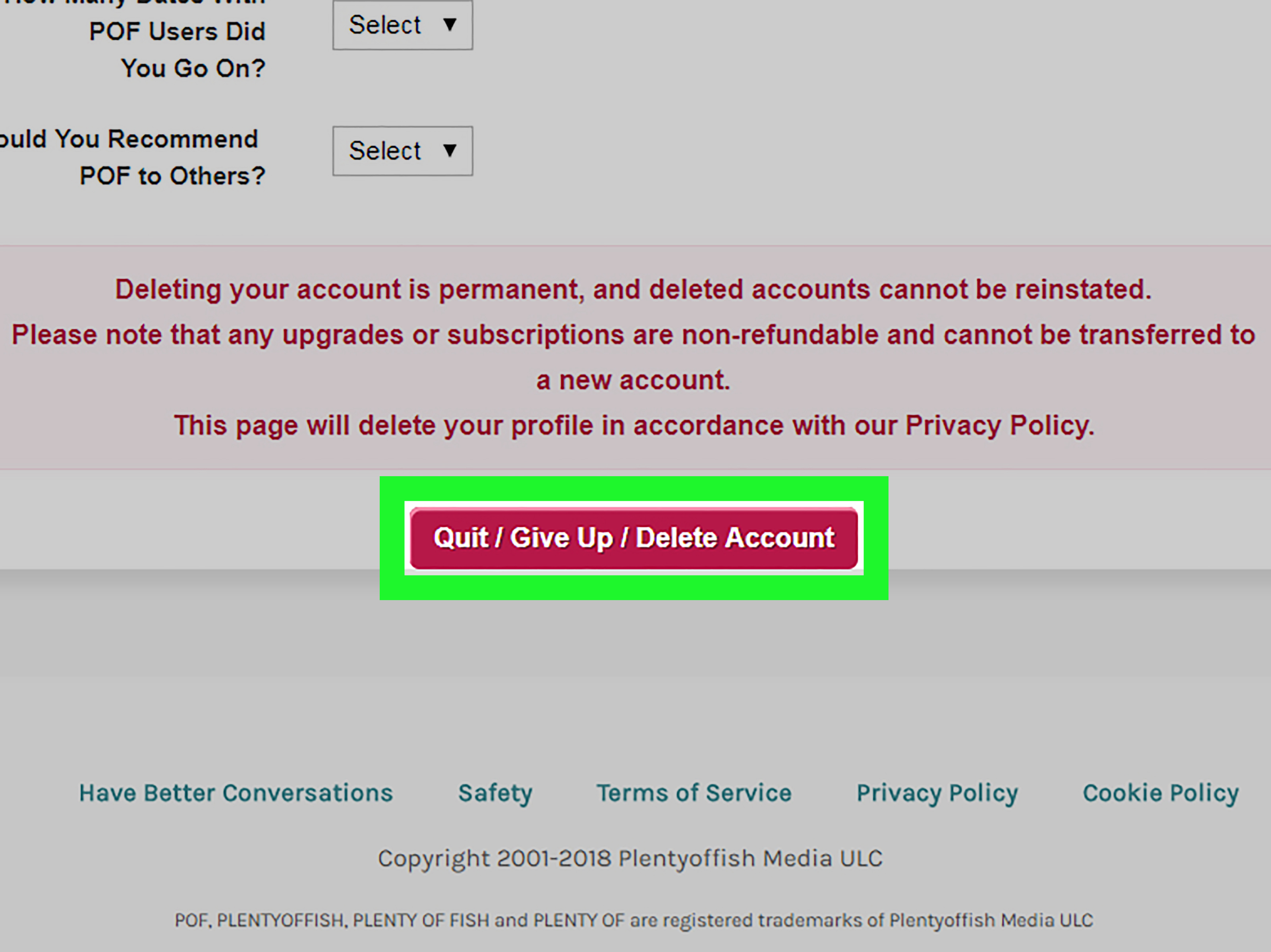
- Delete Account: Permanently removes your account, photos, chats, matches, likes, and interactions. Once deleted, the account cannot be reactivated.
If you simply want quiet, choose Take a Break. If you want to keep browsing privately, consider Incognito if it is available to you. If you are truly finished with the platform, deletion is the final goodbye wave from the dock.
How to Hide Your Plenty of Fish Profile Using Take a Break
The official way to pause your POF visibility is through Take a Break. This option is designed for users who want to step away without permanently deleting their account.
Steps to Take a Break on the POF App or Mobile Web
- Open Plenty of Fish on the mobile app or mobile web browser.
- Tap the My Profile icon.
- Go to Manage Account.
- Tap Delete My Account. Do not panic; you are not deleting yet.
- Choose Take a Break.
- Select how long you want your break to last.
- Confirm your choice and enjoy the silence.
The wording may feel odd because the Take a Break option may appear inside the delete account flow. It is like finding a spa entrance inside a fire exit, but it works. POF uses this path to offer a less permanent alternative before you delete your account.
Can You Take a Break on Desktop?
At the time of writing, Take a Break is available through the app and mobile web, but not through desktop. If you are using a laptop or desktop computer and cannot find the option, try signing in through your phone’s browser or the mobile app instead.
What If You Do Not See Take a Break?
POF notes that Take a Break may be available only in certain regions. If the option does not appear in your account, you may need to use another privacy method, such as Incognito, blocking specific members, removing sensitive profile details, or deleting the account if you want your profile fully removed from view.
What Happens When You Take a Break?
When you pause your Plenty of Fish profile, your account becomes hidden from general visibility. That means members should not see you in Discovery, Meet Me, or regular browsing areas. You also will not be able to like members on Meet Me, send messages, or receive messages while your break is active.
Your profile information and photos remain saved, so you do not have to rebuild everything later. This is helpful if your profile took three coffees, two outfit changes, and one existential crisis to create.
Can Previous Matches Still See You?
POF explains that when you Take a Break, your profile is not accessible through search or general browsing. However, if you previously communicated with another member, that person may still be able to reply to earlier messages, although they should not be able to find you through search.
This matters because some users expect hiding to erase every trace of their profile instantly. It does not necessarily work that way. Screenshots, old conversations, notifications, and prior interactions may still exist in some form. Hiding is a visibility tool, not a time machine.
How to Return After a Break
Returning is simple. POF says that when you are ready to come back, you can start using the app again, and your break will stop. Your profile details and photos should still be there, ready for action, like a dating-app superhero stepping out of a very tiny phone booth.
How to Hide Your Profile While Still Browsing: POF Incognito
If you want to keep using Plenty of Fish without showing your profile to everyone, Incognito may be the better option. Incognito is a privacy feature available in certain paid tiers, such as Plus, Premium, and Prestige, and it may not be available in all locations.
When Incognito is on, your profile is hidden from most users. It is generally shown only to people you choose to interact with, such as members you like or message. That means you can browse more privately instead of appearing in recommendations to people you have not contacted.
How to Turn On Incognito on iOS or Android
- Tap your Profile icon.
- Go to My Account.
- Tap Manage Account.
- Find Incognito.
- Toggle Incognito On.
If Incognito requires a paid plan, POF may show an upgrade or payment screen before the feature becomes active.
How to Turn On Incognito on Web
- Click your profile avatar.
- Go to My Account.
- Look for Incognito.
- Turn it on or off as needed.
If you do not see the option, it may not be included in your plan, device version, or location.
What Incognito Does Not Do
Incognito does not delete your account, unmatch existing matches, block people, or guarantee invisibility outside the app. Existing matches may still see your profile and message you. People you like or message can also see you. And, as with any online platform, someone can still take a screenshot. Privacy settings help, but they do not come with a superhero cape.
How to Block Someone on Plenty of Fish
If your goal is not to hide from everyone but to stop one person from contacting you, blocking may be the better tool. Blocking prevents that member from messaging you in the future. According to POF support guidance, you can block someone from the last message they sent by opening the message menu and selecting Block This Person.
Blocking is useful when someone is pushy, rude, suspicious, or giving off “I own twelve snakes and all of them are named Steve” energy. You do not need to explain yourself. Protecting your peace is a complete sentence.
Can Blocking Hide You From Search?
Blocking someone mainly stops messages. It may not prevent you from seeing that member in searches or elsewhere on the site. If your goal is broad visibility control, use Take a Break or Incognito instead.
Should You Hide or Delete Your POF Account?
Choose hiding if you might come back. Choose deleting if you are done for good. Deleted POF accounts cannot be reactivated. Your photos, chat history, matches, likes, and member interactions are removed permanently. Upgrades from a deleted account generally do not transfer to a new account.
Before deleting, check whether you have an active subscription. Deleting your profile does not always automatically cancel billing through Apple, Google Play, or another payment provider. Cancel the subscription first, ideally at least 24 hours before renewal, then delete the account if you still want to leave.
How to Delete a POF Account on Desktop
- Sign in to POF.com on a desktop browser.
- Go to My Profile.
- Open Settings.
- Select Delete Account.
- Follow the prompts to confirm deletion.
How to Delete a POF Account on Mobile Web
- Open POF.com in your mobile browser.
- Tap the profile icon to go to My Profile.
- Tap Manage Account.
- Choose Delete My Account.
- Follow the confirmation steps.
For Android users, POF may direct account deletion through mobile web rather than the in-app flow. For iOS, follow the current in-app or support instructions shown in your account.
Privacy Tips Before You Hide Your POF Profile
Hiding your profile is a smart move, but it is not the only privacy step worth taking. Dating profiles often include more personal information than people realize: photos, city, interests, relationship goals, work clues, lifestyle details, and sometimes connected social media information. A stranger does not need your entire biography plus a treasure map to your favorite coffee shop.
Remove Identifying Details
Before you pause or hide your profile, review your bio and photos. Remove your workplace, school, exact neighborhood, last name, license plates, house numbers, gym name, and any photo that reveals too much location detail. A cute selfie is fine. A selfie in front of your apartment building with the address visible is less fine.
Disconnect Social Accounts
If you connected Instagram, Facebook, Spotify, or another account, consider disconnecting those integrations. Social profiles can reveal routines, friends, workplace details, family connections, and places you visit often.
Use Strong Account Security
Use a unique password for POF and turn on two-factor authentication if it is available. Do not reuse your email password or banking password. If your dating-app password is “password123,” please take this as a loving digital intervention.
Keep Conversations on the Platform at First
Romance scammers often push people to move quickly off dating apps and onto text, messaging apps, or email. Staying on the platform gives you access to reporting and blocking tools. If someone is rushing you to leave the app, asking for money, avoiding video calls, or telling dramatic stories involving emergencies, gift cards, crypto, or overseas travel, slow down.
Common Problems When Hiding a POF Profile
The Hide Option Is Missing
If you cannot find a traditional “Hide Profile” button, look for Take a Break instead. POF’s interface has evolved, and older tutorials may show settings that no longer appear in the same place. Use the mobile app or mobile browser, then check My Profile, Manage Account, and Delete My Account for the Take a Break option.
Your Profile Still Appears After You Hide It
Visibility changes may take a short time to apply. Also, people who already interacted with you may still see earlier messages or have existing access through previous conversations. If a friend says your profile still appears in general search after you activated Take a Break, log out, update the app, clear cache, or check from mobile web.
You Want to Hide From One Person Only
POF does not currently offer a feature that lets you hide your profile from one specific member while remaining visible to everyone else. Use block or unmatch tools for unwanted attention, and use Take a Break or Incognito for broader visibility control.
You Want to Browse Without Being Seen
Use Incognito if it is available in your plan and location. Take a Break is more like stepping away from the party; Incognito is more like walking through the party wearing sunglasses and only talking to people you choose. Neither option is perfect invisibility, but each serves a different purpose.
Best Reasons to Hide Your Plenty of Fish Profile
There are plenty of valid reasons to hide a POF profile. You do not need a dramatic breakup, a grand announcement, or a documentary crew following you around.
- You met someone and want to focus on that connection.
- You feel overwhelmed by messages or attention.
- You want to take a mental health break from dating apps.
- You are traveling and do not want location-based visibility.
- You want to revise your profile before becoming visible again.
- You are concerned about privacy or unwanted contact.
- You are deciding whether to delete your account permanently.
Dating should feel interesting, not like a second job with worse coffee. If hiding your profile gives you breathing room, that is reason enough.
Experiences and Practical Lessons From Hiding a POF Profile
People usually hide their Plenty of Fish profile for one of two reasons: they are either happy with someone they met, or they are exhausted enough to start judging everyone’s profile by their punctuation. Both are normal. Online dating can be exciting, but it can also be noisy. Hiding your profile gives you a chance to decide what you want without a fresh notification pulling you back into the app every ten minutes.
One common experience is the “almost relationship” moment. You have been chatting with someone consistently, maybe you have gone on a few dates, and you want to see where things go. Deleting your profile feels too intense, like showing up to a picnic with a wedding binder. But staying fully visible can feel unfair or distracting. In that situation, Take a Break is a practical middle ground. It lowers outside attention while keeping your account ready in case things do not work out.
Another common situation is dating-app burnout. After reading dozens of bios that say “just ask,” “fluent in sarcasm,” or “looking for my partner in crime,” your brain may request immediate evacuation. Hiding your profile can stop the cycle of checking messages, comparing matches, and rewriting your bio at midnight like it is a college admissions essay. A short break helps you return with more patience and clearer expectations.
Privacy concerns are also real. Some users hide their profile after realizing how much information they have shared. Maybe a photo shows their street. Maybe their bio mentions their employer. Maybe someone from work appears in search results, causing the kind of panic usually reserved for sending a text to the wrong group chat. Before reactivating your profile, it helps to do a privacy audit. Remove exact locations, avoid posting your full name, use photos that do not reveal your home or workplace, and keep early conversations inside the app.
Some users also learn that hiding a profile does not erase every past interaction. A person you messaged before may still have the conversation thread. Someone may have taken a screenshot. An old notification may still exist. This is why it is better to think of hiding as reducing future visibility, not deleting your history. If someone is bothering you, block them. If you feel unsafe, report the profile and preserve relevant messages before taking further action.
There is also the subscription lesson, which many people learn the annoying way. Hiding or deleting a profile does not always cancel a paid subscription. If you subscribed through Apple or Google Play, cancel through that platform. If you paid directly through POF, check your account billing settings. It is deeply unromantic to be charged for a dating app you thought you left three weeks ago.
The best personal strategy is simple: pause before you disappear. Decide whether you want a temporary break, private browsing, or a permanent exit. If you may return, Take a Break is usually the cleanest option. If you still want to browse discreetly, check Incognito. If you are done, cancel subscriptions, save anything you need, and delete the account. Your dating life should be something you control, not a push notification with hobbies.
Conclusion
Hiding your Plenty of Fish profile is a useful way to control your dating visibility without immediately deleting your account. The main option is Take a Break, which pauses your profile and keeps it out of search, Discovery, and normal member browsing. If you want to keep browsing while limiting who sees you, Incognito may be available through certain paid plans and locations. For unwanted contact from a specific person, blocking is the better tool. For a permanent exit, deleting your account removes your profile and history, but it cannot be undone.
Before you hide, review your profile for privacy. Remove identifying details, disconnect unnecessary social accounts, use a strong password, and be careful with anyone who pushes for personal information, money, or off-app communication too quickly. A hidden profile can give you quiet, but smart privacy habits give you control.