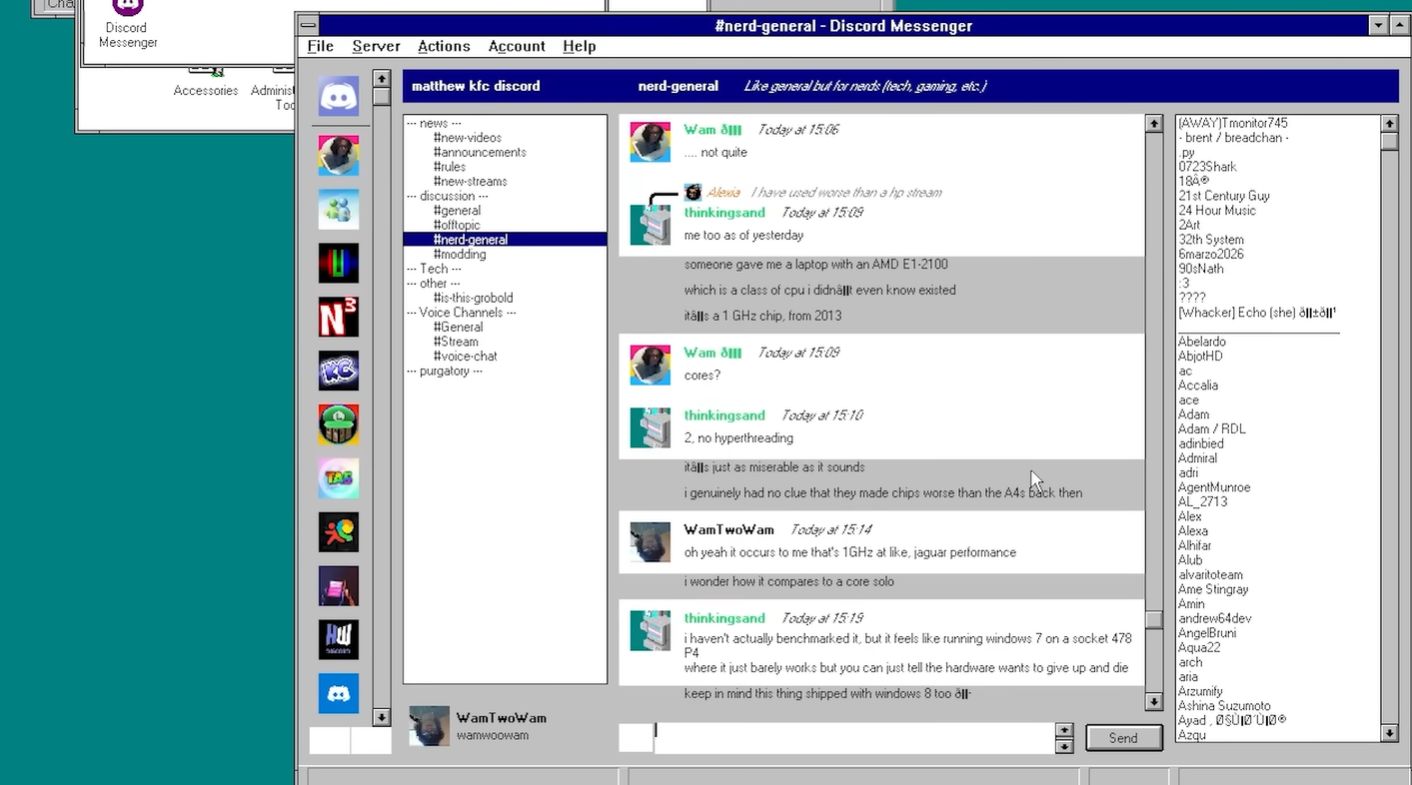
Modern Discord on Windows 95 sounds like the kind of thing a retro-computing goblin would whisper at 2 a.m. beside a beige tower PC. Yet the idea is real: an unofficial project called Discord Messenger brought Discord-compatible text chat to operating systems that were never supposed to know what a server boost, reaction emoji, or oversized gaming community looked like.
The project is not the official Discord desktop app squeezed into a time machine. That would be like trying to park a cruise ship inside a floppy disk sleeve. Today’s official Discord client depends on modern web technologies, Chromium/Electron-style expectations, current TLS behavior, recent Windows APIs, and operating system support far beyond the 1990s. Discord Messenger takes a different path. It is a native Windows client designed to talk to Discord while stripping the experience down to the essentials: messages, servers, attachments, replies, basic embeds, and a retro-friendly interface that looks shockingly at home on old Windows.
The result is a fascinating software archaeology lesson. Porting Discord to Windows 95 and Windows NT 3.1 was not just about recompiling code and hoping the pixels felt nostalgic. It required toolchain decisions, missing API workarounds, old networking support, ANSI compatibility, runtime surgery, and enough patience to make a 486-era hard drive sound emotionally supportive.
Why Port Discord To Windows 95 And NT 3.1?
At first glance, the practical answer is: you probably should not. Windows 95 launched in 1995, and Windows NT 3.1 arrived even earlier in 1993. These systems were designed for an internet that looked nothing like today’s encrypted, API-driven, always-online software world. Back then, a “chat app” might have meant LAN messaging, IRC, or a tiny instant messenger that could run comfortably while your CRT monitor warmed the room.
But retro computing has never been only about practicality. It is about curiosity. It asks: what happens if we make modern software speak the language of old machines? Can a current chat platform be reduced to its core functions and rebuilt for an operating system from the Clinton administration? Can a native Win32 application avoid the bloat of a browser-based client and still feel usable?
Discord Messenger answers those questions with a cheerful, slightly chaotic “yes, mostly.” It does not replicate every feature of official Discord. Voice channels, QR login, full modern rendering, and some advanced social functions are not the point. The point is text communication on legacy Windows, which is already impressive when the target includes Windows NT 3.1, an operating system old enough to make Windows 95 look like a futuristic nightclub.
The Big Difference: Native Client, Not Electron
The official Discord desktop app is widely associated with modern web-app architecture. That approach makes cross-platform development easier, but it also assumes a modern operating system and significant memory. Discord’s current desktop requirements begin at Windows 10, and official support for older Windows versions and 32-bit Windows has been retired. That leaves Windows 95 and NT 3.1 so far outside the support window that they are not even waving from the parking lot.
Discord Messenger works because it is not trying to drag the modern desktop client backward. Instead, it behaves more like a traditional native Windows application. It uses the Win32 API directly, presents a streamlined interface, and implements only the parts of Discord that are realistic for old machines. In plain English: instead of bringing the whole nightclub, it brings the group chat, the chairs, and maybe one tasteful lava lamp.
Starting Point: Windows XP, Then Going Backward
The project’s journey makes sense when viewed as a ladder. A developer can start with a target like Windows XP because it still has many APIs and runtime behaviors closer to modern Windows. From there, each step backward removes something: newer runtime support, Unicode expectations, networking assumptions, shell features, themed controls, notification area conveniences, and sometimes even long filename comfort.
Windows 98 and Windows 95 were already ambitious targets. Windows NT 3.1 raised the difficulty again because it is a very early Win32 system. It has a Windows 3.x-style shell, a young implementation of the Windows API, and a runtime environment that lacks many conveniences later developers take for granted. Supporting it required treating “normal” Windows programming habits with suspicion. On NT 3.1, the answer to “surely that API exists” is often “adorable, but no.”
The Toolchain Problem: Why MinGW Mattered
One of the biggest technical choices was the compiler toolchain. Microsoft Visual Studio is convenient for many Windows projects, but modern MSVC builds tend to require newer Windows runtimes. Even when using older-targeting toolsets, the practical floor can land around Windows XP SP2, not Windows 95 or NT 3.1.
That is why MinGW became important. MinGW and mingw-w64 can produce native Windows executables using GCC, and for a project like Discord Messenger, that opens the door to older Windows targets. The project offers different builds, including an MSVC version for Windows XP SP2 and newer, a MinGW Unicode-oriented version for later NT-family systems, and a MinGW ANSI version intended for the oldest machines, including Windows 95 and NT 3.x.
The ANSI build is especially important. Old Windows 9x systems and very early NT versions do not behave like modern Unicode-first Windows environments. A Unicode build may be cleaner for newer operating systems, but the oldest targets need an approach that respects their limitations. It is less glamorous than “AI-powered real-time productivity hub,” but it actually runs, which is a wonderful feature.
Missing APIs: The Shims That Saved The Day
Backporting software often means discovering that the operating system is missing functions your code expected to call. Later versions of Windows added hundreds of APIs across kernel, user interface, networking, shell, synchronization, and file-handling areas. A program compiled for a newer platform can fail immediately on an old system if it imports a function that does not exist there.
The usual solution is to write compatibility shims. A shim is a small replacement or wrapper that lets the program keep working when the native operating system cannot provide the exact expected behavior. Sometimes a shim maps a newer function to an older equivalent. Sometimes it implements a small subset of behavior. Sometimes it simply avoids a feature entirely and returns a safe fallback.
For Discord Messenger, shimming helped bridge the gap between Windows XP-era assumptions and much older Win32 systems. The trick is not to make Windows 95 magically modern. The trick is to make the application polite enough to stop asking Windows 95 for things it has never heard of. Imagine requesting oat milk at a 1995 diner. You may receive milk, coffee whitener, or a confused stare. Good compatibility code learns to order coffee differently.
Networking: Winsock 1.1 Versus Winsock 2.0
Discord is a network service, so networking support was a major piece of the puzzle. Modern software tends to assume more advanced sockets behavior, but legacy Windows systems may only provide older Winsock support. Windows Sockets 2 added features and broader protocol handling, but older environments often revolve around Winsock 1.1.
Discord Messenger’s release notes show a practical solution: use Winsock 1.1 when Winsock 2.0 is not available. That kind of fallback is exactly what old-platform support demands. You do not win by insisting on the newest interface. You win by asking, “What is the oldest reasonable layer that can still get bytes across the network?”
That sounds simple until encryption enters the room wearing steel-toed boots.
TLS And OpenSSL: Modern Security On Ancient Windows
Discord communication requires modern encrypted connections. Windows 95 and NT 3.1 do not ship with today’s TLS expectations. Their built-in security stacks are not ready to talk to current web services without help. This is where OpenSSL becomes essential.
Discord Messenger depends on OpenSSL support to handle encrypted communication. For older Windows compatibility, the project includes instructions around building or using compatible OpenSSL libraries. That matters because a program can have a perfect user interface and still be useless if it cannot negotiate secure connections with the service it is trying to reach.
This is one of the clearest examples of why the project is impressive. Rendering chat bubbles on Windows 95 is cute. Making a 1990s operating system participate in modern encrypted network communication is the actual dragon fight.
The NT 3.1 Boss Battle: MSVCRT Runtime Issues
Windows NT 3.1 was the final boss for a reason. The project reportedly ran into MSVCRT runtime issues, meaning the Microsoft C runtime available on that system did not provide functions expected by the application or its dependencies. The C runtime is the quiet kitchen staff of many native applications: string functions, memory utilities, file operations, startup routines, and other essentials often pass through it.
On newer Windows, developers rarely think about these details because the runtime is assumed to exist in a familiar form. On NT 3.1, assumptions become land mines. The solution involved backporting needed runtime features to match what the old system could support. This is unglamorous, delicate work. Nobody throws confetti because a missing runtime helper was replaced correctly. But without it, the executable may not launch at all.
Subsystem Version: A Tiny Number With Big Consequences
One especially retro detail is the Windows subsystem version inside the executable header. Windows Portable Executable files include metadata that tells the operating system what subsystem version the program expects. If that number is too new, an old OS can reject the program before it even starts.
Discord Messenger’s old Windows instructions mention byte-patching the executable so it reports a minimum subsystem version compatible with NT 3.1. This is the kind of detail that makes vintage software porting feel like safecracking. The program is not necessarily using impossible magic; the operating system simply needs to be convinced that the executable belongs in its era.
Of course, byte patching is not something casual users should do blindly. One wrong edit and the executable becomes a tiny digital paperweight. But as a compatibility technique, it shows how deep the project had to go. This was not “right-click, compatibility mode, done.” This was “open the hood and negotiate with the binary format.”
Short File Names And The 8.3 Reality Check
Another wonderfully old-school issue is filename compatibility. Some old Windows configurations, especially those involving FAT partitions or early Windows NT versions, may not support long filenames in the way later systems do. Modern DLL names like libcrypto-3.dll are perfectly normal today, but old systems may prefer or require shorter 8.3-style names.
The project documentation addresses this by suggesting short filename versions for certain DLLs when needed. It is a reminder that porting is not only about code. Filesystem behavior, installer layout, DLL naming, and directory paths can all turn into obstacles. A modern developer may worry about cloud sync conflicts. A retro porter may worry that a filename has too many letters. Both are valid forms of suffering.
What Actually Works?
Discord Messenger is not a full replacement for the official client. That should be clear and repeated because someone, somewhere, will try to join a voice channel on Windows NT 3.1 and then blame the universe.
The implemented feature list focuses on text-first Discord use. Users can view and interact with servers and direct messages, view and download images and attachments, upload attachments, edit and delete messages, reply, see typing indicators, open URL hotlinks with warnings, view pinned messages, and use partial embed support. The project also includes profile pictures in direct message lists and user notes.
Planned or missing features include friends list improvements, voice channels, more complete group member lists, muting options, custom status, and more. Some actions, such as joining servers or logging in by QR code, are not practical or are avoided because they may trigger Discord anti-spam systems. The project also warns that third-party Discord clients violate Discord’s terms of service, so users should understand the account risk before experimenting.
Why This Port Feels Important
The Windows 95 and NT 3.1 Discord port is not important because everyone should run modern chat on ancient machines. It is important because it proves how much software weight comes from choices rather than inevitability. A modern chat client does not technically need to consume huge amounts of memory just to display text messages. It often does because modern development favors portability, web UI reuse, rapid iteration, and rich features over minimalism.
Discord Messenger shows the other side of the tradeoff. By building natively and choosing a smaller feature set, a developer can make something that runs across roughly three decades of Windows history. That is remarkable. It is also a little funny. Somewhere, a Pentium-era machine is looking at a modern gaming PC and saying, “Nice RGB lights. I can still read the group chat.”
Lessons For Developers
1. Compatibility Is A Design Goal, Not An Accident
Old-system support must be planned. You cannot bolt it on at the end unless you enjoy pain as a hobby. Discord Messenger required separate builds, old toolchain awareness, fallback networking, runtime workarounds, and careful feature decisions.
2. Dependencies Decide Your Minimum OS
Your own code may be portable, but dependencies can quietly raise the floor. OpenSSL, image libraries, runtime DLLs, compiler outputs, and even subsystem headers can decide whether your app runs on Windows 95 or merely dreams about it from Windows XP.
3. Smaller Feature Sets Can Be More Durable
Discord Messenger does not try to do everything. That is its strength. By focusing on core chat, it avoids dragging in entire layers of modern UI and media complexity. For retro platforms, restraint is not laziness. It is architecture.
4. Native UI Still Has Power
There is something satisfying about a native Windows interface that feels like it belongs on the target OS. It may not have animated gradients, glassy blur, or a floating sidebar that eats half your RAM, but it responds quickly and respects the machine.
Real-World Experience: What It Feels Like To Use Discord On A Retro Windows Machine
Using Discord Messenger on an old Windows machine feels less like opening a modern app and more like restoring a forgotten telephone line between decades. The first surprise is how familiar the core experience remains. Servers, channels, messages, and direct conversations are still understandable even without the heavy visual polish of the official client. The second surprise is how much you stop missing once the basics work.
On a vintage setup, every modern feature becomes a negotiation. Images are useful, but huge media previews are not. Embeds are nice, but incomplete embeds are better than no chat at all. Typing indicators feel almost luxurious. A reply button on Windows 95 has the strange emotional energy of seeing a cup holder installed in a horse carriage.
The limitations also make the experience healthier in a weird way. The official Discord client can feel like a full social operating system: animated stickers, popouts, voice controls, streaming options, activity cards, store-like surfaces, and endless motion. A retro client narrows the field. You read messages. You answer. You move on. It is Discord without the carnival midway.
Performance expectations change too. On modern hardware, users complain when an app takes a second too long to load. On a 1990s system, simply launching a Discord-compatible client is already a tiny miracle. The interface may be plain, but plain is good when memory is measured in megabytes and disk activity sounds like a coffee grinder discovering jazz.
There is also a strong preservation angle. Projects like this help newer developers understand old Windows design, Win32 compatibility, C runtime assumptions, network API evolution, and the cost of abstraction. Reading about API shims is educational. Watching a modern service communicate through a Windows 95-style application makes the lesson stick.
For hobbyists, the port is a reminder that old computers are not dead objects. They can still participate, within reason, in today’s digital world. Not safely as daily drivers, and certainly not as security-hardened machines, but as laboratories. A retro PC running Discord Messenger is not a productivity recommendation. It is a museum exhibit with a keyboard, a TCP/IP stack, and an unreasonable amount of charm.
The experience also reveals why official software vendors move on. Supporting old systems is expensive. Every compatibility layer creates testing burden. Every security requirement becomes harder. Every third-party library can break the chain. For a hobby project, those problems are a challenge. For a company with millions of users, they are a support nightmare wearing vintage sneakers.
Still, the port is inspiring because it proves that “unsupported” does not always mean “impossible.” It means no official guarantee, no safety net, and no promise that tomorrow’s API changes will be friendly. Within those limits, Discord Messenger is a beautiful hack: part engineering, part preservation, part joke that got out of hand and became genuinely useful.
Conclusion
Discord on Windows 95 and Windows NT 3.1 is not magic. It is better than magic: it is careful engineering. The project worked by avoiding the official client’s modern baggage, building a native Discord-compatible application, using MinGW for old Windows targets, creating ANSI builds, falling back to older networking APIs, relying on OpenSSL for modern encryption, patching runtime gaps, and working around ancient filesystem and executable-header assumptions.
The result is not perfect, and it is not risk-free. Third-party clients can violate platform terms, old operating systems are unsafe for normal internet use, and many modern Discord features remain missing. But as a technical achievement, the port is delightful. It shows that old Windows still has stories to tell, especially when a determined developer is willing to argue with MSVCRT, Winsock, and a subsystem version byte until the chat window finally opens.
Note: This article is based on publicly available technical project information, release notes, developer documentation, and reporting about Discord Messenger, Windows 95, Windows NT 3.1, MinGW, Winsock, and Discord platform support. Users should treat any third-party Discord client as experimental and understand the security and account risks before using it.