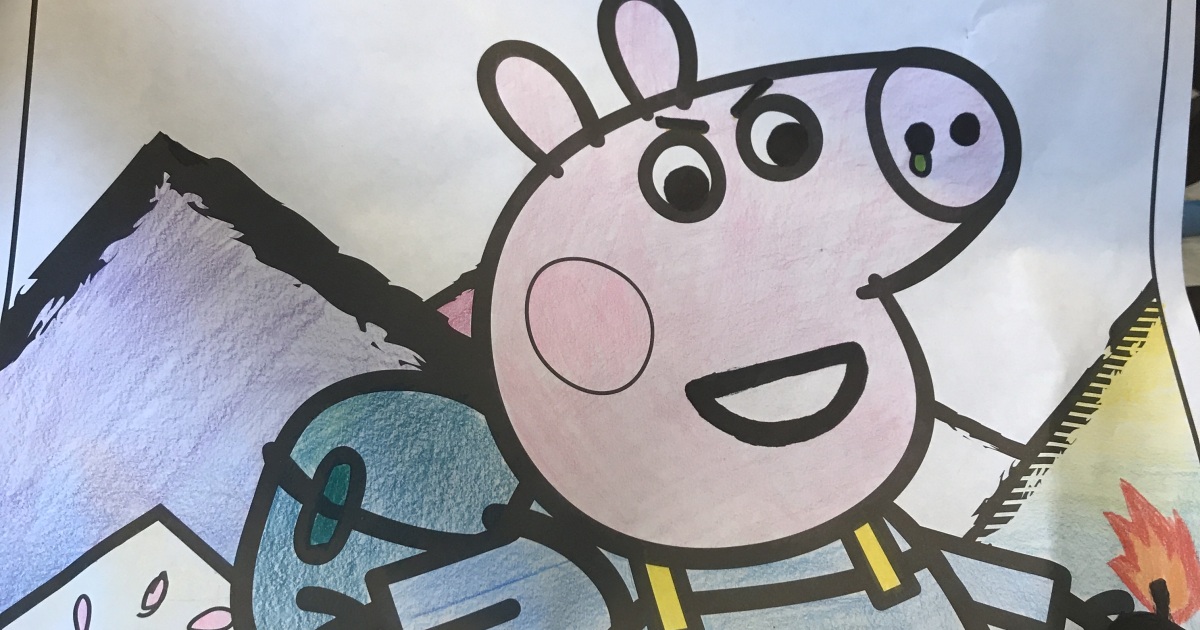
There is something wonderfully chaotic about taking a simple coloring page and giving it a makeover. One person sees a smiling bunny. Another sees a bunny detective standing in a thunderstorm, holding a tiny flashlight, investigating who stole the carrots. That is the magic behind the idea of “Hey Pandas, Edit A Colouring Page.” It is not just about staying inside the lines. It is about asking, “What else could this become?”
Coloring pages have always been friendly territory for kids, classrooms, parents, and anyone who owns a printer that only jams when guests are watching. But in recent years, coloring pages have also become a playground for adults, digital artists, meme-makers, scrapbookers, teachers, and online communities. People edit printable coloring sheets, remix old illustrations, add jokes, turn innocent scenes into dramatic stories, and transform simple line art into personalized creative projects.
This guide explores how to edit a coloring page in a smart, fun, and responsible way. We will cover creative ideas, practical editing steps, copyright basics, printable design tips, accessibility considerations, and real examples of how a plain page can become something hilarious, beautiful, educational, or deeply personal.
What Does “Edit A Colouring Page” Actually Mean?
To edit a coloring page means to change, improve, personalize, or remix an existing line-art design. That could be as simple as adding a name at the top of the page or as wild as turning a smiling dinosaur into a tiny lawyer arguing a case in prehistoric court. The word “colouring” in the title gives the phrase a playful, community-style feel, while “coloring page” is the standard American spelling most readers search for online.
Editing can happen on paper or digitally. On paper, you might draw extra details with a black marker, add speech bubbles, glue collage pieces, or change the background. Digitally, you can use tools like Adobe Express, Canva, Procreate, Photoshop, Illustrator, or free browser-based editors to clean lines, add text, remove clutter, resize the page, or build a full printable activity sheet.
Why Coloring Page Editing Became So Popular
Coloring pages are easy to start with because they remove the scariest part of art: the blank page. The outline is already there, politely waiting like a calm little intern. You do not have to invent an entire composition from scratch. Instead, you can focus on storytelling, mood, color choices, humor, and small personal details.
U.S. cultural institutions such as the Smithsonian, the Library of Congress, and the New York Public Library have helped make coloring pages more interesting by turning historic artwork, archives, portraits, maps, animals, and public-domain images into printable activities. Brands like Crayola have also normalized free printable coloring pages for kids and adults, while digital tools now make it easy to generate, customize, and print line art at home.
It Is Creative Without Being Intimidating
Editing a coloring page gives beginners permission to play. You do not need a fine arts degree, an expensive tablet, or the ability to draw a horse that does not look like a nervous table. You only need an idea. Add sunglasses to a cat. Put a spaceship behind a cottage. Turn a princess castle into a haunted bakery. Suddenly the page belongs to you.
It Works for Kids, Adults, and Classrooms
Teachers can edit coloring pages to match lessons about animals, history, holidays, science, or reading comprehension. Parents can customize pages with a child’s name or favorite theme. Adults can turn coloring pages into stress-relief activities, party games, handmade cards, planner inserts, or social media challenges.
How to Edit a Coloring Page Step by Step
1. Choose the Right Base Page
Start with a clean, high-resolution coloring page. Simple designs are easier for younger children, while detailed mandalas, animals, city scenes, flowers, and fantasy illustrations work well for teens and adults. If the lines are too thin or blurry, the page may print poorly. Look for bold outlines, open spaces, and a balanced layout.
If you plan to publish, sell, or share the edited page online, pay attention to usage rights. A page found on a random website is not automatically free to remix. Public-domain collections, Creative Commons materials, self-created artwork, and properly licensed resources are safer choices.
2. Decide the Purpose Before Editing
Ask what the edited page is supposed to do. Is it funny? Relaxing? Educational? Decorative? A classroom worksheet? A community challenge? A printable birthday activity? The purpose guides every design choice.
For example, if the page is for preschoolers, use large shapes, minimal text, and friendly details. If it is for adults, you can add intricate patterns, tiny jokes, decorative borders, or layered themes. If it is for a web article, make sure the final design has a strong visual concept that can be explained in captions and alt text.
3. Clean Up the Lines
Before adding creative edits, clean the original image. Increase contrast so black lines are crisp. Remove gray smudges, scanning shadows, stray pixels, and uneven borders. If you are editing digitally, use brightness and contrast controls, threshold tools, or vector tracing. Clean line art prints better and looks more professional.
A good coloring page should not make people squint like they are trying to read a restaurant menu in candlelight. Clear lines matter, especially for younger children, older adults, and users with low vision.
4. Add a Twist
This is where the fun begins. Add something unexpected but readable. A plain dog can become a superhero dog. A flower garden can become a tiny insect city. A mermaid can be sitting in a coffee shop answering emails. A panda can be editing a coloring page of another panda, creating a deeply silly art universe that may or may not require a spreadsheet.
Good edits usually keep the original structure but change the meaning. That balance is what makes the final page funny or clever. If you cover everything with random details, the design becomes confusing. If you add one strong idea, the page feels intentional.
5. Use Text Carefully
Speech bubbles, labels, jokes, prompts, and titles can make a coloring page more engaging. However, text should be easy to read and not crowd the art. Use simple fonts, generous spacing, and strong contrast. Avoid decorative fonts that look adorable for three seconds and then become impossible to read.
For an educational page, text might include vocabulary words, instructions, or a short question. For a funny page, a speech bubble can carry the whole joke. For example, a dragon looking at a tiny birthday cake might say, “I promise I will not breathe near it this time.” Instant story. Minimal effort. Maximum dragon accountability.
Creative Ideas for Editing a Coloring Page
Turn It Into a Story Scene
Add a beginning, middle, or ending to the image. If the original page shows a cat sitting on a chair, add a spilled cup, a suspicious paw print, and a detective hat. Now the cat is not just sitting. The cat is under investigation.
Create a Before-and-After Challenge
Post the original coloring page and invite people to edit it in their own style. One person may make it cute. Another may make it spooky. Another may add motivational quotes, glitter effects, or a raccoon with questionable business plans. This works well for online communities because everyone starts with the same base but ends with something unique.
Make It Educational
Coloring pages can support learning when you add labels, counting tasks, matching activities, or simple science facts. A page of birds can become a lesson about migration. A page of planets can become a space vocabulary worksheet. A page of fruits can become a color recognition activity.
Design a Relaxation Page
For stress relief, use repeated patterns, gentle shapes, balanced spacing, and calming themes such as leaves, waves, stars, flowers, cozy rooms, or animals. Mental health organizations often include coloring and quiet activities in stress-management materials because they can help people pause, focus, and settle into the present moment.
Create a Funny “Corrupted Coloring Book” Style Edit
Some online artists enjoy transforming innocent coloring pages into unexpected adult-humor scenes. The trick is to be clever rather than mean-spirited. Add irony, absurdity, or visual surprise without turning the page into something harmful or offensive. A teddy bear at a tiny office job is funny. A teddy bear filing quarterly reports while drinking cold coffee is art.
Copyright and Remixing: The Part Nobody Loves But Everyone Needs
Editing a coloring page can create a derivative work, which means it is based on an existing work. In the United States, copyright protects original creative works once they are fixed in a tangible form, including illustrations and graphic art. That means you should not assume you can take any coloring page, edit it, and publish it as your own.
Here are safer options: draw your own base page, use public-domain images, use resources with clear remix permission, use Creative Commons materials according to their license terms, or purchase a commercial-use license. If you are editing only for personal fun at home, the risk is different from uploading, monetizing, or selling the result. For public web publishing, be careful and keep records of where your base images came from.
Public Domain Can Be a Creative Goldmine
Public-domain collections from libraries and museums can inspire beautiful coloring pages. Historic botanical illustrations, old maps, animal drawings, architectural details, portraits, and vintage children’s book art can often be adapted into line art. Always check the rights statement for each image, because not every old-looking picture is automatically free to reuse.
Creative Commons Requires Attention
Creative Commons licenses can allow sharing and adaptation, but the terms vary. Some require attribution. Some prohibit commercial use. Some require you to share your edited version under the same license. Read the license before publishing. Yes, it is less exciting than adding a wizard hat to a squirrel, but it can save you a headache later.
Design Tips for Printable Coloring Pages
Use a Standard Page Size
For U.S. readers, letter size is usually the safest format: 8.5 by 11 inches. Leave margins so home printers do not cut off important details. A border can help the page feel finished, but keep it away from the edge.
Keep Lines Dark and Consistent
Black or very dark gray lines print best. Thin lines may disappear, especially on cheaper printers. Very thick lines can feel heavy and reduce the amount of space available for coloring. Aim for a line weight that suits the audience: bolder for kids, finer for adults.
Balance Detail With Open Space
A good coloring page gives people room to color. If every inch is packed with tiny shapes, the page can feel stressful instead of relaxing. For children, use larger open sections. For adults, mix detailed areas with breathing room.
Think About Accessibility
High contrast helps readers see the design clearly. Avoid placing important text over busy textures. Use readable fonts and simple instructions. If you publish the page online, include descriptive alt text so screen reader users know what the image contains. Accessibility is not a boring add-on; it is part of good design.
Digital Tools That Make Editing Easier
You can edit coloring pages with many tools, from basic to professional. Adobe Express and Firefly can help generate or customize printable coloring pages. Canva is useful for adding text, borders, and layout elements. Procreate is popular for iPad drawing and hand lettering. Photoshop and Illustrator are powerful for cleaning scans, adjusting line weight, and creating vector art. Free tools like Krita, GIMP, Inkscape, and browser-based editors can also handle many editing tasks.
The tool matters less than the workflow. Start with a clean file, keep a backup of the original, work in layers when possible, export a high-resolution PDF or PNG, and test print before sharing. The test print is where design dreams meet printer reality, and printer reality is famously dramatic.
Examples of Coloring Page Edits
Example 1: The Cozy Panda Cafe
Start with a simple panda sitting at a table. Add a tiny menu, a steaming cup of cocoa, a window with rain outside, and a sign that says “Bamboo Latte Special.” The result becomes a cozy coloring page for kids or adults. You can add patterns to the wallpaper and mugs for extra coloring areas.
Example 2: The Space Dinosaur
Take a basic dinosaur outline and add a helmet, stars, planets, and a little rocket backpack. This works well for a children’s activity sheet. Add labels like “planet,” “rocket,” and “stars” to make it educational.
Example 3: The Adult Relaxation Mandala Remix
Use a simple flower design and add repeating leaves, dots, waves, and geometric patterns. Keep the center clear and let the details expand outward. This creates a calming adult coloring page that feels more polished than the original.
Example 4: The Silly Office Animal
Turn a cheerful raccoon into an overworked office manager. Add a tie, a laptop, sticky notes, and a coffee mug labeled “Do Not Touch.” It is funny because the base image stays cute while the new details add grown-up chaos.
Common Mistakes to Avoid
The first mistake is over-editing. Too many details can make a page messy. The second is poor print quality. A design may look fine on a screen but print as a gray blur. The third is ignoring image rights. If you plan to publish your edited coloring page, make sure you have permission or a safe source. The fourth is using text that is too small. If people need a magnifying glass, the joke has already lost the room.
Another common mistake is forgetting the audience. A page designed for a five-year-old should not have 900 tiny flower petals. A page designed for adults should not feel like a worksheet unless that is the point. Match complexity, humor, and instructions to the people who will actually use it.
How Edited Coloring Pages Can Build Community
The phrase “Hey Pandas” feels like an invitation. It says, “Come join in. Show us what you made.” That is why coloring page edits work so well online. Everyone begins with the same prompt, but the results reveal different personalities. Some people go wholesome. Some go weird. Some go artistic. Some go so wildly specific that you wonder if the raccoon accountant is based on their boss.
Community challenges are especially fun when the rules are simple. Share one base coloring page. Ask people to edit it without changing the main character. Encourage different themes: spooky, cozy, futuristic, historical, dramatic, cute, or absurd. Then collect the results in a gallery. The page becomes less of a worksheet and more of a conversation.
Experiences Related to “Hey Pandas, Edit A Colouring Page”
The best experience with editing a coloring page is the moment when the original design stops being “just a page” and becomes a tiny world. Imagine opening a simple printable sheet of a panda holding a balloon. At first, it is cute but ordinary. Then someone adds a party hat. Another person draws a moon behind it. Someone else turns the balloon into a tiny hot-air balloon carrying three mice and a sandwich. Suddenly, the page has history, drama, aviation, and snacks. That is a full creative ecosystem right there.
In a classroom, editing a coloring page can become a surprisingly powerful group activity. Give every student the same outline and ask them to add a background that explains where the character lives. One child may put the panda in a jungle. Another may place it in a library. Another may draw it on Mars, because children correctly understand that pandas deserve space travel. When the pages are displayed together, students see how one prompt can produce many valid answers. It teaches creativity without turning the room into a competitive art contest.
At home, edited coloring pages can become personalized keepsakes. A parent might take a simple birthday cake coloring page and add a child’s name, age, favorite animal, and inside jokes. The finished page feels more special than a generic printable. It becomes a snapshot of that child’s personality at that moment: dinosaurs, rainbows, soccer balls, unicorns, or whatever current obsession has taken over the household like a tiny, adorable government.
For adults, the experience can be relaxing in a different way. Editing a coloring page gives your brain a small, manageable problem to solve. What should I add? Where should the line go? Would this owl look better with a scarf? These questions are gentle. They do not demand your five-year plan or ask why your inbox has 3,000 unread messages. They invite focus, humor, and play. That is why many adults enjoy coloring and creative hobbies as a break from screens, deadlines, and daily noise.
Online, the “Hey Pandas” style of challenge adds another layer: shared laughter. When people post edited coloring pages, the fun is not only in the artwork but in the unexpected choices. Someone will always add a mysterious door. Someone will always give the animal sunglasses. Someone will always create an oddly emotional backstory for a cupcake. These edits remind us that creativity does not have to be polished to be valuable. Sometimes the funniest idea is a messy one drawn quickly with a marker while drinking coffee.
The most memorable edited coloring pages often have one strong twist. A bear becomes a chef. A castle becomes a dentist’s office for dragons. A butterfly becomes a stained-glass window. A smiling sun becomes the host of a weather podcast. The charm comes from seeing the original image and the new idea at the same time. That double vision is what makes the edit satisfying.
In the end, editing a coloring page is not about proving you are the best artist in the room. It is about participating. It says, “Here is my version.” That small act can be funny, calming, educational, or even confidence-building. Whether you are using colored pencils, a tablet, a black marker, or the mysterious pen from the kitchen drawer, the goal is the same: take the lines you were given and make them say something new.
Conclusion
“Hey Pandas, Edit A Colouring Page” is more than a playful prompt. It is a reminder that creativity can begin with something simple. A coloring page gives you structure, but editing gives you ownership. You can add humor, story, learning, relaxation, personal meaning, or community energy. You can create printable activities for kids, stress-relief pages for adults, classroom resources, funny social posts, or handmade gifts.
The smartest edits are clear, printable, audience-friendly, and respectful of copyright. Use clean lines, strong contrast, readable text, and source images you are allowed to adapt. Then let the weird little ideas in your brain have a meeting. They have been waiting patiently, probably wearing tiny hats.
Note: For web publishing, use original artwork, public-domain images, or coloring pages with clear permission for editing and reuse. Always test print your final page before sharing it with readers.