Note: This article is written in publication-ready HTML body format and is based on real Dreamcast hardware, controller adapter, Maple bus, VMU, mouse, keyboard, and retro gaming information.
The Sega Dreamcast has always had a talent for making modern gamers say, “Wait, it could do that?” Online play? Yes. A memory card with a screen? Absolutely. Keyboard and mouse support on a console from the late 1990s? Somehow, also yes. So when a Dreamcast controller adapter appears that works not only with PlayStation, Saturn, and Genesis-style controllers but also with mice, it feels less like a surprise and more like the Dreamcast winking from the future.
The headline “Dreamcast Controller Adapter Even Works With Mice” sounds funny at first, because a mouse is not exactly the first thing most people imagine plugging into a console controller port. But for Dreamcast fans, it makes perfect sense. Sega’s final console was built around a flexible peripheral system called the Maple bus, and that system was designed to recognize different device types, including controllers, memory units, keyboards, rumble packs, microphones, light guns, and yes, mice. The adapter simply taps into that overlooked brilliance and gives it a modern, practical twist.
In plain English, this kind of adapter lets players use non-Dreamcast input devices on real Dreamcast hardware. That can mean a PlayStation 1 or PlayStation 2 controller, a Sega Saturn pad, a Genesis or Mega Drive-style controller, a keyboard, or a PS/2 mouse. For retro players, homebrew tinkerers, and collectors who have one working Dreamcast controller and a drawer full of everything else, that is a pretty big deal. It is like finding out your old toaster can also print homework.
Why the Dreamcast Controller Port Was Ahead of Its Time
To understand why this adapter matters, you need to understand that the Dreamcast controller port was not just a simple button-reading socket. It used the Maple bus, a custom communication system that let the console talk digitally with peripherals. Instead of asking, “Is the A button pressed?” and calling it a day, the console could ask devices what they were, what functions they supported, and what data they had to send back.
That matters because a Dreamcast controller could be more than a controller. The standard pad had slots for sub-peripherals, most famously the Visual Memory Unit, or VMU. The VMU worked as a memory card, a tiny screen, and even a little portable mini-game device. The controller could also accept a Jump Pack for vibration feedback. The Dreamcast was not merely accepting button presses; it was managing a tiny ecosystem through each controller port.
This is why adapter projects are so interesting. A good Dreamcast controller adapter does not only convert wires. It has to pretend convincingly to be a real Maple device. It must answer the console’s requests, report supported functions, translate input from another controller or mouse, and respond at the right time. That is less “plastic dongle” and more “tiny bilingual diplomat wearing a circuit board suit.”
What the Dreamcast Controller Adapter Actually Does
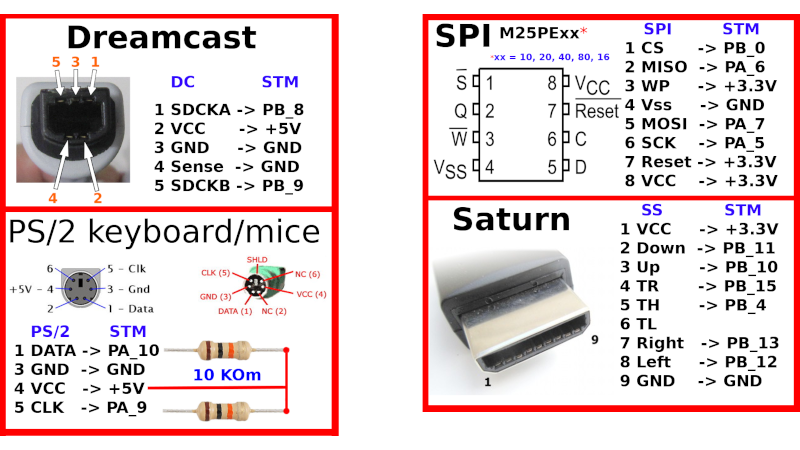
The adapter highlighted by retro hardware circles is especially fun because it supports a wide range of input devices. It can connect PlayStation 1 and PlayStation 2 controllers, including vibration support. It can also support Sega Mega Drive/Genesis and Saturn pads, which is excellent news for players who prefer the crisp feel of older Sega controllers. On top of that, it can support PS/2 keyboards and mice.
The mouse support is the eye-catching part. Most controller adapters are judged by whether they can make a modern gamepad behave like an original controller. That is useful, but expected. Mouse support takes the idea further because it means the adapter can present a different class of device to the Dreamcast. Instead of saying, “Hello, I am a controller,” it can effectively say, “Good evening, I am a mouse, please point me at Quake III Arena.” That is hardware cosplay, and it is wonderful.
Under the hood, the adapter uses a microcontroller powerful enough to emulate the Dreamcast’s Maple interface. The commonly discussed build uses an STM32F103C8T6 chip, a popular 32-bit microcontroller running at up to 72 MHz. That speed gives the adapter enough headroom to handle protocol timing, read inputs from connected devices, and respond to the console without making the Dreamcast suspicious. The Dreamcast may be old, but it is not easily fooled.
Why Mouse Support on Dreamcast Is Not a Gimmick
Mouse support on a Dreamcast adapter may sound like a novelty until you remember that the Dreamcast had official keyboard and mouse accessories. These were not imaginary peripherals designed only for trade-show photos. They were real accessories used for web browsing, typing, online communication, and certain games.
First-person shooters are the obvious example. Games such as Quake III Arena and Unreal Tournament were much more comfortable with keyboard and mouse controls than with the standard Dreamcast pad. The Dreamcast controller is iconic, but nobody ever confused its single analog stick and unusual shape for a tournament-grade FPS setup. It has charm, yes. It also has the ergonomic subtlety of a friendly white boomerang.
Mouse input also fits the Dreamcast’s internet personality. The console shipped during an era when Sega aggressively promoted online features, web browsing, and connected play. The built-in modem was a major part of its identity. Having a keyboard and mouse made the system feel closer to a living-room computer than a normal console. That idea looks ordinary now, but in the late 1990s and early 2000s, it was bold.
The Maple Bus: The Secret Sauce Behind the Magic
The Dreamcast Maple bus is the reason all this is possible. In simple terms, it is the communication protocol the console uses to connect controllers and other peripherals. The Dreamcast has four controller ports, and each port can communicate with a main peripheral and sub-peripherals. A controller can report that a VMU or Jump Pack is attached. A keyboard can report itself as a keyboard. A mouse can report itself as a mouse.
The protocol uses device function codes. That means the console can distinguish between a standard controller, a memory card, a keyboard, a mouse, an LCD screen, or a vibration pack. This flexible design is why the Dreamcast controller ecosystem feels so unusual compared with many other consoles of its era. The system was built to ask, “What are you?” before deciding how to use the device.
For adapter makers, this is both an opportunity and a headache. The opportunity is obvious: if you can emulate the right Maple responses, you can make the Dreamcast accept all kinds of input devices. The headache is that timing matters. The bus is not a casual conversation where the adapter can wander off, make coffee, and respond whenever it feels emotionally ready. The device has to answer quickly and correctly.
Why Retro Controller Adapters Matter in 2026
Original Dreamcast accessories are not getting younger. Controllers wear out, analog sticks loosen, cables fray, and VMUs sometimes behave like tiny electronic divas. Meanwhile, the collector market has pushed up prices for clean original hardware. A good adapter helps keep the console playable without forcing every player to hunt down pristine accessories.
Adapters also improve accessibility and comfort. Some players prefer the shape of a PlayStation controller. Others love the Saturn pad for fighting games. Some want an arcade stick. Some want keyboard and mouse controls for shooters. Instead of locking everyone into one controller design, an adapter makes the Dreamcast more flexible while keeping the original console at the center of the experience.
That last part is important. Emulation is fantastic, and modern Dreamcast emulators can produce beautiful high-resolution graphics. But real hardware has a special appeal. The boot swirl, the disc drive sounds, the VMU beep that could wake a sleeping cat in the next countythese are part of the ritual. A controller adapter lets players preserve that ritual while making the input side more convenient.
Examples of Devices a Dreamcast Adapter Can Support
PlayStation 1 and PlayStation 2 Controllers
PS1 and PS2 controllers are popular choices because they are common, comfortable, and familiar. DualShock-style controllers give players a different grip, a second analog stick for games or homebrew projects that can use expanded input, and vibration support where the adapter implements it. For players who grew up bouncing between Sega and Sony hardware, this feels oddly natural.
Sega Saturn and Genesis-Style Pads
For 2D fighters, arcade collections, and retro-style games, Saturn and Genesis-style pads are hard to beat. The Saturn controller in particular has a legendary reputation among fighting game fans because of its responsive D-pad and six-button face layout. Pairing that with the Dreamcast makes sense, especially when playing arcade ports or games that do not require analog input.
PS/2 Keyboards and Mice
PS/2 keyboards and mice are the delightfully nerdy part of the story. The PS/2 connector may look ancient to younger players, but it remains beloved in retro projects because it is relatively simple to interface with compared with many modern USB devices. For a Dreamcast adapter, PS/2 input can be translated into Maple keyboard or mouse behavior, making it useful for web browsing, typing, and supported games.
Virtual VMU Support
Some Dreamcast adapter projects also include virtual VMU functionality. That means the adapter can emulate memory card behavior rather than requiring a physical VMU in every situation. This can be useful for saving games, managing multiple virtual memory banks, or reducing wear on original units. It is also a reminder that the Dreamcast controller port was never just a controller port; it was a whole accessory network.
Where This Fits in the Dreamcast Homebrew Scene
The Dreamcast homebrew scene has stayed alive for decades because the console is unusually friendly to experimentation. Developers have built new games, online server replacements, optical drive emulators, HDMI mods, wireless controller projects, VMU upgrades, and Maple bus experiments. A controller adapter that works with mice belongs perfectly in that culture.
Modern projects such as Maple bus emulators and USB-to-Dreamcast adapters show that the idea keeps evolving. Some newer projects use Raspberry Pi Pico or RP2040-style boards to translate modern USB controllers, keyboards, and mice into Dreamcast-compatible input. Others focus on Bluetooth controllers or expanded VMU features. The shared goal is simple: keep the Dreamcast useful, playable, and just weird enough to remain lovable.
This is also why the Dreamcast has such a loyal fan base. The console was discontinued early, but it never really left. It became a playground for people who enjoy hardware with personality. The Dreamcast was not perfect, but it was ambitious. It took swings. Sometimes it missed. Sometimes it accidentally predicted the future.
Benefits of Using a Dreamcast Controller Adapter
The biggest benefit is flexibility. Instead of relying only on original Dreamcast controllers, players can use devices they already own. This is especially useful if original controllers are expensive in your area or if you want a different layout for specific genres.
The second benefit is preservation. Every hour spent using an alternate controller is one less hour of wear on original hardware. Collectors may still want original accessories, but daily players often appreciate having a practical setup that does not require treating every controller like a museum artifact.
The third benefit is comfort. The Dreamcast controller is famous, but it is not universally loved. Some players find it bulky. Some dislike the cord placement. Some wish it had a second analog stick. Adapters let players customize the experience without modifying the console itself.
The fourth benefit is genre-specific control. Fighting games may feel better with a Saturn pad. First-person shooters may feel better with keyboard and mouse. Racing games may benefit from analog triggers. Arcade titles may shine with a stick. One console, many control styles. That is the dream.
Limitations You Should Know Before Getting Excited
As cool as these adapters are, they are not magic. Compatibility depends on the adapter firmware, the input device, and the Dreamcast game. A game must support mouse input for a mouse to be useful. Plugging in a mouse will not suddenly turn every Dreamcast title into a PC game. Sonic Adventure will not become a spreadsheet simulator, and frankly, the world is better that way.
Some games may expect specific Dreamcast controller features. Others may not understand expanded inputs. Vibration support can vary. VMU behavior may also differ depending on whether the adapter uses real or virtual memory units. For the best experience, users should check compatibility notes for the specific adapter build or firmware version they plan to use.
There is also the matter of build quality. DIY adapters can be brilliant, but they depend on careful assembly, clean soldering, correct voltage handling, and reliable firmware. The Dreamcast Maple bus uses different voltage behavior than some modern microcontroller boards, so level shifting and protection are not optional details. They are the difference between “awesome mod” and “why does my living room smell like regret?”
Why the Mouse Feature Gets Retro Fans Talking
The phrase “even works with mice” sticks because it captures the Dreamcast’s whole personality. This console was always slightly more computer-like than its rivals. It had a modem. It had a keyboard. It had a mouse. It had memory cards with screens. It had online games before online console gaming became normal. A mouse-compatible controller adapter does not feel like a random hack; it feels like finishing a sentence Sega started years ago.
It also highlights how smart the original hardware design was. If the controller port had been designed only for button pads, adapter projects would be much more limited. Because Sega built a flexible peripheral system, modern builders can revive and expand those ideas decades later. Good hardware design ages well, even when the console itself loses the market race.
There is a lesson here for modern devices too. Closed ecosystems can be tidy, but flexible systems invite creativity. The Dreamcast may not have won its generation commercially, but it created room for fans to keep experimenting long after official support ended. That is why people are still building adapters, writing firmware, restoring online services, and arguing lovingly about VMU batteries.
Practical Experience: What It Feels Like to Use a Dreamcast Adapter With a Mouse
Using a Dreamcast controller adapter with a mouse feels like discovering a secret basement in a house you have owned for twenty years. At first, the setup looks strange. A Dreamcast sits there with its cheerful white shell, and instead of the familiar controller, there is an adapter connected to a keyboard, mouse, or another console’s pad. It looks slightly illegal, but in the harmless “I made waffles in a rice cooker” kind of way.
The first pleasant surprise is how natural mouse input can feel in the right game. In a shooter that supports keyboard and mouse, aiming becomes more precise and less awkward. The Dreamcast controller has personality, but mouse aiming gives certain games a rhythm closer to their PC versions. You stop wrestling the analog stick and start focusing on movement, timing, and reaction. The console suddenly feels less like a late-1990s compromise and more like a compact gaming computer that happens to love orange swirls.
The second surprise is how much the adapter changes the mood of the hardware. With a Saturn-style pad, the Dreamcast feels like an arcade machine. With a PlayStation controller, it feels familiar and relaxed. With a keyboard and mouse, it feels experimental and almost futuristic again. That is the fun of these adapters: they do not erase the Dreamcast’s identity. They reveal how many identities were hiding inside it.
There is also a practical comfort factor. Original Dreamcast controllers are becoming collector items, and not everyone wants to put heavy daily use on a clean original pad. An adapter gives players permission to enjoy the system without worrying about every thumbstick wobble or cable bend. For long sessions, a preferred controller can make a huge difference. The Dreamcast stays original; your hands get options. Everybody wins, except maybe the VMU battery, which is still emotionally dramatic.
Mouse use also adds a fun testing element. You begin thinking like a hardware detective. Does this game recognize mouse input? Does the pointer move smoothly? Does the adapter report the device correctly? Is the keyboard layout comfortable? Does vibration work with this controller? A normal gaming session becomes a mini lab experiment, except the lab coat is optional and probably covered in snack dust.
For retro hobbyists, that process is part of the appeal. The Dreamcast community enjoys solving problems. Getting a mouse to work through an adapter is not just about convenience; it is about proving that the console still has unexplored possibilities. Every successful setup feels like a small victory against time, dust, and the cruel disappearance of original accessories from thrift stores.
The best experience comes from matching the input device to the game. Use a Saturn pad for 2D fighters. Use a PlayStation-style controller for general 3D games if you prefer that shape. Use keyboard and mouse for supported shooters or browser-related experiments. Do not force the mouse where it does not belong. A mouse is wonderful for aiming; it is not going to make a fishing game more majestic unless you are using it to point at your questionable life choices.
In everyday use, the adapter feels like a bridge between eras. On one side is Sega’s ambitious console from 1999. On the other side are familiar controllers, keyboards, mice, microcontrollers, firmware updates, and homebrew tools. The adapter sits in the middle, quietly translating, like a retro gaming interpreter with excellent manners.
That is why “Dreamcast Controller Adapter Even Works With Mice” is more than a quirky headline. It represents what makes the Dreamcast special: a console that was flexible enough to keep surprising people long after its commercial life ended. It reminds us that old hardware is not automatically obsolete. Sometimes it is just waiting for someone with a soldering iron, patience, and a mildly unreasonable amount of enthusiasm.
Conclusion
The Dreamcast controller adapter that works with mice is a perfect example of retro gaming at its best. It is practical, clever, slightly funny, and deeply respectful of the original hardware. By translating inputs from PlayStation controllers, Sega pads, keyboards, mice, and other devices into Dreamcast-friendly Maple bus communication, it keeps Sega’s final console more playable and more interesting for modern fans.
More importantly, it proves that the Dreamcast’s design still matters. Sega built a console with unusual peripheral flexibility, and decades later, hobbyists are still finding ways to use it. Whether you want a better fighting game pad, a comfortable controller, virtual VMU support, or mouse aiming in compatible games, a well-made Dreamcast controller adapter can make the old machine feel surprisingly fresh.
The Dreamcast may be a retro console now, but projects like this show that it is not frozen in the past. It is still being explored, upgraded, and celebrated. And if a console from 1999 can still learn new tricks with a mouse attached, maybe the future really did arrive earlyit just came in a white plastic shell with a noisy disc drive.