Installing an XMB forum is a bit like opening a cozy neighborhood coffee shop on the internet: you need a clean space, a working counter, a sensible menu, and a few house rules so nobody starts juggling espresso machines. XMB, short for eXtreme Message Board, is a lightweight open-source PHP forum script that runs with a MySQL or MariaDB database. It is not the flashiest forum platform in the world, but that is part of its charm. It is fast, simple, customizable, and friendly to site owners who want a traditional bulletin board without dragging a small spaceship behind it.
This guide walks you through how to install and customize an XMB forum in 13 clear steps. You will learn how to prepare hosting, create a database, upload files, run the installer, secure your forum, adjust themes, configure categories, manage users, and polish your community for real visitors. Whether you are building a hobby forum, support board, private class discussion space, gaming clan hub, or niche community for people who collect antique staplers with suspicious enthusiasm, the process is manageable when you take it one step at a time.
Before You Start: What You Need
Before installing XMB forum software, make sure your hosting environment supports PHP and MySQL or MariaDB. Most shared hosting accounts, cPanel hosting packages, VPS servers, and local development stacks can run a PHP-based forum. You will also need FTP access or a web-based file manager, a database name, a database username, a database password, and your domain or subdomain ready to go.
It is also wise to download the latest stable XMB package from an official or trusted repository. Forum software handles logins, posts, permissions, private messages, and sometimes uploads, so outdated files are not just dusty; they can be risky. Think of old forum scripts like old milk: technically still in the fridge, but nobody should be testing fate.
How to Install and Customize an XMB Forum in 13 Steps
Step 1: Choose the Right Hosting Environment
The first step is choosing hosting that supports PHP, MySQL, or MariaDB. For a small forum, shared hosting is often enough. For a busy community with thousands of posts, image-heavy threads, or lots of active users, a VPS gives you more control over memory, caching, backups, and server configuration.
Look for a host that provides SSL certificates, database management, file backups, PHP version controls, and reliable uptime. A control panel such as cPanel can make the installation easier because you can create databases, manage files, change PHP versions, and use phpMyAdmin without touching the command line. If you prefer manual server administration, an Apache or Nginx web server with PHP and MariaDB can also work well.
Step 2: Download the XMB Forum Package
Download the current XMB forum package from a trusted source. Avoid random ZIP files floating around old forum threads, unless you enjoy the digital equivalent of eating gas station sushi. The official XMB project and known public code repositories are safer choices because they are more likely to include current files, documented changes, and security updates.
After downloading the package, unzip it on your computer and inspect the folder structure. You should see core PHP files, folders for installation, images, templates, and configuration-related files. Do not edit anything yet. At this stage, your job is simply to confirm the package looks complete and ready for upload.
Step 3: Create a MySQL or MariaDB Database
XMB needs a database to store users, posts, topics, settings, private messages, categories, and other forum data. In cPanel, open the MySQL Databases or Database Wizard area. Create a new database, then create a dedicated database user with a strong password. Assign that user to the database with the privileges needed for installation and normal forum operation.
Use a unique database name and avoid sharing one database user across every application on your hosting account. If one application ever has a security problem, separation helps limit the mess. Write down the database name, username, password, and database host. On most shared hosting plans, the database host is usually localhost, but your provider may use a different address.
Step 4: Upload XMB Files to Your Server
Next, upload the XMB files to your web server. You can use FTP software such as FileZilla, a hosting file manager, or command-line tools if you are working on a VPS. If you want the forum to appear at your main domain, upload the files into the public web root, often called public_html. If you want the forum at a path like example.com/forum, create a folder named forum and upload the files there.
When uploading many small files, a ZIP upload followed by server-side extraction is often faster than dragging hundreds of files through FTP one by one. After extraction, double-check that the main forum files are in the correct directory and not accidentally buried inside an extra folder such as /forum/xmb/XMB-1.9/. That mistake has caused many beginners to stare at blank pages while questioning their life choices.
Step 5: Set File and Folder Permissions
Correct permissions allow the installer and forum software to write required configuration files while keeping sensitive files protected. The exact permission settings can vary by host, but common patterns include folders set to 755 and files set to 644. Some installation files or configuration files may need temporary write permissions during setup.
Do not casually set everything to 777. That may make errors disappear, but it can also make security problems appear wearing tap shoes. If the installer says a file is not writable, adjust only the file or directory requested, finish the installation, and then tighten permissions again. Good permissions are boring, and boring is wonderful when you are protecting a forum.
Step 6: Run the XMB Installer
Open your browser and visit the XMB installation path. If your forum is uploaded to example.com/forum, the installer may be available under an /install/ directory. The installer will ask for database details, forum information, and administrator account credentials.
Enter the database name, database username, password, and host carefully. One wrong character can cause a database connection error. Then choose your forum name, board URL, administrator username, administrator password, and email address. Use a strong admin password that you do not reuse anywhere else. Your admin account is the master key to the castle, and castles do not survive long when the key is hidden under the welcome mat.
Step 7: Complete Installation and Remove Setup Files
After the installer finishes, log in to your new XMB forum as the administrator. Before celebrating too aggressively, remove or rename the installation directory if the installer instructs you to do so. Leaving installation files accessible can create security risks because attackers may try to rerun setup scripts or inspect outdated installation routines.
Visit the forum homepage and click through a few basic pages. Test login, logout, registration, topic viewing, and posting if available. If you see errors, check your PHP version, database credentials, file permissions, and server error logs. Installation problems usually come from one of those areas, not from a mysterious internet goblin, though the goblin often gets blamed.
Step 8: Configure General Forum Settings
Once installed, open the XMB administration control panel. Start with the general settings. Confirm the board name, site URL, administrator email, default language, date format, time zone, cookie settings, registration options, and email configuration.
If your forum sends registration confirmations, password resets, or notifications, make sure email works properly. Some hosts require SMTP settings rather than basic PHP mail. Send a test email if possible. A forum that cannot send password resets will eventually create a support inbox full of sad users and dramatic subject lines.
Step 9: Create Categories and Forums
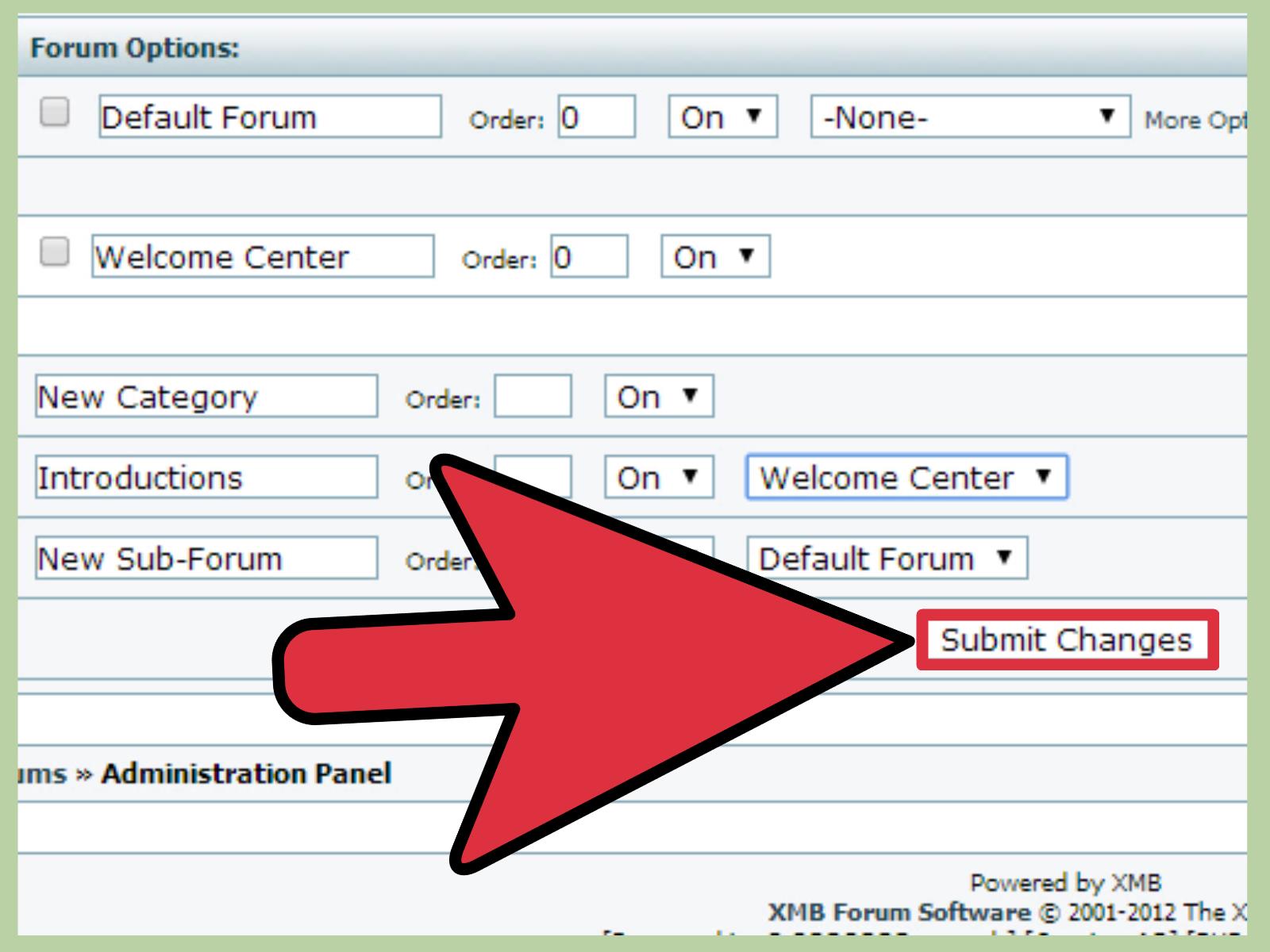
A good forum structure makes conversation feel natural. Start with broad categories, then create specific forums inside them. For example, a gaming community might use categories such as Announcements, General Discussion, Game Guides, Bug Reports, Off Topic, and Marketplace. A classroom forum might include Course News, Weekly Questions, Assignment Help, Resources, and Student Lounge.
Keep the structure simple at launch. Empty forums look lonely, and too many categories make users feel like they have walked into a shopping mall with no signs. Begin with a few practical sections, then add more as the community grows. Write short descriptions for each forum so members know where to post.
Step 10: Customize the XMB Theme
XMB supports visual customization through themes, templates, images, colors, and layout adjustments. Start with easy changes: forum logo, header text, background color, link colors, button images, and footer text. If your XMB version includes theme management tools, use them before editing files manually.
Choose a design that matches your community. A tech support forum may need a clean, professional look. A retro gaming forum can lean into pixel art and nostalgic colors. A book club forum might use warm tones and a calm reading-room style. Just remember that readability beats decoration. Neon green text on a black background may feel cyberpunk for five seconds, then become an eye exam nobody asked for.
Step 11: Install Modifications Carefully
XMB modifications can add features such as anti-spam tools, profile enhancements, theme improvements, editor changes, moderation options, or extra navigation features. Before installing any modification, confirm that it matches your XMB version. A modification built for an older branch may not work properly with a newer release.
Always back up your files and database before changing code. Read the installation instructions completely before editing anything. If a modification requires manual code edits, make one change at a time and test after each change. When something breaks, knowing the last edit you made is much better than whispering, “I changed several things and now the forum has become soup.”
Step 12: Secure Your XMB Forum
Forum security is not optional. Keep your XMB version updated, use supported PHP versions, maintain strong admin passwords, remove unused admin accounts, limit file upload permissions, and install an SSL certificate so logins happen over HTTPS. Use database credentials only for the forum database, not for unrelated applications.
Also configure anti-spam defenses. Public forums attract bots the way porch lights attract moths. Use registration controls, email verification, moderation queues, CAPTCHA if supported, sensible posting limits, and clear rules for new members. Review user permissions carefully so guests, registered users, moderators, and administrators only have the access they need.
Step 13: Test, Launch, and Maintain the Community
Before announcing your forum, test it like a new user. Register a test account, confirm the email, create a topic, reply to a thread, update a profile, search the forum, and report a post if that feature is available. Check the forum on desktop and mobile screens. Even if XMB has a classic layout, users still expect basic mobile usability.
After launch, maintenance becomes your new best friend. Schedule regular backups of files and databases. Monitor error logs. Update software when security releases appear. Review inactive plugins or modifications. Keep your categories organized, welcome new members, and model the tone you want. A forum is not just software; it is a living room. If the host never shows up, eventually the plants die and somebody puts a couch on the ceiling.
Best Practices for Customizing an XMB Forum
Make the Homepage Instantly Understandable
Your forum homepage should tell visitors what the community is about within seconds. Use a clear forum title, concise descriptions, and obvious navigation. If people cannot tell whether your forum is about Linux, Labrador training, local gardening, or competitive soup photography, they will leave faster than you can say “new thread.”
Write Community Rules That Humans Will Read
Rules do not need to sound like a courtroom transcript. Write them clearly and kindly. Explain what is allowed, what is not allowed, how moderation works, and what members should do when they need help. Place the rules in a visible forum and link to them during registration if possible.
Use Moderators Before You Desperately Need Them
When a forum begins growing, appoint trusted moderators early. Choose people who are calm, fair, active, and familiar with the community. A moderator should not be someone whose main qualification is “owns a keyboard and enjoys power.” Give moderators clear expectations and private communication channels for handling disputes.
Keep SEO Clean and Natural
XMB forums can attract search traffic when threads answer specific questions. Use descriptive forum names, encourage clear topic titles, avoid duplicate categories, and keep public discussions accessible to search engines when appropriate. Google and Bing both reward useful, organized content more than awkward keyword stuffing. A thread titled “Help please!!!” tells search engines almost nothing. A thread titled “How to Fix XMB Database Connection Error After Moving Hosts” is far more useful.
Common XMB Installation Problems and Fixes
Database Connection Error
If XMB cannot connect to the database, recheck the database host, database name, username, and password. On cPanel hosting, database names and usernames often include an account prefix. For example, a database you named xmbforum may actually be account_xmbforum.
Blank Page After Upload
A blank page may indicate a PHP error, missing files, incompatible PHP settings, or incorrect permissions. Enable error reporting in a development environment or check your hosting error logs. Do not leave verbose errors visible on a public production site.
Installer Says a File Is Not Writable
Adjust the specific file or folder permission requested by the installer. After installation, reset permissions to safer values. If you are unsure, ask your host which permission settings are recommended for PHP applications on their server configuration.
Email Notifications Do Not Send
If registration emails or password resets fail, check whether your host allows PHP mail. You may need SMTP configuration, a verified sending address, or DNS records such as SPF and DKIM for reliable delivery.
Real-World Experience: What Installing and Customizing XMB Teaches You
Installing an XMB forum teaches a surprisingly useful lesson: simple software still deserves careful planning. Many beginners think the installation is the hard part, but the real work starts after the installer says everything is complete. The forum may technically exist, but a successful community needs structure, identity, security, and a reason for people to return. A fresh forum with no categories, no welcome post, and no clear purpose feels like renting a banquet hall and forgetting to invite guests.
One practical experience many administrators share is that small decisions become big habits. For example, naming categories seems harmless at first, but vague labels can confuse users for years. A forum called “General” may collect everything from bug reports to birthday wishes. A better structure guides members gently: Announcements for official news, Support for help requests, Guides for tutorials, Feedback for suggestions, and Off Topic for the glorious chaos that every community secretly needs.
Customization also reveals the difference between personal taste and user experience. It is tempting to make the forum look exactly how you imagined it: bold colors, custom icons, dramatic backgrounds, maybe a logo with more gradients than a 2004 music player skin. But visitors care most about readability, speed, and clarity. A clean XMB theme with readable fonts, obvious links, and consistent spacing will outperform a visually noisy design almost every time. Your forum should feel branded, not like it fell into a box of highlighters.
Another lesson is that backups are not boring; they are heroic. Before editing a theme file or installing a modification, create a backup of both files and the database. This habit saves enormous frustration. When a code edit breaks the layout or a modification conflicts with your XMB version, a backup turns disaster into a five-minute recovery. Without one, you may spend hours trying to remember which semicolon betrayed you.
Security becomes more real once bots find your forum. Even a tiny new forum can receive spam registrations quickly. That does not mean your site is famous; it means automated bots are tireless little gremlins. Setting up email verification, moderation for new users, posting limits, and clear permissions early can prevent a messy cleanup later. It is much easier to stop spam at the gate than to sweep confetti from every room after the parade.
Finally, running an XMB forum reminds you that community software is only the stage. The people create the show. Post welcome topics, answer early questions, seed useful discussions, and thank contributors. A forum grows when members feel seen and safe. The best customization is not always a theme color or plugin; sometimes it is a thoughtful sticky post, a friendly moderator, or a clear answer that helps a newcomer feel smart instead of lost.
Conclusion
Learning how to install and customize an XMB forum is a practical project for anyone who wants a lightweight, classic PHP message board. The key is to move carefully: choose compatible hosting, create a clean database, upload the files correctly, run the installer, remove setup files, configure core settings, design sensible categories, customize the theme, secure the installation, and test everything before launch.
XMB may not be the trendiest forum platform, but it remains a capable option for straightforward communities that value speed, simplicity, and control. Treat the setup process like building a small town square. Give people clear paths, good lighting, fair rules, and a reason to gather. Then maintain it. Forums do not thrive because software exists; they thrive because someone cares enough to keep the doors open and the conversations worth joining.
Note: This article is based on current public information about XMB forum software, PHP hosting requirements, MySQL and MariaDB database setup, cPanel-style hosting workflows, web application security practices, and modern SEO fundamentals. Always check your specific XMB version and hosting provider documentation before changing files, permissions, or server settings.