Note: This article is written as a publication-ready HTML body section, based on real historical and technical information about Windows for Workgroups 3.11, retrocomputing, networking, and modern hardware experiments.
In 2018, running Windows For Workgroups 3.11 on real hardware was not exactly a normal weekend plan. Most people were busy arguing about smartphones, cloud storage, streaming services, and whether every refrigerator needed Wi-Fi. Meanwhile, a certain corner of the retrocomputing universe was asking a much funnier question: “Can we make a 1993 business networking operating environment behave on a laptop from 2009?”
The answer, delightfully, was yes. But “yes” in retrocomputing usually means “yes, after drivers, BIOS settings, floppy images, IRQ archaeology, and a small offering to the hardware gods.” Windows for Workgroups 3.11 in 2018 was not just nostalgia. It was a practical demonstration of how much personal computing changed in 25 years, and how much of the modern desktop experience was already visible in rough, beige, pixelated form.
Windows for Workgroups 3.11, often shortened to WFW 3.11, was Microsoft’s networking-focused version of Windows 3.x. It arrived before Windows 95 took over the world with a Start button and a marketing campaign powerful enough to make people line up for software at midnight. WFW 3.11 belonged to the final chapter of the 16-bit Windows era, but it also carried hints of the 32-bit future. That makes it fascinating: it was both old-fashioned and forward-looking, like a fax machine wearing running shoes.
What Was Windows for Workgroups 3.11?
Windows for Workgroups 3.11 was released in the early 1990s as an evolution of Windows 3.1 with integrated networking features. Unlike plain Windows 3.1, it was designed for small offices, departments, classrooms, and home users who wanted computers to talk to one another without requiring a full-blown server setup. It offered peer-to-peer file sharing, printer sharing, workgroup browsing, network mail tools, and improved protected-mode components.
Under the hood, it still depended on MS-DOS. This was not a clean, modern operating system in the Windows NT sense. It was more like a highly ambitious graphical environment sitting on top of DOS, juggling applications, drivers, memory managers, and network services while trying not to drop anything on the carpet. Yet for its time, it was impressively useful.
One of the most important upgrades in WFW 3.11 was its support for 32-bit file access. This helped Windows handle disk operations more efficiently by moving more work into protected mode. It also included improved networking architecture, including 32-bit network components. These technologies helped bridge the gap between Windows 3.1 and Windows 95.
Why Run Windows For Workgroups 3.11 In 2018?
To a practical person, running WFW 3.11 in 2018 might sound like trying to commute by horse because you miss the smell of hay. But retrocomputing is not only about practicality. It is about preservation, curiosity, engineering, and the joy of watching old software perform tasks it was never expected to face.
In 2018, the modern web was dominated by HTTPS, JavaScript-heavy pages, responsive layouts, cloud services, and security standards far beyond anything a 1993 Windows environment could understand. A typical modern browser had become a small operating system with tabs. By comparison, a 16-bit browser on Windows 3.11 was more like a brave toaster with a modem.
That challenge is exactly why the project was interesting. Running Windows for Workgroups 3.11 on real hardware, rather than inside a virtual machine, forced every historical limitation to become real again. Drivers mattered. Ports mattered. Screen resolution mattered. Sound was not guaranteed. Networking was a puzzle. The machine did not politely abstract everything away. It made you negotiate.
The 2018 Retro Hardware Challenge
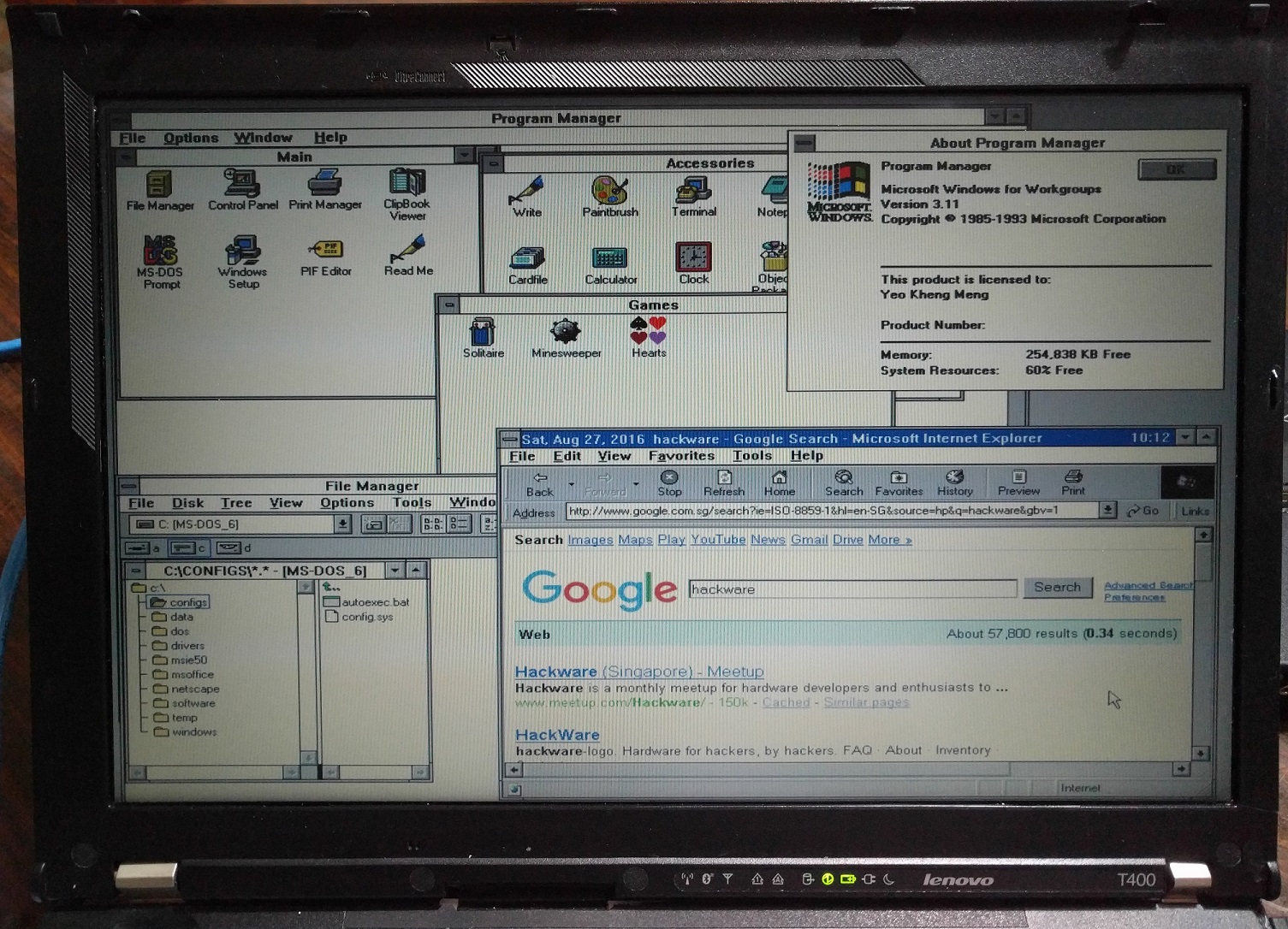
A well-known example involved getting WFW 3.11 running on a Lenovo ThinkPad T400, a laptop from around 2009. That choice was clever because the T400 was modern enough to be widely available and still useful, but old enough to retain legacy-friendly features through its docking station. The dock could provide serial and parallel ports, which are practically museum pieces now but were once essential parts of the PC ecosystem.
This mattered because Windows for Workgroups 3.11 was built for a world of ISA cards, Sound Blasters, serial mice, parallel printers, VGA adapters, and network cards that expected very specific drivers. A 2009 laptop was already from another planet. It had hardware designed for Windows XP, Vista, or Linux, not for a DOS-based Windows environment that thought “Plug and Play” sounded like a suspicious nightclub.
Video was one of the first major hurdles. Basic WFW 3.11 support could be limited, and higher resolutions required suitable drivers. Sound was another issue. Modern integrated audio chips were not built with Windows 3.11 in mind. That led to creative solutions such as using parallel-port audio hardware inspired by the Covox Speech Thing, a simple digital-to-analog sound device from the earlier PC era.
Networking: The Real Star of the Show
The phrase “Windows for Workgroups” sounds almost boring today, but in the early 1990s, built-in small-network support was a major selling point. Before Wi-Fi routers became household appliances, networking a few computers could involve cables, cards, drivers, terminators, protocols, and enough configuration screens to make a grown technician stare into the middle distance.
WFW 3.11 supported common networking approaches of its time, including Microsoft networking, NetBIOS, IPX/SPX, and optional TCP/IP through Microsoft’s TCP/IP-32 add-on. TCP/IP support is especially important because it allowed WFW 3.11 machines to participate in the broader Internet protocol world, at least within period-appropriate limits.
In 2018, however, TCP/IP alone was not enough. The Internet had changed. Many websites required HTTPS. Encryption standards had moved on. Certificates, ciphers, and browser expectations had evolved dramatically. A Windows 3.11 browser could not simply open today’s average website and pretend everything was fine. The modern web would look at it and say, “Sir, this is a 256-bit establishment.”
Why HTTPS Was a Problem
Modern websites rely heavily on encryption. That is good for security, privacy, login protection, e-commerce, and preventing strangers from reading your traffic at the coffee shop. But old operating systems and browsers were designed when many websites used plain HTTP, and SSL support was still developing. As a result, old browsers cannot handle many current HTTPS requirements.
For retrocomputing demonstrations, people sometimes use local proxies or controlled test environments to translate modern web content into something older systems can display. This is not something anyone should treat as secure browsing. It is a museum trick, not a banking strategy. Running WFW 3.11 online in 2018 was more like letting a Model T Ford drive slowly around a closed parking lot, not entering it in a Formula 1 race.
What Windows For Workgroups 3.11 Could Still Do
Despite the limitations, WFW 3.11 remained surprisingly capable in a retro context. It could run classic Windows 3.x software, launch DOS programs, handle simple productivity tasks, browse files, connect to compatible network shares, and provide a graphical environment that still feels familiar in its basic logic.
Program Manager, File Manager, Control Panel, and the old accessory tools remind users how much of desktop computing was already established. You clicked icons. You opened windows. You managed files. You adjusted settings. You installed drivers. You rebooted when things went sideways. In other words, the grand tradition of “try restarting it” was alive and well.
Classic applications such as Microsoft Write, early versions of Word and Excel, Paintbrush, terminal tools, card games, and file utilities can still run beautifully when paired with appropriate hardware or emulation. The simplicity can feel refreshing. There are no notification storms, no automatic cloud sync pop-ups, no animated assistant trying to summarize your soul. Just windows, menus, and the occasional system crash to keep you humble.
What It Could Not Do Well
WFW 3.11 was not built for modern security, modern websites, modern file sizes, modern USB expectations, or modern multitasking habits. It had limited memory handling compared with today’s systems. It was fragile by modern standards. Hardware compatibility was highly dependent on drivers. Long file names were not native to the DOS and Windows 3.x workflow. Networking with modern systems could require lowering security settings, which is not recommended outside a controlled lab.
Modern users also expect operating systems to identify hardware automatically. Windows for Workgroups expected you to know things. It expected you to understand ports, addresses, interrupt requests, driver disks, configuration files, and why two devices might both be fighting over the same resource like cats in a cardboard box.
This is one reason WFW 3.11 in 2018 was so educational. It showed how much invisible labor modern operating systems perform. Today, when you connect a mouse, it usually works. When you connect to Wi-Fi, the system handles layers of authentication, drivers, encryption, and network configuration. In the WFW era, you often had to meet the computer halfway, wearing sturdy shoes.
Why Retrocomputing Fans Love This Stuff
Retrocomputing is not only about old machines. It is about understanding technology through direct contact. Reading about 16-bit Windows is useful, but booting it, configuring it, and watching it interact with real hardware teaches a different lesson. You feel the design constraints. You notice the assumptions. You discover why certain features mattered.
Windows for Workgroups 3.11 is especially interesting because it sits at a crossroads. It came after Windows became popular on consumer PCs but before Windows 95 made networking, long file names, and a more consumer-friendly interface mainstream. It came before broadband, before USB took over, before Wi-Fi became ordinary, and before software updates arrived like uninvited houseguests.
Using WFW 3.11 in 2018 was a reminder that “old” does not always mean useless. Sometimes old software is valuable because it reveals the foundations of modern systems. Workgroups, shared printers, network browsing, TCP/IP configuration, driver management, and graphical multitasking are still relevant ideas. They just wear much nicer clothes now.
Security Lessons From a 1993 System in a 2018 World
One of the biggest lessons is that old systems should be treated carefully. Windows for Workgroups 3.11 was designed before today’s threat landscape. It was not built for phishing campaigns, botnets, ransomware, drive-by downloads, modern browser exploits, or hostile public networks. Connecting it directly to the open Internet is a terrible idea unless the goal is to create a very small digital haunted house.
A safer approach is to keep retro machines behind a firewall, isolate them on a lab network, avoid sensitive logins, use read-only media where possible, and treat any Internet access as demonstration-only. If file sharing is needed, use a controlled bridge machine or a dedicated vintage-compatible server configuration. The goal is preservation and learning, not pretending a 1993 network stack is ready for 2018 cyber weather.
Specific Examples of 2018 Use Cases
A WFW 3.11 system in 2018 could serve as a writing station for distraction-free drafting. It could run period-correct office software for historical research. It could demonstrate early LAN concepts in a classroom. It could access a local HTTP server serving lightweight pages. It could connect to compatible file shares in a carefully configured lab. It could play older Windows games and DOS titles. It could also become a fantastic conversation piece, especially if you enjoy hearing people say, “Wait, that laptop is running what?”
For makers, the project also highlighted how hardware creativity solves software problems. When built-in sound support was not practical, a parallel-port sound solution became a workaround. When modern HTTPS broke old browsers, proxy techniques made limited web demonstrations possible. When floppy media became inconvenient, USB floppy emulation helped installation. Every obstacle became a tiny history lesson with a soldering iron nearby.
The User Experience: Charming, Stubborn, and Honest
Using Windows for Workgroups 3.11 today feels both familiar and alien. The interface is clean and direct. Program Manager organizes applications into groups. File Manager shows directories in a way that still makes sense. Dialog boxes are small, square, and confident. There is no visual clutter because computers at the time did not have enough resources for clutter to start a family.
At the same time, the system is unforgiving. Install the wrong driver, and you may be editing configuration files. Pick the wrong display mode, and you may be staring at a screen that looks like modern art had a bad day. Configure networking incorrectly, and nothing works, but it fails with the emotional warmth of a locked filing cabinet.
That honesty is part of the charm. Modern systems often hide complexity behind friendly animations. WFW 3.11 exposes the machinery. It makes the user part of the process. You do not merely consume computing; you wrestle with it, politely but firmly.
Experience Notes: What It Feels Like to Use Windows For Workgroups 3.11 In 2018
Imagine sitting down with a laptop that looks modern enough to fool someone across the room, then watching it boot into a world of gray dialog boxes, blue title bars, and icons that look like they were designed with exactly nine pixels and a dream. The first feeling is amusement. The second is respect. The third is concern, usually after the system asks for a driver disk you have not seen since the Clinton administration.
The experience of using Windows for Workgroups 3.11 in 2018 is a strange mix of speed and slowness. Simple tasks feel instant because the software is tiny by modern standards. Menus open quickly. Basic apps launch without drama. The whole environment has a lightweight confidence that modern operating systems sometimes lack. But the moment you ask it to interact with the modern world, time stretches like warm cheese. A webpage is no longer a document; it is a jungle. A network share is no longer just a shared folder; it is a diplomatic negotiation between decades.
There is also a powerful tactile feeling to the setup process. You think about hardware in a way modern users rarely need to. What video chip is this? Does a Windows 3.x driver exist? Can the BIOS emulate a USB floppy drive? Is the network adapter supported? Is the parallel port real or merely pretending? These questions make the computer feel less like a sealed appliance and more like a machine with a personality, possibly a grumpy one.
Working inside WFW 3.11 also changes your expectations. You stop opening twenty tabs. You stop assuming every document lives in the cloud. You stop treating memory and storage as infinite. You become careful with file names. You organize things because the system will not organize them for you. The result is surprisingly focused. It is not comfortable in the modern sense, but it is clear.
The funniest part is how familiar some concepts remain. A network name still matters. A printer still needs a driver. A file path can still ruin your afternoon. Compatibility is still a real issue. The vocabulary has changed, but the problems are cousins. In that sense, Windows for Workgroups 3.11 is not just a relic. It is a family photo of the modern PC before it grew up, got broadband, joined the cloud, and started asking for two-factor authentication.
By the end of the experience, the biggest takeaway is not “old computers were bad” or “new computers are perfect.” The lesson is that computing has always been a chain of compromises. WFW 3.11 made networking accessible for small groups at a time when that was a big deal. Running it in 2018 showed both how far we had come and how much ingenuity was packed into earlier systems. It is charming, difficult, educational, and occasionally ridiculous. In other words, it is retrocomputing at its best.
Conclusion
Windows For Workgroups 3.11 In 2018 was more than a novelty project. It was a playful but serious look at how old software survives when placed in a world it was never designed to understand. WFW 3.11 represented a key moment in Microsoft’s desktop history: a DOS-based Windows environment with built-in workgroup networking, improved performance features, and early signs of the Windows 95 future.
Running it decades later highlights the brilliance and awkwardness of early PC networking. It reminds us that convenience is built on layers of invisible progress. It also proves that retrocomputing is not just nostalgia for beige boxes and floppy disks. It is a hands-on way to learn why modern systems work the way they do.
In 2018, Windows for Workgroups 3.11 was outdated, insecure for modern Internet use, and stubborn about hardware. It was also charming, fast in its own tiny universe, historically important, and surprisingly fun. Like finding a pager in a smartphone store, it made people smile, then think, then appreciate the long road between “shared printer” and “cloud workspace.”