Audio and video formats are like adapters in a hacker’s junk drawer: everyone owns too many, nobody remembers where half of them came from, and the one you need is always hiding under a suspiciously sticky cable. At Hackaday Supercon 2023, senior software engineer Ben Combee stepped into this delightful chaos with a practical talk, A Hacker’s Guide to Audio/Video Formats, aimed at makers who do not have a Hollywood rendering farm, a licensing department, or unlimited RAM hiding behind the soldering iron.
The talk matters because modern media is deceptively complicated. A file named video.mp4 may look simple, but inside it might live H.264 video, AAC audio, subtitles, metadata, chapters, timestamps, and enough compatibility decisions to make a microcontroller cry tiny binary tears. For web developers, embedded hackers, digital artists, retro-computing fans, and hardware tinkerers, the question is not “Which format is best?” The real question is “Best for what, on which device, with how much CPU, RAM, storage, latency tolerance, and legal patience?”
That is the spirit of Combee’s Supercon session. It is less a dusty encyclopedia of codecs and more a survival guide: know your constraints, choose your format deliberately, and do not assume that the most fashionable codec is the right codec for your tiny badge, word clock, art installation, browser app, or gloriously unnecessary robot that plays movie clips for no reason except joy.
Why Audio/Video Formats Confuse Even Smart People
The biggest trap in multimedia is that people use the words “format,” “codec,” and “container” as if they are interchangeable. They are not. A codec is the method used to compress and decompress audio or video. A container is the file structure that packages streams together. A media file can contain video, audio, subtitles, metadata, and timing information, all neatly wrapped in one box. The box may say MP4, WebM, Matroska, AVI, MOV, or something older than the office coffee machine.
Think of the container as a lunchbox and the codec as the recipe. An MP4 container might hold H.264 video and AAC audio. A WebM container might hold VP9 or AV1 video with Opus audio. A WAV file might hold raw PCM audio. A Matroska file may carry multiple audio tracks, subtitles, chapters, and other goodies. None of this is magic, although when playback works on the first try it certainly feels like witchcraft with a progress bar.
Combee’s talk brings this distinction down to earth. Before choosing anything, ask what your project is actually doing. Are you playing audio only? Displaying animation? Recording video? Streaming live content? Running on a desktop browser? Running on an RP2040, ESP32, or another small embedded device? The answer changes everything.
The Hacker’s First Rule: Constraints Beat Trends
A shiny modern codec is not automatically a good fit. AV1 is efficient and attractive for large-scale streaming, but it is computationally demanding without hardware support. H.265 can reduce file size, but patent licensing can complicate commercial use. H.264 is widely supported, but it is not “free of decisions.” MPEG-1 is old enough to have a favorite chair, yet it can be wonderfully practical for small systems because it is simpler to decode and its relevant patents have long expired.
Combee’s framework is refreshingly practical. Before picking an audio or video format, ask:
- How much CPU processing can the target device handle?
- How much RAM is available during playback?
- How much storage can the project spare?
- Does the project only decode media, or must it encode media too?
- How much latency is acceptable?
- Does the hardware include media acceleration?
- Are there patent or licensing costs?
- Can available tools create, inspect, convert, and validate the files?
That final point is underrated. A clever file format is less clever when your toolchain treats it like an alien artifact. FFmpeg, VLC, browser developer tools, platform media documentation, and small decoder libraries are the hacker’s flashlight in the multimedia basement.
Audio Formats: From Raw PCM to Opus
Audio begins with sampling. A digital audio stream captures sound at a particular sample rate, bit depth, and channel count. CD-quality audio is commonly associated with 44.1 kHz sampling and 16-bit stereo, but embedded projects often have very different needs. A talking badge, toy, or notification device may sound perfectly fine at lower rates. A music player, synth project, or interactive art piece may demand more care.
PCM: Simple, Honest, and Hungry
PCM is raw audio data. It is easy to understand and easy to play if your hardware can push samples to a DAC or audio peripheral. The downside is size. PCM does not politely compress itself; it sprawls across storage like a cat on a warm keyboard. For short clips, sound effects, and projects where simplicity matters more than storage, PCM can be a beautiful choice. For long music tracks on tiny flash memory, it becomes a storage goblin.
MP3: The Old Reliable With Expired Patent Baggage
MP3 remains everywhere because it solved a real problem: making music files small enough to move, store, and play conveniently. Today, MP3 is attractive for hackers because support is widespread and its historical patent headaches are no longer the monster they once were. The tradeoff is decoding complexity. On desktop-class hardware, MP3 playback is trivial. On small microcontrollers, it may still consume meaningful CPU and memory.
AAC, Vorbis, and Opus
AAC is common in MP4 workflows and widely supported across consumer devices. Vorbis is an open audio codec often associated with Ogg and older open-web media work. Opus is especially interesting because it is open, royalty-free, and strong for both speech and music. It was designed for interactive internet audio, which makes it useful when latency and low bitrates matter.
For speech, Opus can be a star. For a simple embedded project, though, the question is not merely “Is Opus good?” It is “Can my chip decode Opus smoothly while also updating LEDs, reading buttons, drawing pixels, and not bursting into metaphorical flames?” Multimedia decisions are full of these tiny betrayals.
Video Formats: Pictures, Motion, and the Tyranny of Bandwidth
Video is just a sequence of images, in the same way a skyscraper is just a stack of bricks. Technically true, spiritually inadequate. Once you start moving images at 24, 30, or 60 frames per second, data explodes. Compression becomes mandatory unless your project has storage measured in “small moons.”
Motion JPEG: Simple but Not Tiny
Motion JPEG is easy to grasp: each frame is a JPEG image. That makes decoding conceptually simple and often friendly to systems that already know how to decode JPEGs. The drawback is efficiency. Motion JPEG does not take full advantage of similarities between frames. If a video shows a mostly still background, modern inter-frame codecs can store only the changes. Motion JPEG keeps ordering full sandwiches for every meal.
MPEG-1 and MPEG-2: Old, Useful, and Not Dead
One of the most interesting parts of Combee’s Supercon talk is his appreciation for MPEG-1. It was created for video delivery in the era of CDs, and by modern standards it is not the most efficient. Yet its simplicity is exactly why hackers should still care. Single-header libraries such as pl_mpeg can make MPEG-1 video approachable in C/C++ projects, which is priceless when you are trying to make video work on constrained hardware.
MPEG-2 extended the family into broadcast and DVD-era use. It remains historically important and still appears in real systems. These older formats remind us that “obsolete” and “useless” are not synonyms. Sometimes the old hammer is still the right hammer, especially when the new hammer requires a subscription, hardware decoder, and three lawyers.
H.264, H.265, VP9, and AV1
H.264/AVC became one of the most widely used video codecs because it balances quality, compression, and hardware support extremely well. It is common in MP4 files, cameras, phones, browsers, and streaming workflows. H.265/HEVC improves compression efficiency but introduces licensing complexity and uneven platform support. VP8 and VP9 grew out of the open web video movement, especially around WebM. AV1, developed by the Alliance for Open Media, pushes compression further and is increasingly important for modern streaming platforms.
The hacker lesson is blunt: the codec that saves bandwidth may cost CPU. The codec that plays everywhere may carry licensing concerns. The codec that is open and efficient may not be easy to decode on your target hardware. The “best” codec is the one that survives your actual project constraints.
YUV, RGB, and Why Brightness Gets Special Treatment
Many beginners expect video to be stored as RGB pixels because screens display red, green, and blue components. But video compression often works in YUV or related color spaces. The key idea is that human vision is more sensitive to brightness detail than color detail. Codecs exploit this by preserving more luminance information while reducing chroma resolution through techniques such as chroma subsampling.
This is why 4:2:0 video can look good while storing less color information than a full RGB image. The eye is forgiving in some places and annoyingly picky in others. Video codecs are basically professional negotiators with your visual cortex.
I-Frames, P-Frames, B-Frames, and the Memory Problem
Modern video codecs usually do not store every frame as a complete image. Instead, they store occasional full frames and then describe changes from frame to frame. I-frames are self-contained. P-frames predict from previous frames. B-frames may use both past and future frames. This is efficient, but it complicates decoding.
For embedded systems, reference frames can become a major RAM issue. Combee’s own Hackaday.io notes about getting short video clips running on the 2023 Supercon badge show how quickly memory math becomes real. A 240-by-240 display may sound small, but multiple Y, Cr, and Cb reference planes can eat RAM faster than a browser tab running three video ads and a mysterious crypto widget.
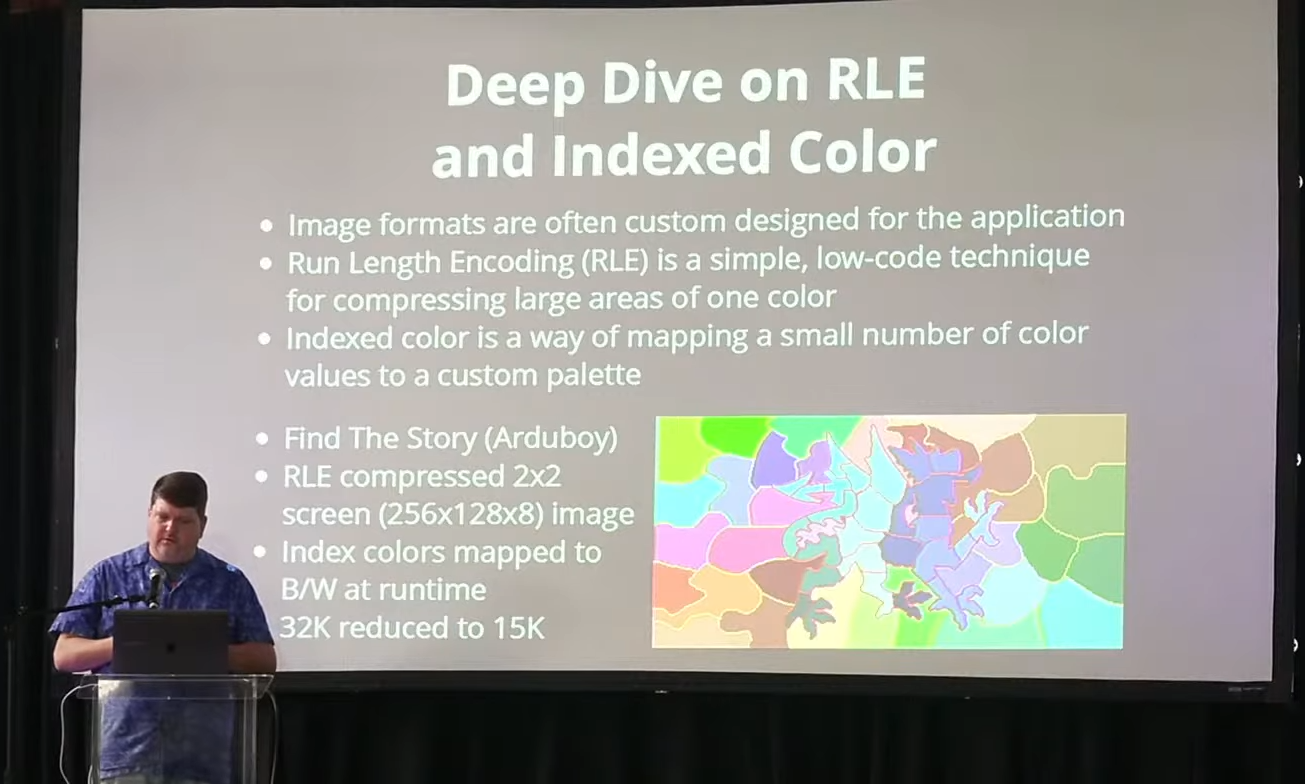
This is why small projects often benefit from simpler formats, reduced resolution, lower frame rates, fewer reference frames, indexed color, run-length encoding, or custom pipelines. Nobody gives you bonus points for using a fancy codec if your badge freezes before the second frame.
Containers: MP4, WebM, Matroska, AVI, and Friends
Containers matter because they organize streams and timing. MP4, based on the ISO Base Media File Format family, is widely used for web, mobile, camera, and streaming workflows. WebM is built as a web-friendly open media container based on a subset of Matroska. Matroska itself is flexible and popular for files that need multiple audio tracks, subtitles, chapters, and rich metadata. AVI is older and still encountered, but it lacks many conveniences expected in modern workflows.
For web publishing, MP4 with H.264/AAC remains a safe compatibility choice, while WebM with VP9 or AV1 and Opus can be valuable when openness and compression efficiency matter. For archiving or enthusiast distribution, Matroska is flexible. For tiny embedded projects, the container may be overkill; a raw stream or purpose-built format may be easier.
Streaming Is a Different Beast
Streaming adds another layer. Protocols such as HLS split media into segments and playlists so players can adapt to bandwidth and device conditions. Browser media APIs allow web applications to append media segments dynamically. This is powerful, but it also means the file is no longer just a file. It becomes a delivery system with timing, buffering, adaptation, and compatibility concerns.
If you are building a website, streaming platform, or media-heavy app, adaptive bitrate delivery may be essential. If you are building a conference badge that plays a tiny animation from flash memory, HLS is hilariously inappropriate. Context wins again.
Synchronization: The Part Everyone Notices When It Fails
Audio/video sync is one of those features users only notice when it goes wrong. A 100-millisecond mismatch can make a speaker look like a badly dubbed movie villain. Combee’s slides discuss presentation timestamps, clock behavior, and the danger of trusting a device’s real-time clock too much. Media has its own timeline, and your program must respect it.
Sync also matters beyond audio and video. Closed captions, animations, lyric highlighting, subtitles, LED effects, and interactive elements may all depend on timing. Combee’s Daft Punk word clock example is a perfect hacker-grade case: syncing lyric highlighting to MP3 playback sounds straightforward until clock drift arrives wearing tap shoes.
A Practical Format Selection Cheat Sheet
| Project Type | Good Starting Point | Why It Works |
|---|---|---|
| Short embedded sound effects | PCM or WAV | Simple decoding and predictable timing |
| Speech at low bitrate | Opus | Strong quality for speech and interactive audio |
| Music playback on common devices | MP3 or AAC | Broad compatibility and mature tools |
| Small-device video experiments | MPEG-1 or Motion JPEG | Simpler decoding and easier debugging |
| General web video | MP4 with H.264/AAC | Excellent practical compatibility |
| Open web video | WebM with VP9/AV1 and Opus | Open ecosystem and efficient compression |
| Rich media files with subtitles | Matroska | Flexible track and metadata support |
Why Ben Combee’s Talk Is Useful for Real Builders
The best technical talks do not merely transfer information; they improve judgment. Combee’s guide does exactly that. It reminds hackers that media formats are engineering compromises, not personality tests. You are not morally superior because you picked AV1, and you are not a cave-dwelling goblin because you used MPEG-1. You are solving a problem inside constraints.
That mindset is especially valuable in hardware projects. On a laptop, bad media choices often produce mild inconvenience. On a microcontroller, they produce silence, stutter, memory exhaustion, dropped frames, and the kind of debugging session where you start bargaining with the compiler. Supercon is the perfect venue for this lesson because attendees are not just talking about technology; they are building strange, delightful, stubborn things with it.
Experience Notes: What Building With Audio/Video Formats Teaches You
Working with audio and video formats teaches humility quickly. The first lesson is that a file extension is not a promise. A file named .mp4 may work beautifully in one player and fail in another because the codec, profile, level, pixel format, audio stream, subtitle track, or metadata arrangement is not supported. Beginners often blame the player. Experienced developers blame everything, including themselves, the moon, and occasionally QuickTime.
The second lesson is that small test files lie. A five-second clip may play perfectly, then a two-minute clip fails because buffering, timestamp rollover, drift, or memory fragmentation appears later. This is why serious testing should include long files, awkward files, low-bitrate files, high-bitrate files, weird resolutions, mono audio, stereo audio, missing metadata, variable frame rates, and at least one cursed file downloaded from an ancient forum post preserved by pure stubbornness.
The third lesson is that audio is less forgiving than many people expect. A dropped video frame may be acceptable. A crackle, pop, or audio gap is instantly annoying. Humans tolerate visual imperfection better than broken sound. For embedded projects, prioritize stable audio timing early. Once the audio pipeline is solid, video can often be adjusted through frame skipping, lower resolution, or simpler rendering.
The fourth lesson is that tools are part of the format decision. If FFmpeg can inspect, transcode, and generate the file easily, your life improves. If VLC can play it, you gain a sanity check. If browser support tables agree with your plan, your web deployment has fewer surprises. If the only encoder is a mysterious binary last updated when flip phones were considered futuristic, reconsider.
The fifth lesson is that “smaller file” does not always mean “better project.” A highly compressed file may save storage but require a decoder too heavy for the target system. A larger, simpler format may use more flash but less CPU. In battery-powered devices, decode complexity can matter as much as file size. In real-time installations, predictable playback can matter more than maximum compression efficiency.
The sixth lesson is to measure instead of guessing. Time the decoder. Count the bytes. Watch RAM usage. Check CPU headroom. Log dropped frames. Verify timestamps. Run the project after it warms up. Try the worst-case clip, not just the flattering demo. Multimedia bugs love demos because demos are full of optimism, and optimism is where bugs build vacation homes.
Finally, building with media formats teaches respect for old technology. Ancient formats can be surprisingly useful because they are documented, simple, patent-expired, and supported by small libraries. New formats can be excellent when the ecosystem is ready. The wise hacker does not worship age or novelty. The wise hacker asks, “What will actually work here?” Then they test it twice.
Conclusion
Supercon 2023: Ben Combee And The Hacker’s Guide To Audio/Video Formats is more than a talk about files. It is a reminder that media engineering is a stack of tradeoffs: quality versus size, simplicity versus efficiency, compatibility versus openness, CPU versus storage, latency versus buffering, and ambition versus available RAM.
For hackers, the winning move is not memorizing every codec ever invented. The winning move is learning how to ask better questions. What are you building? Where will it run? What must it play? What can it afford? What tools support it? What legal baggage follows it? Once those answers are clear, the right format often reveals itself. Sometimes it is a modern streaming stack. Sometimes it is MP3. Sometimes it is MPEG-1 on a tiny display, grinning like a retro champion.
And if the audio cuts out during a talk about audio/video formats? Well, that is not a failure. That is multimedia giving a live demonstration of why the topic matters.