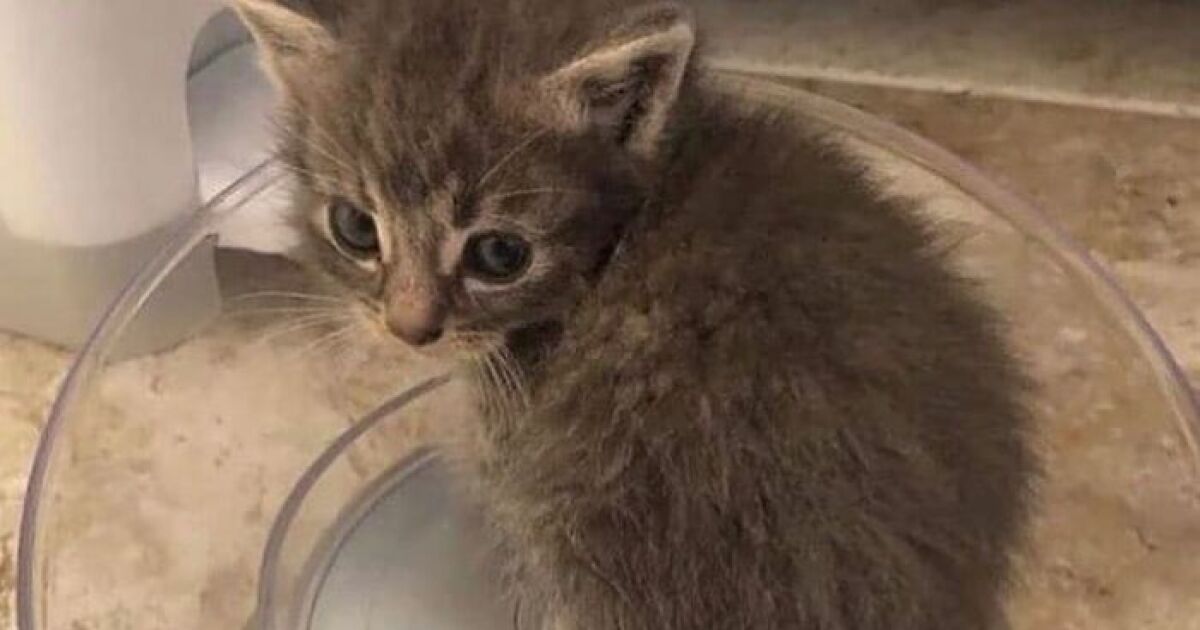
Some internet prompts arrive wearing a tuxedo. Others enter the room carrying a laser pointer, knocking over a houseplant, and demanding creative chaos. “Hey Pandas, Photoshop This Kitten” belongs firmly in the second group. It is playful, visual, community-powered, and wonderfully unserious in the best possible way. A tiny kitten photo becomes the launchpad for a thousand jokes: space explorer, tiny CEO, loaf of bread with whiskers, dragon tamer, detective in a trench coat, or a suspiciously fluffy villain plotting world domination from inside a laundry basket.
At first glance, the idea sounds simple: take a kitten picture and make it funny. But the magic of a good Photoshop challenge is not just the editing software. It is the shared imagination. One person sees a cute pet. Another sees a medieval knight. A third person sees a kitten who clearly belongs on a movie poster titled The Fast and the Furriest. That gap between the original image and the unexpected edit is where the comedy lives.
Today, photo editing is easier and more powerful than ever. Classic tools like layers, masks, selections, cloning, and color correction still matter, while newer AI-assisted features can add, remove, or extend image elements with a few words. But even with smart tools, the best kitten Photoshop edits still depend on taste, timing, storytelling, and one very important rule: never underestimate the comedic power of a cat looking mildly inconvenienced.
Why Kitten Photoshop Challenges Work So Well
Kitten images are naturally shareable because they deliver instant emotional payoff. They are cute, expressive, and often unintentionally dramatic. A kitten blinking at the camera can look confused, offended, heroic, sleepy, or ready to testify in court. That flexibility makes kittens perfect subjects for visual remixing.
Photoshop challenges thrive on contrast. The original photo is usually ordinary: a kitten sitting on a rug, peeking out of a box, stretching on a sofa, or staring at nothing with the intensity of a tiny philosopher. The edit adds the twist. Place that kitten on the moon, behind a news anchor desk, inside a Renaissance painting, or in the cockpit of a fighter jet, and suddenly the image has a story.
The Comedy Formula: Cute Plus Unexpected
The funniest edits often follow a simple formula: take something adorable and put it somewhere absurd. A kitten is already charming. A kitten leading a board meeting while wearing glasses? Better. A kitten being carried by a team of tiny construction workers? Excellent. A kitten as the final boss in a fantasy video game? Frame it, print it, send it to the Smithsonian of Silly Things.
Humor also grows when the edit respects the kitten’s original expression. If the kitten looks shocked, put it in a dramatic disaster scene. If it looks smug, make it a royal portrait. If it looks sleepy, turn it into a cloud, a marshmallow, or a retired wizard who has simply had enough of everyone’s nonsense.
The Internet Has Always Loved Remixable Cats
Cats have been internet royalty for decades because they are unpredictable, expressive, and just independent enough to seem like they are in on the joke. Long before today’s short-form video feeds, people were sharing captioned cat images, funny pet photos, and image macros. The cat meme became a kind of universal language: part joke, part comfort food, part tiny furry chaos engine.
“Hey Pandas” style prompts fit perfectly into this tradition. They invite people not just to look, but to participate. The audience becomes the creative team. Instead of passively scrolling past a kitten, people imagine what else the kitten could become. That small act of participation is powerful. It makes the internet feel less like a billboard and more like a group project where everyone brought glitter, snacks, and questionable judgment.
How to Photoshop a Kitten Without Making It Look Like a Floating Sticker
The biggest beginner mistake in a kitten Photoshop edit is cutting out the cat, dropping it into a random background, and calling it done. That can still be funny, of course, but a polished edit needs a little more care. The kitten should feel like it belongs in the scene, even if the scene is ridiculous.
1. Start With a Clear Cutout
A good selection is the foundation. Fur is tricky because it has soft edges, fine strands, and transparent-looking areas around the ears and tail. Use selection tools carefully, refine the edge, and avoid cutting the kitten into a hard plastic outline. A tiny bit of softness around the fur makes the final result feel more natural.
2. Match the Lighting
If the kitten photo has light coming from the left, the new background should respect that direction. A kitten lit by a sunny window will look strange in a dark alley unless you adjust the shadows and highlights. Matching brightness, contrast, and color temperature can transform an obvious paste job into a believable visual joke.
3. Add Realistic Shadows
Shadows are the secret sauce. Even a silly edit benefits from a grounding shadow under the paws, body, or object. Without shadows, the kitten floats. With shadows, the kitten suddenly appears to be truly standing on a pirate ship, a kitchen counter, a throne, or the surface of Mars. Naturally, Mars has very strict kitten landing regulations.
4. Use Scale for Humor
Scale is one of the easiest ways to make a kitten edit funnier. Make the kitten enormous and place it behind skyscrapers. Make it tiny and put it in a teacup. Make it the size of a loaf of bread and place it in a bakery display. The joke becomes immediate because the viewer understands the visual mismatch at a glance.
5. Preserve the Kitten’s Personality
The best edits do not erase the kitten’s personality. They amplify it. A curious kitten becomes an explorer. A grumpy kitten becomes a judge. A wide-eyed kitten becomes an astronaut who just realized nobody packed snacks. Before editing, ask: what is the expression already saying? Then build the scene around that mood.
Creative Ideas for “Hey Pandas, Photoshop This Kitten”
Need inspiration? The beauty of a kitten Photoshop challenge is that almost any theme works if the idea is clear and the visual punchline lands quickly. Here are some edit concepts that are fun, shareable, and flexible enough for beginners or advanced editors.
The Tiny Movie Poster
Turn the kitten into the star of a dramatic film poster. Add bold typography, smoky lighting, and a title like Whiskers: Judgment Day, The Meowtrix, or Paws of Fury. Use cinematic color grading and a tagline such as “This summer, the litter box fights back.” It is silly, instantly readable, and perfect for social sharing.
The Historical Masterpiece
Place the kitten in a classic painting-inspired scene. Make it a royal portrait with velvet curtains and a tiny crown. Or turn it into a Renaissance scholar holding a feather quill. The contrast between dignified art style and chaotic kitten energy can be comedy gold.
The Giant City Cat
Make the kitten enormous and place it among buildings, bridges, or streets. Add tiny humans looking up in awe, helicopters circling politely, and maybe a news headline: “Local Kitten Demands Tuna Tribute.” Giant cat edits work because cats already behave like they own the room. Enlarging them simply makes the metaphor official.
The Snack Transformation
Kittens already loaf. The internet knows this. Lean into it. Turn the kitten into a croissant, cupcake, cinnamon roll, sushi roll, or suspiciously fluffy baked potato. The trick is to blend fur texture with food shape while keeping the eyes and expression recognizable. Cute? Yes. Hungry-making? Also yes. Slightly confusing? Ideally.
The Office Kitten
Put the kitten at a laptop, behind a desk, or in a conference room. Add a nameplate: “Mr. Mittens, Senior Vice President of Napping.” Place charts behind it showing quarterly yarn growth. This concept works because pets and workplace seriousness are natural enemies, and the collision is hilarious.
Ethical Editing: Funny Does Not Mean Careless
Photo editing can be playful without being misleading or disrespectful. If the kitten belongs to someone else, credit the owner or use an image you have permission to edit. Avoid edits that make it look like the animal is in real danger, injured, neglected, or involved in anything cruel. Comedy should come from imagination, not from distress.
Transparency also matters, especially now that image tools can create very convincing scenes. If an edit uses AI-generated elements, heavy manipulation, or a fictional scenario, label it clearly when context matters. For memes and obvious jokes, viewers usually understand the image is edited. But if the edit could be mistaken for a real event, be upfront. Trust is harder to rebuild than a poorly masked kitten tail.
Kitten Welfare Still Matters Behind the Meme
A kitten Photoshop challenge should never encourage unsafe photo setups. The original kitten photo should be taken in a calm, safe environment. No forcing costumes, no stressful props, no dangerous heights, no bright flashes in the face, and definitely no “just one more shot” if the kitten wants to leave. Kittens are not tiny unpaid actors; they are baby animals with short attention spans and strong opinions.
Good kitten photos often come from patience. Let the kitten play naturally. Use soft natural light. Photograph at eye level. Keep the session short. Offer breaks. The most charming expressions usually happen when the kitten is comfortable, not when it is being posed like a celebrity on a red carpet. Although, to be fair, some kittens do carry themselves like celebrities with better cheekbones.
How to Make Your Edit Stand Out
In a busy online challenge, the strongest edits usually have one clear idea. Do not overload the image with every joke at once. If the kitten is an astronaut, make the space scene strong. If the kitten is a chef, focus on the kitchen chaos. If the kitten is a dragon, commit fully to fantasy lighting, smoke, wings, and a tiny hoard of stolen bottle caps.
Use a Strong Visual Hook
A viewer should understand the joke in one second. That does not mean the image must be simple, but the central idea must be obvious. “Kitten as president” is clear. “Kitten as president during a press conference about missing tuna” is even clearer. “Kitten in a random background with seven unrelated objects” is a scavenger hunt, not a punchline.
Write a Caption That Adds a Second Joke
A caption can make a good edit even better. Try short lines like “He has seen the red dot,” “Quarterly naps are up 300%,” or “The mission was simple: find the tuna.” The caption should not explain the image too much. It should sharpen the joke, like a tiny comedy laser pointer.
Keep the File Web-Friendly
For publishing, compress images without destroying quality. Use descriptive file names, such as photoshopped-kitten-astronaut.jpg instead of IMG_8427_final_final_reallyfinal.jpg. Add alt text that describes the image clearly, such as “A Photoshopped kitten wearing an astronaut helmet on the moon.” That helps accessibility and gives search engines useful context.
SEO Angle: Why This Topic Can Perform Well
The phrase “Hey Pandas, Photoshop This Kitten” combines several search-friendly ideas: community prompts, funny cat photos, Photoshop challenges, kitten memes, and image editing inspiration. It speaks to people who want entertainment, creative ideas, or examples of funny pet edits. That gives the topic broad appeal without needing to sound robotic.
For search optimization, the article should naturally include related phrases such as kitten Photoshop challenge, funny cat edits, Photoshop kitten ideas, cat meme editing, pet photo manipulation, and creative Photoshop examples. These terms help search engines understand the article while keeping the writing readable for humans, who remain the only audience likely to appreciate a kitten dressed as a tax auditor.
Common Mistakes to Avoid
Even fun edits can go sideways. One common mistake is overusing effects: too much blur, too much glow, too many stickers, too many fonts, and suddenly the kitten looks like it wandered into a nightclub poster from 2007. Another mistake is ignoring perspective. If the background is shot from above but the kitten is photographed straight-on, the edit may feel awkward unless you adjust the angle or choose a better scene.
Also avoid jokes that rely on cruelty, stereotypes, or misleading claims. A kitten in a superhero cape is funny. A kitten edited to appear abandoned or harmed is not. The internet already has plenty of chaos; your kitten edit can be the good kind.
Experiences Related to “Hey Pandas, Photoshop This Kitten”
The best part of a prompt like “Hey Pandas, Photoshop This Kitten” is watching how differently people interpret the same image. Give ten editors one kitten photo and you will get ten miniature universes. One person makes the kitten a wizard. Another turns it into a submarine captain. Someone else places it on a magazine cover with the headline “Tiny Menace Refuses Bedtime.” The original photo stays the same, but every edit reveals the editor’s humor, skill level, and personal flavor of delightful nonsense.
From a creator’s perspective, these challenges are excellent practice because they teach practical editing skills without feeling like homework. You learn selections because fur demands patience. You learn shadows because floating kittens are funny only when intentional. You learn color matching because a warm indoor kitten dropped into a cold snowy mountain scene needs adjustment. You learn composition because the eye should go to the kitten first, not to a random explosion in the corner. In other words, the kitten becomes a tiny professor. A professor who chews shoelaces, but still.
There is also a community experience that makes these challenges memorable. People do not just post finished images; they react, comment, remix, and build on each other’s ideas. A simple edit might inspire someone else to create a sequel. A kitten in a cowboy hat becomes a kitten riding a Roomba across the desert. Then another person adds dramatic movie lighting. Then someone writes a fake review: “Five stars. Sheriff Whiskers saved the town and knocked a glass off the saloon bar.” Suddenly the challenge is not just about image editing. It is collaborative storytelling.
For beginners, the experience can be surprisingly confidence-building. A person who has never opened Photoshop may start with a basic cutout and a silly background. It may not be perfect, but it gets laughs. That laugh matters. It encourages the creator to try again, refine the edges, improve the lighting, and experiment with new ideas. Creative growth often begins with low-pressure fun, and nothing lowers pressure quite like a kitten wearing a space helmet.
For advanced editors, the challenge becomes a playground for subtle craft. They may rebuild lighting from scratch, create believable reflections, paint individual fur strands, add atmospheric haze, or design a full poster layout. The joke still lands quickly, but the technical polish rewards a longer look. That balance is powerful: immediate humor plus hidden craftsmanship.
There is also a personal joy in transforming everyday pet photos into imaginary adventures. A kitten napping on a blanket can become a mountain climber resting at base camp. A kitten peeking from a cardboard box can become a submarine commander. A kitten mid-yawn can become an opera singer, a dragon, or a tiny monster announcing that dinner is late. These edits celebrate the personality we already project onto pets. We know the kitten is not actually a CEO, but when it stares into the camera with absolute confidence, the title feels earned.
Most importantly, the experience reminds us that the internet can still be playful. Not every post has to argue, sell, shock, or explain. Sometimes a community just needs a kitten, a creative prompt, and a group of people willing to make something ridiculous together. That is the real charm of “Hey Pandas, Photoshop This Kitten”: it turns a small photo into a shared laugh, and shared laughs are still one of the web’s best inventions.
Conclusion
“Hey Pandas, Photoshop This Kitten” is more than a funny prompt. It is a celebration of internet creativity, pet-photo humor, visual remix culture, and the simple joy of asking, “What if this kitten were in charge of a spaceship?” A great kitten Photoshop edit combines a clear idea, respectful animal imagery, smart technical choices, and a punchline that lands fast. Whether you are a beginner testing your first selection tool or a seasoned editor building a cinematic cat universe, the goal is the same: make people smile without losing the charm of the original kitten.
So choose a safe, cute kitten photo. Respect the animal. Credit what needs crediting. Match your shadows. Add the tiny crown, the rocket ship, the movie title, or the executive desk. Then release your creation into the world and let the pandas decide. The internet may be complicated, but a well-Photoshopped kitten still has the power to unite us for at least seven seconds. In internet time, that is basically a holiday.