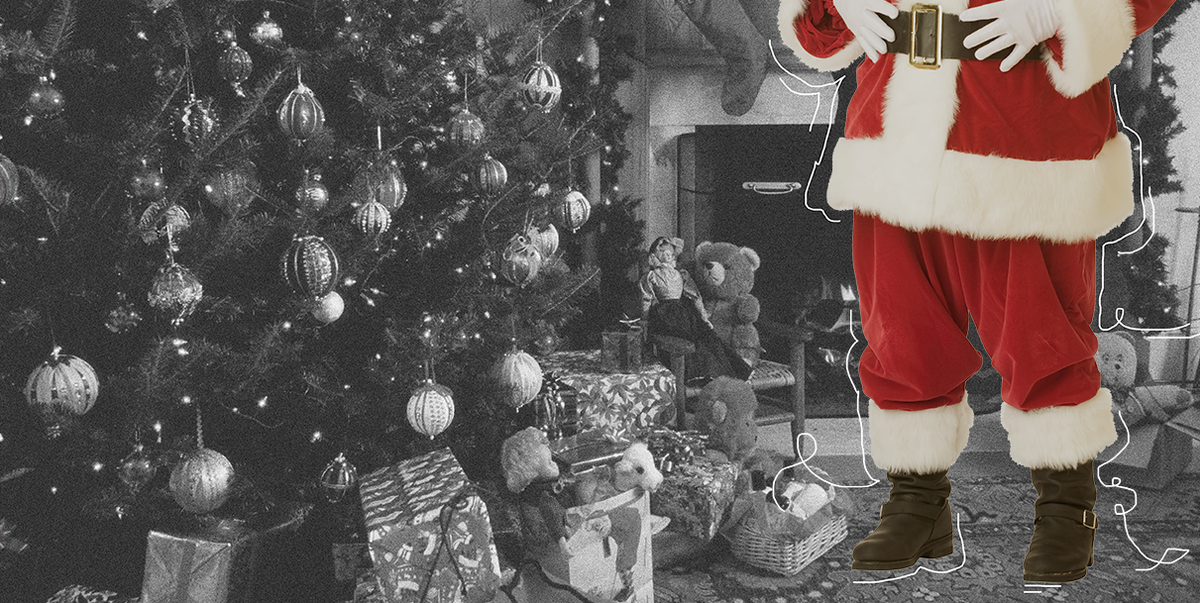
Every December, parents face a familiar holiday challenge: how do you keep the Santa magic alive without installing a chimney, borrowing eight reindeer, or explaining why the cookie plate looks suspiciously untouched? Enter the Capture the Magic Santa app, a Christmas photo-editing tool designed to make it look as though Santa Claus stopped by your home while everyone was asleep.
Instead of acting like a real security camera, the app helps users create a festive photo composite. You start with a picture of your living room, Christmas tree, fireplace, hallway, or cookie station. Then you add a Santa image, adjust his size and position, match the lighting, and save the final result. The finished image can look like proof that the Big Guy in Red visited between midnight and the moment someone discovered wrapping paper in the closet.
The app is commonly known as Capture the Magic, although current store listings may identify it as Catch Santa Claus in My House!. Its tools include Santa poses, resizing, flipping, brightness adjustments, text, frames, filters, and holiday-themed stickers. The app also includes other seasonal characters and decorations, making it more of a holiday photo workshop than a simple Santa sticker pack.
For families that enjoy playful Christmas traditions, the app can turn an ordinary December photo into a memory that feels surprisingly cinematic. It is part holiday magic, part digital scrapbook, and part proof that Santa apparently has excellent posture while carrying a sack of presents.
What Is the Capture the Magic Santa App?
The Capture the Magic Santa app is a mobile photo-editing app that lets users place a realistic-looking Santa Claus image into a photo of their own home. It is designed for parents, grandparents, caregivers, and anyone who wants to create a little Christmas wonder without needing a Hollywood visual-effects team.
The basic concept is simple: take a picture first, then add Santa afterward. Users can select a pose that fits the scene, move Santa into place, resize him so he does not look like a seven-foot-tall giant standing on a coffee table, and adjust brightness until the image blends naturally with the room. Good Housekeeping described the experience as creating a security-camera-style glimpse of Santa in the act, while also noting that users can use poses, overlays, blur, and brightness controls to make the finished image feel more convincing.
That distinction matters. The app does not detect Santa in real time, and it does not record a midnight visitor. It is a creative photo-compositing tool. Think of it as holiday storytelling with pixels, cookies, and just enough plausible deniability to keep Christmas morning interesting.
How the Santa Photo App Works
1. Take a Strong Background Photo
The best Santa photos begin before Santa enters the frame. Take a clear photo of the area where the story will happen. A Christmas tree, fireplace, cookie plate, stack of gifts, or glowing hallway can all work beautifully. Try to take the picture at the same time of day you want the final image to represent.
For example, if you want Santa to appear during the middle of the night, photograph the room with the tree lights on and the overhead lights dimmed. If the room is bright enough to perform surgery, but Santa looks like he arrived during a blizzard at midnight, the effect may be less “North Pole magic” and more “mysterious mall promotion.”
2. Choose a Santa Pose That Makes Sense
Once the background photo is ready, choose a Santa pose that matches the setting. A Santa holding a gift works nicely beside the tree. A Santa bending down may fit near a cookie plate. A standing Santa can work near a fireplace or a hallway entrance.
The trick is to think like a movie director. Ask yourself: What would Santa realistically be doing in this part of the room? He probably would not be balancing on the arm of a sofa. He probably would not be staring directly at the camera with the expression of someone who just discovered the Wi-Fi password. Choose the pose that supports the story.
3. Resize and Position Santa Carefully
Scale is where holiday magic either comes alive or falls flat faster than a cheap inflatable snowman during a windstorm. Santa should look proportional to the furniture, tree, doorway, and presents around him.
If Santa is standing beside a six-foot tree, compare his height with nearby objects. If he is near a chair, make sure his feet line up naturally with the floor. Avoid placing him too high or too low. A floating Santa may delight toddlers, but it will raise questions from older children who have already started their careers in household forensic science.
4. Match Lighting, Brightness, and Direction
Lighting is the secret ingredient that separates a charming Santa photo from one that looks like a holiday meme created at 2:00 a.m. The Capture the Magic app includes brightness controls and photo adjustments intended to help the inserted character match the original background image. Its store listing also describes editing tools such as filters, cropping, focus, overlays, contrast, saturation, text, and the ability to use multiple stickers in one photo.
Look at where the light is coming from in your room. If the Christmas tree lights glow from the left, Santa should not appear brightly lit from the right. If the fireplace creates a warm orange glow, adjust the photo until Santa does not look like he wandered in from a fluorescent office building.
Professional compositing tools rely heavily on matching color, lighting, shadows, and tone between a subject and its background. That same principle applies here, even when the subject happens to be a cheerful man with a beard, boots, and a global cookie-delivery operation.
5. Add Details Without Overdoing It
A little holiday detail can make a Santa picture feel special. Add a short caption such as “Santa stopped by!” or “Cookie inspection complete.” Place a reindeer sticker outside a window, add a snowy overlay, or include a small elf hat near the presents.
Still, restraint is your friend. A few thoughtful details look magical. Twelve reindeer, four snowmen, a glitter border, seven candy canes, and a dancing gingerbread man may create a scene that looks less like Christmas Eve and more like a department store window after a caffeine emergency.
Why Families Love Digital Santa Photos
The appeal of a Santa photo app is not really about fooling anyone forever. It is about creating a moment of wonder. Young children often enjoy traditions that make the holiday season feel personal: an elf arriving with a note, cookies disappearing overnight, reindeer food on the lawn, or a photo that seems to show Santa placing a gift under their own tree.
Holiday traditions do not need to be elaborate to be memorable. Parents often feel pressure to build a picture-perfect Christmas experience, but the best traditions are usually the ones that fit a family’s real routines, energy, and sense of humor. Parents magazine notes that holiday activities work best when families focus on the traditions they actually want to create rather than trying to perform a complicated version of the season for everyone else.
That is exactly why a Santa photo app can be useful. It offers a quick creative activity that does not require baking fifty cookies, sewing matching pajamas, or convincing a relative to wear a beard in ninety-degree weather. One photo can become a tiny family legend.
Creative Santa Photo Ideas to Try This Christmas
Santa Checking the Cookie Plate
Take a photo of a plate with cookies, carrots, and a glass of milk. Add Santa crouching nearby as if he has paused for a snack before heading back to the sleigh. Leave behind a few crumbs or one half-eaten cookie the next morning for bonus storytelling points.
Santa Leaving Gifts Under the Tree
Photograph the tree after the gifts are arranged but before anyone wakes up. Add Santa holding a present or standing beside the pile. Keep the scene simple so the gifts remain the star of the photo.
Santa Waving From the Window
Use a photo of a window facing a dark yard or snowy-looking outdoor space. Add a smaller Santa outside, perhaps near the edge of the frame. This works especially well because a slightly distant Santa does not need as much detailed editing to look believable.
Santa Visiting the Fireplace
A fireplace scene is classic for a reason. Add Santa standing near the mantel, checking stockings, or preparing to leave. Even homes without a fireplace can create a fun version near a decorative hearth, a bookshelf, or the place where the stockings are hung with optimism and removable adhesive strips.
Santa and the Reindeer Parking Situation
Take a photo of the front yard, driveway, balcony, or backyard. Add Santa or a reindeer near the edge of the image. A simple caption such as “Reindeer parking only” can turn the picture into a funny holiday keepsake for older kids and adults.
How to Make Santa Photos Look More Realistic
Realism is not about perfection. It is about visual consistency. Your photo should tell one believable story from beginning to end.
- Use a background photo with natural room lighting.
- Match Santa’s size to furniture and doorways.
- Choose a pose that fits the available space.
- Keep Santa’s feet near the floor instead of floating above it.
- Adjust brightness before adding decorative extras.
- Use gentle blur when the background is slightly out of focus.
- Keep captions short so the image still feels like a photograph.
- Do not crowd the frame with too many stickers or overlays.
Another helpful move is to use an imperfect photo. A slightly grainy nighttime image can make the final Santa picture feel more like a quick security-camera snapshot than a polished advertisement. Santa is busy on Christmas Eve. Nobody expects him to pause for a fashion shoot beside the poinsettias.
Privacy Tips Before Sharing Santa Photos Online
A Santa photo may be playful, but it can still reveal personal details about your family. A picture taken inside your home could show a child’s name, school artwork, address number, street view, bedroom layout, or other information you may not want to share publicly.
Before posting, look carefully at the full image. Crop out house numbers, mail, school logos, family schedules, medical information, and anything that identifies where your child spends time. Consumer Reports advises parents to think carefully about photos that reveal location clues, while Common Sense Media recommends using privacy settings, limiting the audience, and considering closed sharing options for family images.
It is also smart to review app permissions and privacy information before uploading photos. The Federal Trade Commission explains that COPPA gives parents control over the collection of personal information from children under 13 by covered online services and apps.
For sharing with relatives, consider a private family album, direct message, or password-protected photo-sharing option rather than a fully public social-media post. Google Photos, for example, offers shared albums and controls that can be changed later, which can be useful for sending holiday memories to grandparents and relatives without broadcasting them to everyone online.
Keep the Magic Fun, Not Stressful
The goal of a Santa app should be joy, not pressure. You do not need to create a flawless digital masterpiece. Children are often more interested in the story than in whether Santa’s boots perfectly match the rug’s shadow angle.
It is also important to follow your child’s comfort level. Some children love Santa traditions. Others find Santa visits, holiday crowds, or surprise photos unsettling. Parenting guidance from child mental-health experts emphasizes respecting a child’s feelings, preparing them for holiday activities, and avoiding pressure when they are clearly uncomfortable.
Let the Santa photo be an invitation to play, imagine, and talk together. For younger children, it may become a delightful Christmas mystery. For older children, it can evolve into a funny family tradition where everyone collaborates on the most convincing Santa scene of the year.
Experiences That Make the Capture the Magic Santa App Even More Memorable
The most meaningful part of a Capture the Magic Santa photo is usually what happens after it is made. The image itself may take five minutes, but the reaction can become part of a family story told for years. Imagine a child waking up on Christmas morning, racing toward the tree, and finding a photo on a phone or tablet that appears to show Santa holding a present in the exact room where the family is standing. Suddenly, the living room becomes a tiny stage for a much bigger imagination.
One fun experience is to create a “Santa evidence trail.” Start with the edited photo, then pair it with a few simple physical details: a cookie with one bite missing, a carrot nub left on the plate, a note that says “Thank you for the snack,” or a little sprinkling of flour that looks like snowy boot prints. Keep it light and simple. The best part is not whether every clue is perfect; it is the shared excitement of looking for them together.
Another memorable option is to make the photo part of a Christmas Eve routine. After children are asleep, take a picture of the tree, create the Santa composite, and save it in a folder labeled “North Pole Security Camera.” In the morning, let the family discover the image together. Older siblings can help present the “evidence,” while adults maintain a straight face for as long as humanly possible.
For families with relatives far away, Santa photos can create connection. A grandparent who cannot visit in person may receive the image along with a message such as, “Santa stopped here after all!” Private family albums and direct sharing options can make it easier to send the memory without turning it into a public post. This can be especially sweet for military families, grandparents in another state, or loved ones who are unable to travel during the holidays.
The app can also become a creative activity for older kids who already understand the holiday story. Instead of treating the photo as proof, turn it into a mini design challenge. Let them choose the background, select the Santa pose, adjust the brightness, and write a funny caption. They may create Santa reading the family dog’s wish list, Santa inspecting the cookie quality, or Santa trying to figure out why the smart speaker keeps playing the same holiday song.
Some families may prefer to make a yearly Santa-photo tradition. Save one image from each Christmas and place them in a digital album or printed scrapbook. Over time, the photos show more than Santa. They show how the tree decorations changed, how pets wandered into every frame, how children grew taller, and how one particular couch somehow survived another decade of holiday movie marathons.
There is also room for gentle humor. Create a photo of Santa looking at a note that says, “Please avoid stepping on the LEGO bricks.” Add him near a plate of cookies with a caption reading, “Quality control complete.” Make a scene where a reindeer is apparently parked in the backyard. Christmas memories do not need to be serious to be special. Often, the silly details are the ones people remember most clearly.
Most importantly, let the experience fit your family. A single edited photo may be enough. A full Santa mystery with notes, crumbs, and reindeer clues may be more your style. Either way, the Capture the Magic Santa app works best when it supports a warm, low-pressure tradition that gives everyone something to smile about long after the decorations are packed away.
Conclusion
The Capture the Magic Santa app gives families a playful way to create Christmas memories with a little digital sparkle. By combining a real photo of your home with Santa poses, brightness adjustments, filters, captions, and holiday decorations, you can make a festive scene that feels personal to your family.
Use the app as a creative storytelling tool rather than a perfection contest. Take a well-lit background photo, keep the composition believable, protect your family’s privacy before sharing, and focus on the reaction around the image. Whether Santa appears by the tree, near the cookies, or waving from the window, the real magic is the laughter and imagination the photo creates.
Note: This article discusses a photo-compositing holiday app intended for family entertainment. Review app permissions, privacy settings, and your child’s comfort level before creating or sharing images.