If Yelp once felt like your trusty restaurant wingman but now feels more like a digital attic full of old reviews, outdated bookmarks, and opinions you wrote after one suspiciously salty bowl of ramen, you are not alone. Plenty of people eventually decide it is time to close a Yelp account. Some want a privacy reset. Some want to clean up old online profiles. Some simply realized they have not opened Yelp since that one dramatic brunch dispute in 2022.
The good news is that closing a Yelp account is not especially hard. The slightly less good news is that Yelp does not put a giant red Delete Me Forever button in plain sight. Instead, you submit an account closure request, confirm it by email, and then finalize the process. If you are searching for how to close a Yelp account, how to delete a Yelp account, or how to remove your Yelp profile, this guide walks you through the real process in plain English.
Below, you will learn exactly how to close a personal Yelp account, what happens to your reviews and photos, what to do if you use Google or Apple to sign in, and why business owners need to be especially careful before clicking anything. Let us do this with minimal drama and maximum clarity.
What Closing a Yelp Account Actually Means
Before you start, it helps to understand the vocabulary. Many users search for “delete Yelp account,” but Yelp typically refers to the process as closing your account. In practice, that means you submit a request to shut down the account and remove your public consumer contributions tied to it.
For a regular user account, closing your Yelp account generally removes the content you posted as a consumer, including reviews, photos, and other contributions associated with that profile. It is also considered irreversible. In other words, this is not the kind of button you tap casually while half-awake and expect to undo after coffee.
That said, closing the account is not always identical to a full privacy wipe. If your goal is not just to stop using Yelp but to request deletion of additional non-public personal data, you may need to make a separate data-related request as well. That distinction matters if you are focused on privacy, not just platform cleanup.
Why People Decide to Close a Yelp Account
There is no single reason people leave Yelp. Some are doing a broader digital declutter and want fewer accounts floating around online. Others no longer trust review platforms, or they simply do not want their name attached to years of restaurant hot takes. A few want to start fresh because their old profile no longer reflects who they are now, which is fair. Nobody wants to be judged forever by a one-star review of a smoothie place from college.
Another common reason is privacy. A Yelp profile can contain reviews, photos, bookmarks, profile details, and social signals that feel harmless in the moment but less charming years later. If you now prefer a smaller online footprint, closing your Yelp account can be part of that cleanup.
Then there are business-related misunderstandings. Some users assume that closing an account will erase a claimed business listing or make a business vanish from Yelp. That is not how it works. If you are a business owner, keep reading, because this is where many people take a wrong turn.
Before You Close Your Yelp Account
Take a few minutes to do a quick pre-flight check before you close anything. This makes the process smoother and helps you avoid that classic internet regret of “Wait, where did all my stuff go?”
1. Review your Yelp content
Look through your reviews, photos, tips, bookmarks, and collections. If anything matters to you, save it elsewhere first. Once your account is closed, you should assume you are not getting that content back.
2. Remove anything you want gone immediately
If there are specific reviews or photos you want to delete before closing the account, do that first. This gives you more control over what disappears and when, especially if you only want to remove certain posts instead of your entire profile.
3. Check your login method
Do you log in directly with email and password, or do you use Google, Apple, or another sign-in method? This matters because your confirmation email may go to the email address attached to that login. If you do not know where the confirmation is being sent, the process can feel like a scavenger hunt nobody asked for.
4. Remove saved payment information if needed
If you have stored payment details on your Yelp account, remove those manually before closure. It is one of those housekeeping steps that feels boring right up until it feels very important.
5. Understand whether you have a personal or business account
A personal Yelp account and a Yelp business account are not the same thing. Closing a personal account is different from unclaiming or closing a business owner account. If you claimed a business page, do not assume the listing itself disappears when you close your login.
How to Close a Personal Yelp Account
Here is the straightforward version of how to close a Yelp account.
Step 1: Sign in to your Yelp account in a web browser
Start on Yelp’s website and log in to the account you want to close. Using a browser is the easiest route because Yelp’s closure flow centers around an account closure request page and an email confirmation step.
Step 2: Go to the account closure request page
Once signed in, open Yelp’s account closure request form. Yelp’s support flow typically routes users through its help or privacy materials to the proper closure page. If you are expecting to find the option buried under profile settings, you may be disappointed. Yelp prefers a request-and-confirm workflow instead of a simple toggle.
Step 3: Enter a reason and submit the request
Yelp may ask why you want to close the account. You do not need to write a memoir here. A brief note is usually enough. Think of it as a formality, not a breakup letter.
Step 4: Check your email for the confirmation message
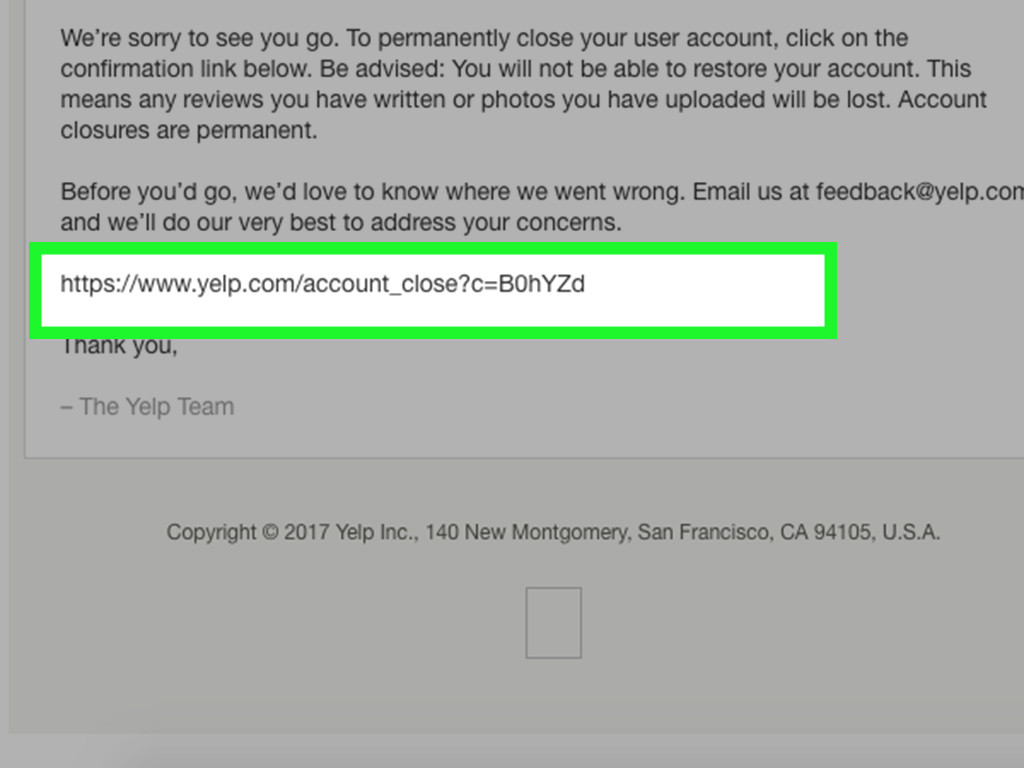
After submitting the request, Yelp sends a confirmation email. Open it and follow the instructions. If you signed up using Google, the confirmation may go to the email address tied to your Google login. If you used another sign-in method, check the email associated with that service.
Step 5: Confirm and close the account
Click the confirmation link and finalize the closure. Once completed, your Yelp account should be closed. This step matters because submitting the request without confirming the email can leave the process unfinished.
What Happens After You Close Your Yelp Account
Once your Yelp account closure is complete, your consumer-posted content is removed from your active public profile. That usually includes reviews, photos, and similar contributions. Your profile itself is no longer active, and Yelp treats the closure as permanent.
However, permanent account closure does not always mean every scrap of information disappears instantly or universally. Yelp’s privacy materials explain that it may retain some information for legal, security, fraud-prevention, backup, or compliance reasons. So if your goal is a broader personal data deletion, not just profile closure, consider making a separate data rights request too.
That distinction is important because users often imagine account closure as a giant digital shredder. In reality, it is more like shutting the front door, removing public-facing materials, and then handling deeper data retention through privacy channels if necessary.
How to Request Broader Data Deletion
If you want Yelp to delete non-public information associated with your account in addition to closing it, submit a separate privacy or data rights request. This is the move for users who care about personal data retention, not just public reviews disappearing from view.
In plain terms, closing your Yelp account handles the account itself. A separate deletion request addresses additional personal data that may still be retained under Yelp’s privacy policy. If privacy is your main goal, do both. It is the digital equivalent of locking the door and checking the windows.
If You Use Google or Apple to Sign In
If your Yelp account is connected to Google or Apple, it is smart to review those third-party connections after closing the account.
For Google users
Open your Google Account’s third-party connections area and review apps or services linked to your account. You can remove access or stop using Sign in with Google for apps you no longer use. This is a good extra cleanup step if you want fewer connected services hanging off your Google account like ornaments from old internet decisions.
For Apple users
If you used Sign in with Apple, check your Apple Account settings and review the list of apps using that login. You can stop using Sign in with Apple for a specific app. If you used Hide My Email, also make sure you can still receive forwarded messages long enough to complete account closure before turning anything off.
Even if Yelp account closure succeeds on its own, reviewing connected app access is a smart habit. It keeps your digital footprint cleaner and reduces the number of forgotten services tied to your main identity accounts.
How Closing a Yelp Business Account Is Different
This part matters. If you are a business owner, closing a Yelp business account does not usually remove the business page from Yelp. Yelp generally keeps business pages live as part of its platform, even if the owner no longer wants to manage the account.
If you no longer want to manage a claimed business page, you may need to unclaim the page rather than assume the page will disappear. If your business has actually closed, Yelp has separate options for marking the business closed or temporarily closed. Those are different actions from closing the owner account itself.
Also, if you are a current advertiser, resolve any paid products or advertising arrangements first. Otherwise, account closure can get more complicated than it needs to be. Translation: do not slam the door while the billing tab is still inside the house.
Common Problems When Trying to Close a Yelp Account
You cannot find the confirmation email
Check spam, promotions, and the inbox tied to your sign-in method. If you used Google or another linked login years ago, the message may be going somewhere you no longer check regularly.
You are signed into the wrong Yelp account
This happens more often than people admit. If you have multiple email addresses, verify that the profile you are viewing is the one you actually want to close before submitting the request.
You only wanted to remove a review, not delete the whole account
If your real goal is to remove one review or photo, delete that individual content instead of closing the entire account. Closing the account is the nuclear option. Effective, yes. Subtle, no.
You are trying to remove a business listing
Closing a business owner account will not normally erase the Yelp business page. Use Yelp’s business management options to mark a business closed, update ownership, or unclaim the page as appropriate.
Should You Close Your Yelp Account or Just Stop Using It?
If you rarely use Yelp and simply do not care anymore, you could just stop logging in. But if you want to reduce your online footprint, remove old reviews, disconnect sign-in permissions, or tidy up stale accounts, then actual Yelp account deletion makes more sense.
Think of it this way: abandoning an account is like shoving clutter into a closet. Closing the account is like finally taking the closet door off its hinges and dealing with the mess. One is easier today. The other feels better next month.
Final Thoughts on Yelp Account Deletion
If you have been wondering how to close a Yelp account, the process is simple once you know where Yelp hides the controls. Log in through a browser, submit the closure request, confirm it by email, and finalize the account closure. Before you do, save anything you want to keep, remove any saved payment information, and decide whether you also want to file a separate data deletion request.
The biggest takeaway is this: closing a personal Yelp account is a true exit, not a casual pause. For regular users, that can be a welcome clean break. For business owners, though, it is not the same as removing a business page from Yelp. Know which account you have, know what result you want, and your digital cleanup will go a lot more smoothly.
Experiences People Commonly Have When Closing a Yelp Account
Many people who go through Yelp account deletion describe the same emotional arc. First comes mild annoyance: they decide to clean up old accounts and assume Yelp will have a simple delete button in settings. Then comes the treasure hunt. They poke around profile menus, account tabs, and notification settings before realizing the real path runs through Yelp’s help and closure request flow. It is not impossible, but it is not exactly rolled out on a velvet carpet either.
Another very common experience is surprise at how much old content is sitting in the account. People log in planning to close the profile in two minutes, then discover a time capsule of restaurant reviews, blurry food photos, bookmarks, compliments, and opinions from a former version of themselves. Suddenly the task turns into a mini life review. “Did I really write 300 words about a sandwich in 2018?” Yes. Yes, you did.
Privacy-minded users often say the closure itself is only half the job. After sending the request, they start thinking bigger: What email was tied to this account? Was it connected to Google? Did Apple Hide My Email forward anything important? Should they also remove app permissions and make a separate data request? Closing a Yelp account can become the first domino in a larger digital privacy cleanup, which is actually not a bad outcome.
Business owners usually have the most confusing experience. Many expect that if they close the business account, the business page will disappear too. Then they learn the listing can remain on Yelp even after the owner account is closed or unclaimed. That can feel frustrating at first, especially for owners who want a clean online exit. Once they understand the difference between a business page, a claimed listing, a temporary closure, and an owner account, the process makes more sense, but there is often an initial “Wait, that is not what I meant” moment.
There is also the issue of second thoughts. Some users close Yelp because they are tired of managing online accounts, then realize they still relied on Yelp for finding local plumbers, checking hours, or scanning quick reviews before choosing a new place to eat. Others feel relieved immediately because an old account is finally gone. In real life, the experience tends to land in one of those two buckets: either “I should have done this sooner” or “Well, I guess I need a new way to judge tacos now.”
The most practical experience people report is that account deletion feels smoother when they prepare first. The users who save content they care about, check the login email, and understand the difference between account closure and data deletion usually finish the process with far less stress. The ones who rush in blindly are the ones more likely to spend the next hour chasing confirmation emails, wondering where their review history went, or realizing too late that they closed the wrong account. In other words, a little prep turns Yelp account deletion from a headache into a tidy, satisfying digital cleanup task.