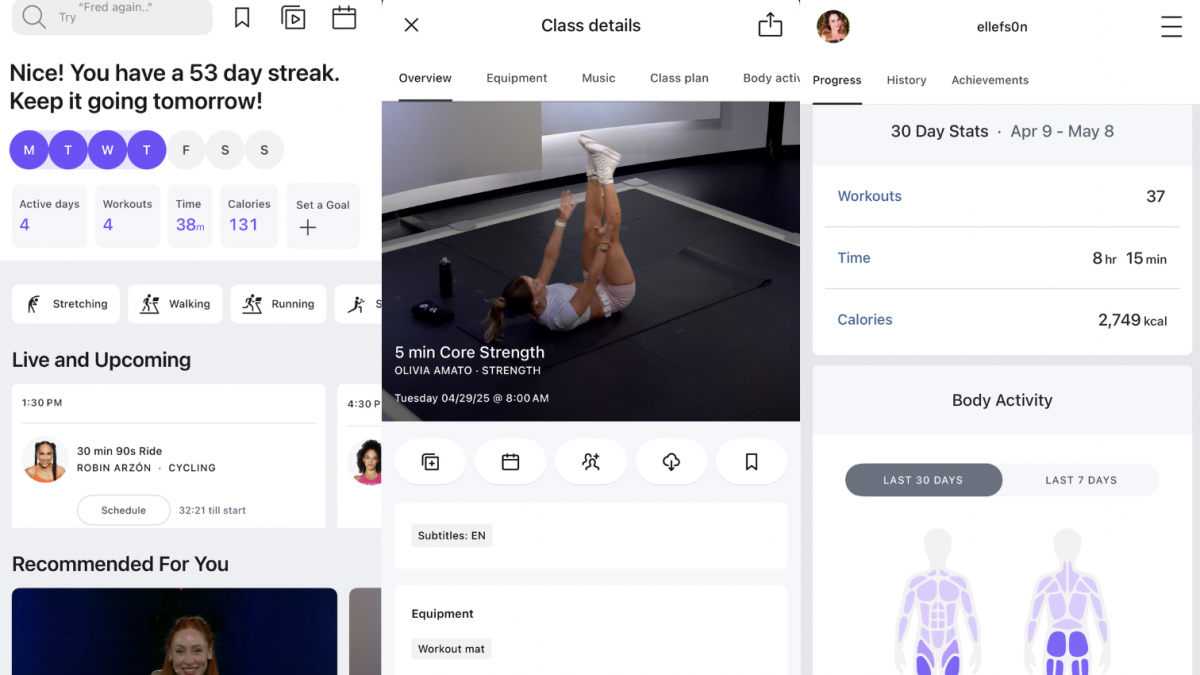
When people hear “Peloton,” many still picture a sleek exercise bike, a glowing leaderboard, and someone in a painfully stylish workout outfit climbing an imaginary hill in their living room. Fair enough. Peloton built its reputation on connected fitness equipment. But the Peloton App has grown into something much bigger than “the thing you use if you bought the bike.” In fact, for many people, the app may be the smartest way to enjoy Peloton without turning the guest room into a cycling studio.
This Peloton App review looks at the experience from the perspective of someone who does not own a Peloton Bike, Tread, or Row. The big question is simple: can the Peloton App stand on its own as a home workout app? The short answer is yes, with a few important caveats. If you like polished classes, energetic instructors, strong music, flexible workouts, and the feeling that someone is cheering for you even when your plank resembles a collapsing card table, the Peloton App is absolutely worth considering.
It is not perfect. Some features are better with equipment, some metrics are limited without connected devices, and serious strength athletes may want more detailed progressive overload tools. Still, as a streaming fitness app for strength training, yoga, Pilates, stretching, meditation, walking, running, cycling, rowing, and general cardio, Peloton offers one of the most complete digital fitness experiences available.
What Is the Peloton App?
The Peloton App is a subscription-based fitness platform that gives users access to live and on-demand workout classes without requiring Peloton-branded equipment. You can use it on a phone, tablet, TV, web browser, or compatible streaming device, depending on your setup. The app includes thousands of classes across categories such as strength, yoga, Pilates, cycling, running, rowing, walking, meditation, stretching, HIIT, barre, and outdoor audio workouts.
The appeal is convenience. You can do a 10-minute core workout before work, a 30-minute full-body strength class at lunch, a 45-minute treadmill run at the gym, or a 5-minute stretch when your lower back files a formal complaint. Peloton classes range from beginner-friendly sessions to challenging workouts that will make you question every life choice that led to “just one more set.”
Unlike random workout videos scattered across the internet, the Peloton App feels organized, searchable, and intentionally built. You can filter by class type, length, instructor, difficulty, music genre, body focus, and equipment. That makes it easy to find something that fits your schedule and energy level, whether you are feeling like “beast mode” or “gentle mobility because I slept like a pretzel.”
Peloton App Pricing and Membership Tiers
Peloton currently separates its digital app experience into several membership options. For people without Peloton equipment, the key tiers are generally Peloton App One, Peloton App+, and Peloton Strength+. App One is the lower-cost entry point and is aimed at users who want strength, yoga, HIIT, outdoor running, meditation, stretching, Pilates, walking, and general app content. It also includes a limited number of equipment-based cardio classes per month.
Peloton App+ is the better fit if you want unlimited access to Peloton’s cardio equipment classes using any compatible exercise bike, treadmill, or rower. This matters if you plan to use the app at a gym or with a non-Peloton bike at home. App+ is also the more complete choice for users who want the closest possible Peloton experience without buying Peloton hardware.
Peloton’s All-Access Membership is different. That membership is designed for Peloton equipment owners and includes full access on Peloton Bike, Bike+, Tread, Tread+, Row, or Guide hardware. If you do not own Peloton equipment, you generally do not need All-Access. That is one of the biggest reasons the app can be such a strong value: you can get the coaching, class library, music, and motivation without the large hardware purchase.
As always, check current pricing before signing up. Fitness app prices change more often than people say “new year, new me” in January.
What You Get Without a Peloton Bike
Strength Training
Strength training may be the Peloton App’s most underrated feature. The app includes bodyweight sessions, dumbbell workouts, core classes, lower-body classes, upper-body classes, full-body strength, beginner strength, advanced strength, and structured programs. You can train with minimal equipment, although a mat and a few sets of dumbbells will unlock much more variety.
The instruction quality is strong. Coaches explain movement patterns clearly, offer modifications, and keep the energy high without turning every class into a boot camp audition. Beginners can start with short foundational classes, while more experienced users can stack multiple strength sessions or follow programs that create a more complete training week.
Yoga, Pilates, Barre, and Mobility
The Peloton App is also useful for low-impact training. Yoga and Pilates classes range from gentle recovery sessions to challenging flows. Stretching and mobility classes are especially valuable because they are short, practical, and easy to add after a run, ride, or strength workout. These classes make the app more than a calorie-burning machine. They help round out a routine, which is important if your body occasionally makes sound effects when you stand up.
Walking, Running, and Outdoor Workouts
Peloton’s outdoor audio classes are excellent for people who walk or run outside. Instead of staring at a screen, you can listen to coaching, music, pacing cues, and encouragement through headphones. These classes are a good fit for beginners who want structure and for experienced runners who want variety without building every workout from scratch.
If you use a treadmill at the gym, App+ gives you access to more treadmill-based classes. You do not need the Peloton Tread to follow along, although you may need to manually adjust speed and incline based on instructor cues.
Cycling and Rowing on Non-Peloton Equipment
This is where the app gets especially interesting. You can use Peloton cycling classes on a non-Peloton stationary bike. You will not get the exact same integrated experience as a Peloton Bike, but you can still follow cadence cues, resistance guidance, music, and coaching. Some users add a cadence sensor to improve the experience. For rowing and treadmill classes, compatibility with third-party equipment can vary depending on Bluetooth and device support.
Will it feel identical to owning Peloton hardware? No. But can you get a sweaty, motivating, studio-style workout on a regular exercise bike? Absolutely. Your bike may not have a giant touchscreen, but your legs will still know what happened.
User Experience: Easy to Use, Easy to Stick With
The Peloton App succeeds because it reduces friction. Opening the app does not feel like walking into a spreadsheet wearing sneakers. Classes are easy to browse, filters are useful, and the interface makes it simple to choose a workout based on how much time you have. Five minutes? Stretch. Ten minutes? Core. Twenty minutes? Upper body. Forty-five minutes? Full workout. Two minutes? Maybe just lie on the mat and call it “breathwork.”
Features like stacking, bookmarking, scheduling, and workout history help users build consistency. Stacking classes is particularly useful. You can combine a 20-minute ride, 10-minute arms class, and 5-minute cooldown stretch into one planned session. This makes Peloton feel more flexible than a traditional single-class app.
The app also tracks completed workouts, streaks, milestones, and personal activity. If you pair a compatible smartwatch or heart rate monitor, you can see more useful metrics. Apple Watch integration is especially attractive for iPhone users, while Wear OS support helps Android users track workouts more easily.
The Instructors Are the Secret Sauce
Peloton’s biggest advantage is not the app design. It is the instructors. The best Peloton coaches make a workout feel like a live class, motivational podcast, dance party, and therapy-adjacent pep talk rolled into one sweaty package. They remember that fitness is emotional. Some days you need discipline. Some days you need encouragement. Some days you need an instructor to say, “You can do hard things,” while you bargain with a dumbbell.
The instructor variety also matters. Some coaches are calm and technical. Others are loud, funny, intense, musical, spiritual, competitive, or wonderfully dramatic. This helps users find personalities that match their mood. A great fitness app does not just give you workouts; it gives you reasons to come back. Peloton understands that motivation is not one-size-fits-all.
Music and Class Variety
Music is another major Peloton strength. Classes often feature recognizable artists, themed playlists, genre-based sessions, and artist collections. That makes workouts feel less generic. Instead of exercising to anonymous background beats that sound like they were composed by a caffeinated printer, you get music that can genuinely change the mood of a session.
The class library is large enough that boredom is rarely a problem. You can choose a 90s ride, a hip-hop strength class, a pop walk, a calming meditation, a Broadway run, or a classic rock stretch. This variety is great for people who struggle with workout consistency because repetition gets dull. Peloton’s content machine keeps things fresh.
Pros of the Peloton App
1. No Peloton Equipment Required
The app’s biggest benefit is that you can use it without buying expensive hardware. A mat, dumbbells, and a phone or TV are enough for many classes.
2. Excellent Instructor Quality
Peloton instructors are polished, energetic, and memorable. Their coaching helps the app feel more personal than a basic video library.
3. Wide Workout Variety
Strength, yoga, Pilates, cycling, running, rowing, walking, meditation, stretching, and HIIT all live in one place. That makes it easier to build a balanced routine.
4. Great for Short Workouts
The app is packed with 5-, 10-, 15-, and 20-minute classes, which makes it ideal for busy schedules.
5. Strong Music Experience
Themed playlists and artist-based classes make Peloton more fun than many workout apps.
Cons of the Peloton App
1. Best Cardio Features Cost More
If you want unlimited cycling, treadmill, or rowing classes on non-Peloton equipment, App+ is usually the better fit. App One may feel limiting for cardio-focused users.
2. Metrics Are Limited Without Hardware
You can track workouts and connect wearables, but the full Peloton metric experience is still strongest on Peloton equipment.
3. Strength Programming Could Be More Detailed
Peloton strength classes are fun and effective, but serious lifters may want deeper tracking for weight progression, sets, reps, and long-term programming.
4. Some Classes Need Equipment
Many strength classes use dumbbells, and cardio equipment classes obviously require a bike, treadmill, or rower. You can still do plenty without gear, but equipment expands the library.
Who Should Use the Peloton App?
The Peloton App is best for people who want guided workouts, upbeat coaching, and lots of class choices. It is especially strong for busy professionals, parents, beginners who want structure, former studio-class fans, runners who want audio coaching, gym members who want treadmill or bike classes, and anyone who needs motivation from real instructors rather than silent workout charts.
It is also a smart option if you are curious about Peloton hardware but not ready to buy. Trying the app first gives you a low-risk way to see whether you like the instructors, class format, music, and overall vibe.
Who Should Skip It?
Skip the Peloton App if you want fully customized personal training, detailed strength analytics, powerlifting-style programming, or a completely free workout solution. Nike Training Club, YouTube, and other free platforms may be enough if budget is your main concern. Apple users who want deep Apple Watch integration and family sharing may also compare Peloton with Apple Fitness+.
That said, Peloton has a stronger live-class culture and a more distinctive instructor community than many competitors. If you enjoy personality-driven coaching, Peloton is hard to beat.
Peloton App vs. Apple Fitness+ and Free Workout Apps
Apple Fitness+ is often cheaper and works beautifully inside the Apple ecosystem. It offers polished workouts, strong Apple Watch integration, and family sharing. Nike Training Club is attractive because it is free and includes a good library of strength, mobility, and conditioning workouts. YouTube has endless fitness content, but quality and structure vary wildly; one video may be excellent, while the next may be a jump-squat festival filmed beside a laundry basket.
Peloton’s advantage is its combination of production quality, instructor charisma, live and on-demand classes, music, community features, and workout variety. It feels less like a folder of exercise videos and more like a fitness studio you can carry in your pocket.
Real-World Experience: What It Feels Like to Use the Peloton App Without the Bike
Using the Peloton App without Peloton equipment feels surprisingly complete. The first thing most users notice is how quickly they can find something doable. You do not have to commit to a 60-minute monster workout to feel productive. A 10-minute arms class, a 15-minute walk, or a 20-minute beginner strength session can still feel like a win. That matters because consistency usually grows from small wins, not heroic Monday plans that collapse by Wednesday.
The app is especially helpful on chaotic days. Imagine finishing work late, feeling tired, and knowing you should move but not wanting to think. Peloton solves the “what should I do?” problem. Open the app, filter by 20 minutes, choose strength or yoga, pick an instructor you like, and press play. There is a strange relief in letting someone else run the session. You only need to show up, follow instructions, and occasionally wonder why reverse lunges exist.
For home workouts, the best setup is simple: a yoga mat, two or three pairs of dumbbells, water, and a TV or tablet. A phone works, but strength and yoga classes are easier to follow on a larger screen. If you cast to a TV, the experience feels much closer to a studio class. You can see form demonstrations clearly, hear music better, and avoid squinting at a tiny screen while holding a plank.
The outdoor workouts are also a major bonus. Walking classes can make a normal neighborhood loop feel more purposeful. Running classes are useful for pacing and motivation, especially if you are trying to build endurance. The coaching gives structure without requiring you to stare at metrics every second. That makes the app feel less obsessive than some fitness trackers.
On a non-Peloton bike, the app experience is good but more manual. You follow cadence and resistance cues as best you can, but your resistance knob may not match Peloton’s numbers exactly. That sounds annoying, but it becomes intuitive after a few rides. You learn what “moderate,” “heavy,” and “very heavy” feel like on your own machine. The workout still works because effort matters more than matching a perfect number.
The community features are subtle but motivating. Milestones, streaks, badges, and instructor shout-out culture make workouts feel less lonely. Even when exercising alone, the app creates a sense that other people are moving with you. It is not the same as being in a packed studio, but it is close enough to help on days when motivation is hiding under the couch.
The biggest practical lesson is that Peloton works best when you build a routine around it. For example, use strength three days a week, yoga or stretching twice a week, and walking or cycling whenever you want low-pressure cardio. The app becomes more valuable when it is not just something you open randomly, but a flexible training companion. You do not need the bike. You need a plan, a little space, and the willingness to be lovingly bullied by enthusiastic instructors.
Final Verdict: Is the Peloton App Worth It Without Peloton Equipment?
Yes, the Peloton App is worth it even if you do not own a Peloton Bike, Tread, or Row. For users who want engaging coaching, excellent music, flexible class lengths, and a wide range of workouts, it delivers strong value. App One is a good choice for strength, yoga, Pilates, walking, meditation, stretching, and general fitness. App+ is better if you plan to use a bike, treadmill, or rower regularly.
The app is not a perfect replacement for personal training, and the deepest metric experience still belongs to Peloton hardware owners. But as a standalone fitness app, Peloton is polished, motivating, and genuinely useful. It can help beginners start, help busy people stay consistent, and help experienced exercisers add variety. Best of all, it proves you do not need a $2,000 bike to join the Peloton party. Sometimes all you need is a mat, a pair of dumbbells, and the courage to press play.