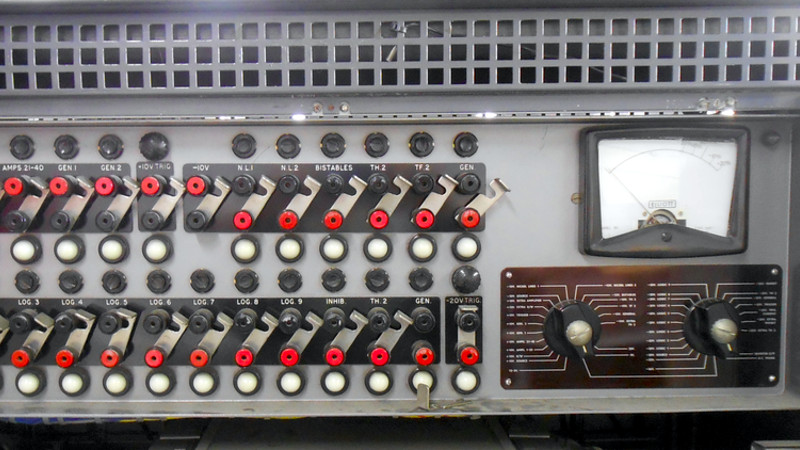
Vintage computers do not fail quietly. They do not politely display a modern error message that says, “Oops, something went wrong.” They click, hum, warm the room, blink like nervous spacecraft, and occasionally announce trouble with a pop dramatic enough to make every engineer in the building stop breathing for three seconds.
That is why the story of the vintage computer, the blown fuse, and the diode is more than a charming repair tale. It is a perfect little detective story about old hardware, patient troubleshooting, power supply repair, and the art of keeping computing history alive without accidentally turning it into expensive museum confetti.
At the center of the case is the Elliott 803B, a 1960s transistorized computer from an era when “portable computing” meant several strong people, a van, and a very optimistic definition of portable. This machine was not a beige desktop box. It was a cabinet-sized system with paper tape, magnetic-core memory, serious electrical appetite, and the kind of engineering that makes modern laptops look like nervous crackers.
A Loud Pop From The Past
The incident began with a familiar nightmare for anyone who maintains vintage electronics: the machine abruptly powered down after a loud pop. In modern consumer electronics, a sudden shutdown may mean a software crash, a weak battery, or a charger that has decided to retire early. In a historic computer, it can mean anything from a minor fuse failure to a serious fault in the power system.
The Elliott 803B was built in a period when computers were physical infrastructure. Its power supply was not a tiny black brick hiding under a desk. It was a cabinet, and inside that world lived transformers, fuses, rectifier diodes, smoothing capacitors, regulators, heavy wiring, and an early built-in uninterruptible power system. The computer used a battery-backed arrangement so short power dips would not immediately stop the system. In the 1960s, this mattered. Power disturbances were more common, and industrial users needed machines to survive brief interruptions.
In other words, the Elliott 803B had a kind of old-school UPS before “UPS” became the thing under your desk that beeps angrily during a storm.
Why A Blown Fuse Is A Clue, Not A Diagnosis
A blown fuse is often misunderstood. It is tempting to treat it as the problem itself: replace the fuse, switch the system back on, and hope the universe has forgiven you. That approach can work when the fuse opened during a harmless transient. But with vintage computer repair, a fuse is more like a witness at a crime scene. It tells you something happened; it does not always tell you who did it.
A fuse is designed to open the circuit when current rises beyond a safe limit. In the best case, it sacrifices itself so more valuable components do not have to. In the worst case, it keeps blowing because the real fault is still sitting downstream, smirking in silicon.
That distinction is critical. Replacing a fuse without finding the reason it blew is like putting a new bandage on a shoe because your foot hurts. The bandage may be innocent, but it is not the root cause.
The Suspects: Battery, Charger, Transformer, Capacitors, Diodes
The investigation started where good repair work usually starts: with the obvious, then the schematic. A small fuse had failed, but replacing it did not bring the machine back. A larger 40-amp fuse in series with the battery had also blown. That opened a big question: was too much current being drawn from the battery, or was the charger side pushing fault current where it did not belong?
This is where vintage hardware rewards patience. Instead of grabbing random parts and performing what technicians affectionately call “parts darts,” the repair process moved through the system logically. The computer-side regulator boards were checked for shorted transistors. Fuses on the monitoring panel were examined. Sections of the machine were isolated and checked for obvious shorts. No major fault appeared on the computer side, which was excellent news. Nobody wants to discover that the logic of a rare vintage computer has become a tiny charcoal sculpture.
Attention then shifted to the battery charger. There, another fuse had blown. When tested separately, the charger drew far more current than it should have. The transformer was checked and appeared healthy. Smoothing capacitors were checked for short circuits and did not seem to be the culprit. Then came the moment every repair detective loves: one rectifier diode measured as a short circuit.
Bingo. The diode was no longer behaving like a diode. It had become, electrically speaking, a suspiciously enthusiastic piece of wire.
What The Diode Was Doing In The First Place
A diode is one of the simplest and most important components in electronics. In plain English, it lets current flow more easily in one direction than the other. That one-way behavior makes diodes useful for rectification, reverse-polarity protection, voltage clamping, signal detection, and many other jobs.
In a battery charger or power supply, rectifier diodes are often used to convert alternating current from a transformer into direct current that can charge a battery or feed a DC system. When a rectifier diode fails short, it can create a heavy current path where one should not exist. The fuse then does exactly what it was hired to do: it opens the circuit and stops the current party before the guest list includes smoke, melted insulation, and regret.
The Repair Problem: The Part Was Old, Rare, And Awkward
Finding the failed diode was only half the battle. The original part was a vintage stud rectifier, listed as a 35-amp, 400-volt PIV Bradley DD716A. It was mounted in a physically awkward location at the bottom of a battery charger that weighed around 200 pounds. That is not a repair job; that is a wrestling match with paperwork.
The replacement challenge was typical of vintage computer restoration. You are not merely asking, “What modern component will work?” You are also asking, “How do we preserve the machine’s character, avoid unnecessary alteration, maintain reliability, and avoid inventing a future nightmare for the next poor volunteer with a wrench?”
The solution was practical and respectful. A modern replacement diode close enough in specification was selected, and both diodes in the pair were replaced rather than only the failed one. That decision matters. In paired power components, one old part and one new part may not share stress equally. The surviving original may already be weakened. Replacing both reduces the chance of repeating the whole circus two weekends later.
Repair Is Not Just Electrical; It Is Mechanical
One of the best lessons from this case is that electronics repair is often mechanical engineering wearing a soldering badge. The failed diode did not simply pop out like a battery from a TV remote. It was mounted deep inside a heavy charger, with difficult access, old hardware, unusual connectors, and very little room for human fingers that were not designed by an octopus.
The repair team had to keep as much of the original mounting arrangement as possible while adapting the new diode’s connection style. That is where restoration differs from casual repair. In a modern device, you may replace a board and move on. In a museum computer, the physical layout, original hardware, and service history are part of the artifact. Every new connection should be electrically sound, mechanically stable, and understandable to the next maintainer.
The Hidden Second Fault
After the diode replacement, the charger was tested under load before being reconnected to the computer. That step was essential. You do not use a rare computer as your first test load unless your hobby is emotional damage.
During testing, another issue appeared: two resistors associated with discharging the smoothing capacitors were open circuit. These resistors were not the headline villain, but they mattered. Capacitors can retain charge, and discharge paths are part of safe and predictable power supply behavior. The failed resistors were replaced with suitable modern parts mounted carefully in the charger frame.
This is a classic vintage electronics lesson. Old systems rarely have just one aging component. The obvious failure may lead you to a second weakness, and that second weakness may have been waiting quietly for years, sipping tea and pretending to be fine.
The Moment Of Truth
After the charger repair, load testing, and resistor replacement, the system was reconnected. This is the part of any restoration story where the room becomes extremely quiet. The machine is old. The parts are rare. The work has been careful. Still, the first power-on after a serious failure is never casual. It is a small ceremony involving switches, meters, crossed fingers, and at least one person silently bargaining with the laws of physics.
The charger came up, the output voltage looked right, and the computer powered on. The Elliott 803B had survived without apparent damage to its CPU logic. For a machine of that rarity, that is not just a repair success. It is a historical save.
Why This Story Matters For Vintage Computer Repair
1. Schematics Are Treasure Maps
Old documentation is not boring paperwork. It is the map through the jungle. Without circuit diagrams, a repairer is forced to guess. With schematics, each fuse, diode, resistor, transformer winding, and regulator board becomes part of a readable story.
2. Fuses Protect, But They Also Report
A fuse does not fail for entertainment. It usually opens because current exceeded a limit. The correct response is not “bigger fuse, bigger confidence.” The correct response is to ask what condition made the fuse operate.
3. Diodes Can Fail Short
Many beginners imagine a failed component as something that stops conducting. Diodes can fail open, but they can also fail short. In a rectifier circuit, a shorted diode can cause serious overcurrent and repeated fuse failure.
4. Modern Parts Can Preserve Old Machines
Authenticity is important, but so is survival. A carefully chosen modern replacement can keep a historic computer operational while preserving its original design intent. The goal is not to turn a 1960s machine into a modern PC. The goal is to let it keep being itself.
5. Safety Is Part Of Preservation
Vintage computer power supplies can involve high current, heavy equipment, stored capacitor energy, old insulation, and mains voltage. This is not a playground for guesswork. Serious repair belongs with trained people, proper documentation, isolation practices, and test equipment. The best restoration stories are the ones where both the machine and the humans survive.
What Collectors Can Learn Without Touching A Live Power Supply
You do not need to own a museum-grade mainframe to learn from this case. The same principles apply to old desktops, early laptops, classic game consoles, vintage audio equipment, and retro test instruments.
First, document everything before changing anything. Take photos, label connectors, record symptoms, and keep the original parts if they have historical value. Second, resist the urge to shotgun-replace random components. Third, understand that power supply issues can damage downstream logic, so power testing should be cautious and staged. Fourth, when paired components share a load, replacing only one may not always be the best long-term repair.
Finally, respect the machine. Vintage electronics are not just gadgets; they are evidence of how people solved problems with the materials, manufacturing methods, and design assumptions of their time. A blown fuse and a failed diode may look ordinary, but in a rare machine, they become part of the artifact’s continuing biography.
The Humor Of Old Hardware
There is something wonderfully comic about a computer the size of furniture being stopped by a component small enough to lose under a workbench. The drama is enormous: a historic machine goes silent, engineers gather, diagrams emerge, fuses are inspected, a 200-pound charger must be moved, and the villain turns out to be a diode with commitment issues.
That is the charm of vintage computer restoration. It is intellectual, technical, physical, and slightly theatrical. The machines have personalities because their design is visible. You can trace power, see wiring, hear relays, smell warm dust, and understand that computation once had weight, temperature, rhythm, and a soundtrack.
Experience Notes: What This Case Feels Like In Real Repair Life
Anyone who has worked around old electronics knows the strange emotional mixture this story captures. There is curiosity, fear, comedy, and a deep respect for the unknown. The moment a vintage machine fails, the first instinct is often denial. Maybe it was the outlet. Maybe it was a tired fuse. Maybe the machine just needed a nap, because honestly, after sixty years, who among us would not?
Then reality enters the room with a multimeter. You begin by checking the obvious things, and each result changes the shape of the mystery. A good fuse is a relief. A blown fuse is useful information. A short circuit is a raised eyebrow. A transformer that tests healthy is like hearing one suspect has an alibi. Slowly, the machine stops being a black box and becomes a set of conversations between parts.
The hardest part is resisting impatience. Modern life trains us to replace assemblies quickly: new charger, new board, new device, problem solved. Vintage computer repair does not work that way. Parts may be unavailable, documentation may be incomplete, and every decision can affect historical value. You learn to move slowly because speed can be expensive.
There is also a special kind of comedy in physical access. The failed component is never mounted politely at eye level with a note saying, “Hello, I am the problem.” It is under something heavy, behind something sharp, secured by hardware last tightened when the Beatles were new, and positioned so the wrench can turn exactly one-eighth of a rotation before your knuckles file a complaint.
But when the machine comes back, the feeling is hard to describe. It is not like fixing a modern appliance. It feels like restoring a voice. A vintage computer running again is not merely functional; it is historical behavior made visible. Paper tape moves, lamps blink, fans turn, meters settle, and a machine designed by engineers from another era continues its conversation with the present.
The lesson from the blown fuse and the diode is not that every repair is simple. It is that good repair is disciplined curiosity. You follow evidence. You respect danger. You understand components. You preserve what can be preserved and update what must be updated. And when the system finally powers on, you allow yourself one quiet moment of joy before writing everything down for the next caretaker.
Conclusion
The case of the vintage computer, the blown fuse, and the diode is a compact masterclass in classic hardware preservation. A fuse failed, but the fuse was only the messenger. The real culprit was a shorted rectifier diode in a battery charger that supported a historic Elliott 803B computer. Finding it required methodical testing, respect for schematics, mechanical patience, and a careful balance between originality and reliability.
For anyone interested in vintage computer repair, the story delivers a memorable message: old machines are not fixed by luck. They are saved by evidence, documentation, skill, and humility. Also, sometimes by sore fingers, a heavy charger, and a diode that finally confesses.
Note: This article is an original, web-ready synthesis written for publication. It avoids source-link clutter inside the article body while preserving factual accuracy, safety awareness, and SEO structure.