Note: This guide explains how to reset your Animal Crossing: New Horizons island save data. It does not factory reset your Nintendo Switch, delete your Nintendo Account, or send Tom Nook to business schoolalthough he would probably charge tuition.
Introduction: When Your Island Needs a Fresh Start
There comes a moment in every Animal Crossing: New Horizons player’s life when the island stops feeling like paradise and starts feeling like a very cute storage problem. Maybe Resident Services is in the worst possible spot. Maybe your rivers look like spaghetti. Maybe you named your island “Snackland” at 2 a.m. and now, three years later, you crave dignity.
The good news is that you can reset your island in Animal Crossing: New Horizons. The important news is that resetting is permanent. When you delete your island save data, you erase the island, residents, bells, house upgrades, museum progress, DIY recipes, Nook Miles, terraforming work, custom layouts, and every lovingly placed garden gnome judging your life choices.
This in-depth guide explains exactly how to reset your ACNH island, what happens when you do, what to save before deleting your island, and how to plan a better second island. Whether you want a clean map, a new Resident Representative, a better airport color, or simply the thrill of hearing Timmy and Tommy say “deserted island” again, here is everything you need to know.
Before You Reset: Understand What You Are Deleting
Resetting your island means deleting the Animal Crossing: New Horizons save data from your Nintendo Switch or Nintendo Switch 2 system. This is not the same as closing the game, archiving the software, deleting the game icon, or removing the cartridge. Your island is stored as save data on the console, and one island is shared by all users on that system.
What Gets Deleted?
When you reset your island, you lose nearly everything connected to that island, including:
- Your island layout, name, buildings, bridges, inclines, and decorations
- Your player character and all other residents on the island
- Your house, storage, bells, Nook Miles, and loan progress
- Your museum donations, Critterpedia progress, and achievements
- Your villagers, friendships, letters, and island history
- Your DIY recipes, catalog progress, and unlocked features
- Your terraforming, custom paths, flowers, trees, crops, and designs placed on the island
In short, resetting your island is the digital equivalent of calling in a meteor made of paperwork. It clears the board completely so you can begin again.
What Does Not Get Deleted?
Resetting your island does not delete your Nintendo Account, your Nintendo Switch user profile, your purchased digital copy of the game, or your Nintendo Switch Online membership. If you bought the game digitally, you can redownload it from the Nintendo eShop. If you own a physical cartridge, the cartridge itself is not affected.
You may also be able to keep outside resources, such as screenshots saved to your album, custom design creator codes you wrote down, or items you temporarily dropped off on a trusted friend’s island before resetting.
How to Reset Your Island in Animal Crossing: New Horizons
Once you are absolutely sure you want to start over, follow these steps carefully. Take a deep breath, maybe pour some coffee, and make peace with your turnip-based financial decisions.
Step 1: Close Animal Crossing: New Horizons
First, make sure the game is not currently running. Press the HOME button on your controller, highlight Animal Crossing: New Horizons, press the X button, and select Close. This helps prevent any save data confusion while you delete the file.
Step 2: Open System Settings
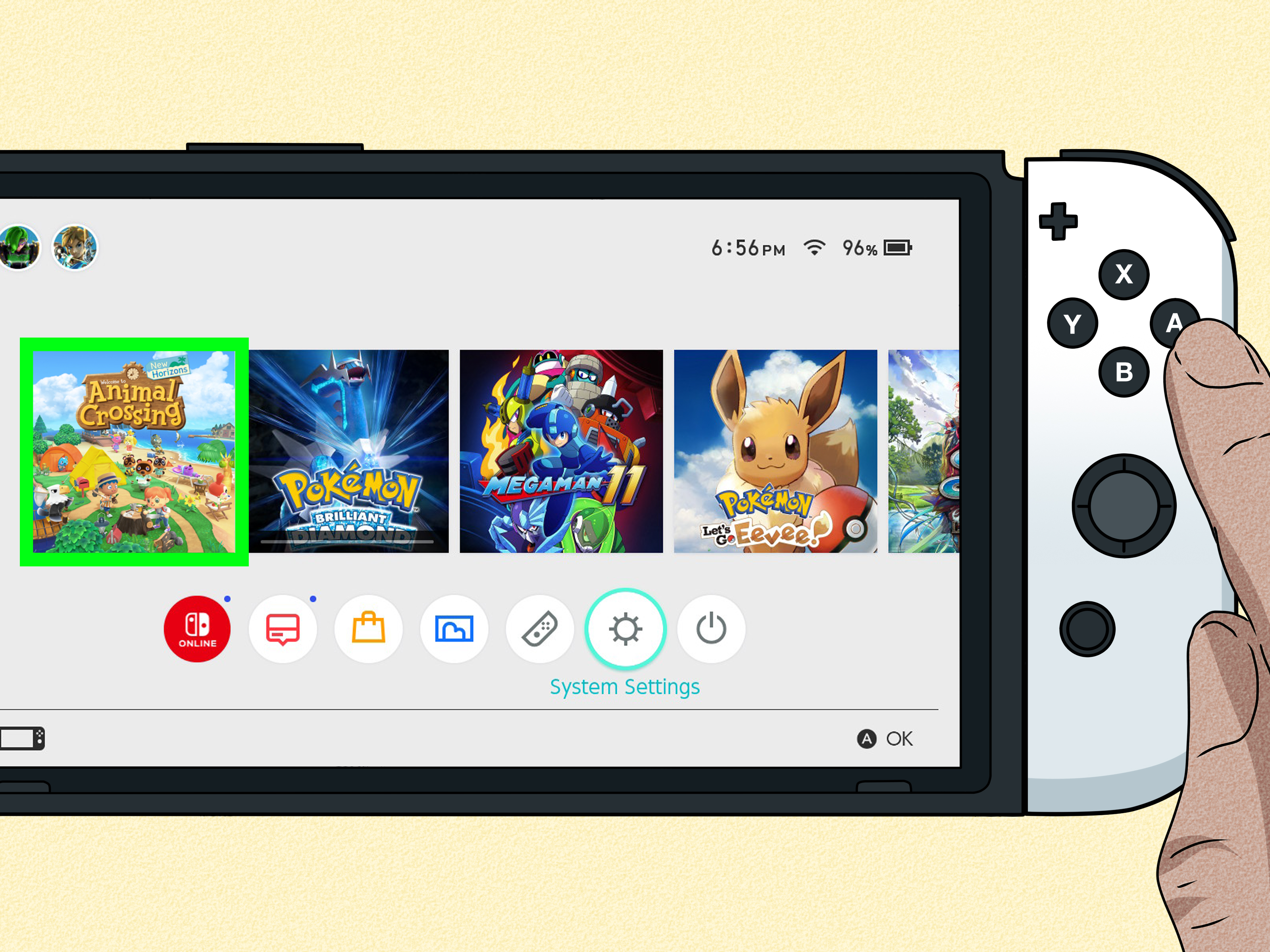
From the Nintendo Switch HOME Menu, select the gear icon labeled System Settings. This is where the serious console management tools live. Do not worryyou are not resetting the entire console.
Step 3: Go to Data Management
Scroll down the left-side menu and choose Data Management. Then scroll toward the bottom and select Delete Save Data. If your console has Parental Controls enabled, you may need to enter the PIN before continuing.
Step 4: Select Animal Crossing: New Horizons
Find Animal Crossing: New Horizons in the list of games and select it. Be careful here. You want the island game, not another title. Accidentally deleting the wrong save file is not a fun side quest.
Step 5: Choose Delete All Save Data for This Software
Because Animal Crossing: New Horizons uses one island shared across the console, you generally need to delete the save data for the software, not just one user. Choose the option that deletes all save data for this software, then confirm the warning.
Once confirmed, the island save data is erased. This action cannot be undone through normal gameplay.
Step 6: Restart the Game
Return to the HOME Menu and launch Animal Crossing: New Horizons. The game should begin as if you are playing for the first time. Timmy and Tommy will greet you, ask for your name and birthday, and invite you to choose a new island layout.
Can You Reset Your Island Without Losing Everything?
Not really. A true island reset means losing the island. However, you may not need a full reset if your main issue can be fixed another way. Before you delete years of progress, ask yourself what you actually want to change.
If You Hate Your Island Layout
If your cliffs, rivers, or neighborhoods bother you, terraforming may solve the problem. Once you unlock the Island Designer app, you can reshape cliffs, reroute water, build paths, and redesign large parts of your island. You cannot move Resident Services, the airport, river mouths, the secret beach, or the pier, but you can still make dramatic changes.
If You Want Different Villagers
You do not need to reset just because one villager keeps giving you fitness advice. Villagers can move out over time, and you can invite new ones through mystery islands, campsite visits, amiibo cards, or other players’ islands. A full reset is only necessary if you want a completely new beginning.
If You Want a New Resident Representative
This is one of the biggest reasons players reset. The Resident Representative is the first player who started the island, and that role cannot be transferred to another resident on the same island. If the wrong user became Resident Representative, the only clean way to change it is to delete the island save data and start again with the correct profile.
If You Only Want to Remove Another Player’s House
If a secondary resident has a tent or house on your island, you may be able to remove that resident through the game’s title screen settings. This is different from deleting the whole island. However, the Resident Representative cannot be removed this way. If the island leader is the problem, the reset button is waiting in the bushes.
Island Backup Is Not an Undo Button
Animal Crossing: New Horizons has an island backup feature for players with Nintendo Switch Online, but it is not designed as a casual reset safety net. Island backup exists mainly for situations where a console is lost, stolen, damaged, repaired, or replaced. It must be enabled before the problem happens, and restoring may require the proper Nintendo Account and system conditions.
In other words, do not reset your island assuming you can simply pull the old one back from the clouds like a magician yanking a rabbit from a hat. If you intentionally delete your save data, treat that decision as final.
Transfer vs. Reset: Do You Actually Need the Island Transfer Tool?
If you bought a new Nintendo Switch or Nintendo Switch 2 and want to keep your island, do not reset. Use the Animal Crossing: New Horizons Island Transfer Tool instead. This tool moves your whole island from one system to another.
Use the Island Transfer Tool when:
- You are replacing your old console with a new one
- You want to move the entire island and all residents
- You want to keep your museum, villagers, homes, and progress
- You are not trying to start over
Reset your island only when you want a blank slate. Transfer your island when you want your current island on a different console. Mixing these up is how players accidentally create heartbreak with Joy-Cons attached.
What to Do Before Resetting Your ACNH Island
Before you delete your island, spend a little time preparing. A reset can feel exciting, but it can also feel surprisingly emotional. That island may contain hundreds of hours of fishing, decorating, fossil hunting, and politely ignoring sea bass.
1. Take Screenshots and Videos
Capture your favorite areas before they disappear. Take photos of your entrance, house, museum, gardens, beaches, and rooms. If you have a five-star island, document it. Future you may want design inspiration from past you.
2. Save Important Custom Design Information
If you used custom designs from other creators, write down creator codes or take screenshots. If you made your own designs, photograph them or save copies where possible. After resetting, you may need to find or recreate those designs again.
3. Ask a Trusted Friend to Hold Items
If you have rare furniture, bells, Nook Miles Tickets, materials, or seasonal items you want to keep, you can ask a trusted friend to let you drop them on their island temporarily. After you reset and unlock airport travel again, you can pick them up.
Choose someone reliable. Do not hand your entire fortune to a random internet stranger named “DefinitelyNotAScammer.” The name is trying too hard.
4. Write Down Your Dream Island Goals
Before starting over, decide what you want your new island to become. Cottagecore forest? Citycore shopping district? Tropical resort? Elegant Japanese garden? Chaotic frog kingdom? A theme helps you make better early decisions.
5. Choose the Right User Profile
The first player to begin the new island becomes the Resident Representative. If multiple people share the console, make sure the correct person starts the game first. This choice matters because the Resident Representative controls major island progress.
Best Choices to Make on Your New Island
Starting over gives you a rare opportunity to make smarter choices from day one. Here are the details worth paying attention to during setup.
Island Layout
When the game shows you four map options, study them carefully. Look at the placement of Resident Services, the airport, river mouths, beaches, rocks, and the peninsula. You can terraform later, but some features are permanent. A little patience at the map screen can save you months of decorating frustration.
Island Name
Your island name cannot be casually changed later, so pick something you will still like after the joke wears off. Funny names are great, but remember that villagers will say the name often. If you name the island “Tax Audit,” do not blame Isabelle when morning announcements feel stressful.
Hemisphere
The Northern and Southern Hemispheres have opposite seasonal timing. Choose the one that matches your real-life preference or your desired gameplay vibe. If you want winter in December, choose Northern Hemisphere. If you want summer in December, choose Southern Hemisphere.
Starter Villagers
Your first two villagers usually come from specific personality types. You may not get your dream neighbors immediately, but they are part of your island’s origin story. Some players reset repeatedly until they like the starting villagers, fruit, airport color, and map combination.
Native Fruit and Airport Color
Your native fruit affects early island identity and selling prices. Airport color is mostly cosmetic, but many players care because it influences the look of the entrance and some associated items. If aesthetics matter to you, do not rush through setup.
Common Mistakes to Avoid
Mistake 1: Deleting the Game Instead of the Save Data
Archiving or deleting the software does not reset your island by itself. If you reinstall the game and the save data is still on the console, your island will still be there, waving politely as if nothing happened.
Mistake 2: Forgetting Other Players on the Island
Because the island is shared, deleting the save data affects every resident on that console. If family members or roommates play on the same island, warn them first. Surprise island deletion is not considered good household diplomacy.
Mistake 3: Assuming You Can Change the Resident Representative Later
You cannot simply pass the Resident Representative role to another player. Start your new island with the user profile that should lead island progress.
Mistake 4: Resetting Too Soon
Sometimes burnout feels like a reset problem, but all you need is a redesign break. Try flattening one area, moving buildings, or creating a new theme before deleting everything. A remodel may give you the fresh energy you want without sacrificing your museum full of bugs.
Quick Reset Checklist
Use this checklist before pressing the final delete button:
- I understand that my island reset is permanent.
- I took screenshots or videos of favorite areas.
- I saved custom design codes and theme ideas.
- I moved valuable items to a trusted friend, if desired.
- I warned other players who live on the island.
- I know which user profile should become Resident Representative.
- I am ready to lose my current island progress and start fresh.
Player Experience: What Resetting Your Island Really Feels Like
Resetting an Animal Crossing: New Horizons island is not just a technical process. It feels a little like moving houses, cleaning out a closet, and deleting a scrapbook at the same time. At first, there is excitement. A new island means new rivers, new villagers, a new name, a new airport, and a fresh chance to build the island you always meant to create before your first one became a museum of random choices.
Then the nostalgia hits. You remember the first time you paid off a loan, caught a coelacanth in the rain, or finally got that one villager to move in. You may scroll through your island and suddenly feel attached to a path you complained about for months. This is normal. ACNH is cozy, but it is also sneaky. It stores memories inside furniture placement.
The best reset experience usually comes from treating the old island with respect before letting it go. Walk through your favorite spots. Visit the museum. Sit on the beach. Take screenshots of rooms, gardens, and neighborhoods. Invite a friend over for one last tour if you want. You are not being dramatic. You are archiving a tiny digital life where a raccoon ran the economy and somehow everyone accepted it.
After the reset, the early game can feel slower than expected. You go from terraforming cliffs and decorating cafés to picking weeds, gathering branches, and celebrating a flimsy fishing rod like it is advanced technology. That slower pace can be refreshing if you embrace it. The new island gives you a chance to make intentional choices: a better entrance, a cleaner neighborhood layout, smarter flower placement, and a theme that does not require demolishing half the island later.
One useful strategy is to avoid rushing. Many players reset because they want perfection, then immediately pressure the new island to become perfect too. Let the first few days breathe. Place buildings with future paths in mind. Keep open space near Resident Services. Do not plant every flower in a random field unless you enjoy botanical chaos. Store materials, pay attention to your map, and build gradually.
The emotional payoff comes when the new island starts feeling like yours. Maybe your airport lines up beautifully with your entrance. Maybe your Resident Services plaza is finally in a spot you love. Maybe your new island name makes you smile instead of cringe. That is the magic of resetting: not erasing the past because it was bad, but starting again because you now know what kind of island you actually want.
So, if your current island feels more exhausting than inspiring, a reset can be worth it. Just do it thoughtfully. Save what matters, say goodbye properly, choose your new map carefully, and remember that even the messiest first island taught you something. Probably several things. Like never placing ten villager houses on the beach “temporarily.” We have all been there.
Conclusion
Resetting your island in Animal Crossing: New Horizons is simple, but it is not a casual button press. To start over, you must delete the game’s save data through your Nintendo Switch or Nintendo Switch 2 system settings. Once deleted, your island, residents, progress, items, and history are gone from that console.
Before resetting, make sure a full restart is really what you want. If you only dislike your layout, terraforming might help. If you want new villagers, you can invite them over time. If you need a new Resident Representative or a completely blank island, then resetting may be the cleanest solution.
A fresh island can be incredibly fun. You get to choose a better map, create a stronger theme, and build with all the wisdom you earned from your first attempt. Just prepare carefully, save anything you can through screenshots or trusted friends, and begin again with a plan. Your new island paradise is waitingand yes, Tom Nook has already prepared the invoice.