Your Xbox Series X is basically a tiny black monolith that eats games, breathes air, and quietly judges dusty entertainment centers. It also pulls in dust, pet hair, and the occasional mysterious fuzz blob that seems to have appeared from another dimension. So yes, cleaning your console matters. A cleaner Xbox Series X usually means better airflow, less grime on the shell, fewer clogged vents, and a lower chance that your fan starts sounding like it just accepted a side job as a leaf blower.
The good news is that cleaning your Xbox Series X does not require wizardry, a garage full of tools, or the nerves of a bomb technician. Most of the job is simple, safe exterior maintenance. A deeper internal clean is possible too, but that part calls for more caution, more patience, and a solid willingness to stop if things start feeling sketchy. In this guide, we will cover both the outside and the inside, plus the habits that help keep your console cleaner long after your microfiber cloth has clocked out.
Why cleaning your Xbox Series X matters more than most people think
Dust is not just ugly. It can interfere with airflow, build up around vents, collect on fan blades, and settle into heatsink fins where cooling performance really counts. That is when owners start noticing the usual drama: a louder fan, a hotter console, random performance anxiety, and the classic “Why does this thing sound like it’s preparing for takeoff?” moment.
Cleaning also helps you catch environmental problems that are easy to miss. Maybe your Xbox is shoved into a snug cabinet with the airflow of a sealed lunchbox. Maybe it is sitting on the floor, where it happily inhales dust, lint, and pet hair like a tiny black vacuum with better taste in graphics. Maybe the outside looks fine, but the vents are quietly collecting buildup around the edges. A quick cleaning session often doubles as a reality check.
Before you start: the golden rules
Before you clean anything, shut the console down completely and unplug it. Let it cool for a bit. Cleaning warm electronics is like trying to mop a floor while someone is still spilling soup on it. Technically possible, emotionally unwise.
Next, remember the big rule: never spray liquid directly onto the Xbox Series X. If you need to use a little moisture for exterior cleaning, apply it to the cloth, not the console. Use a soft, lint-free microfiber cloth, not paper towels, rough shop rags, or that shirt you were “going to donate anyway.” Your Xbox deserves better.
If you plan to clean the inside, be honest about your comfort level. An internal cleaning is not impossible, but it is not beginner-friendly either. Microsoft’s own repair guidance treats internal work as a job for technically inclined people using the right tools and safety precautions. If that description does not sound like you, there is no shame in sticking to external cleaning or using a professional service.
What you need
- A clean microfiber or other soft lint-free cloth
- Cotton swabs for tight edges and port rims
- Isopropyl alcohol at 70% or less for safe exterior spot-cleaning
- A can of compressed air or a hand dust blower
- A soft anti-static brush or very soft bristle brush
- A T8 Torx driver only if you plan to open the console
One thing you should skip: a regular household vacuum. It may sound efficient, but it is not a great match for delicate electronics. This is one of those moments where “I’ll just use the vacuum real quick” can turn into “I should not have used the vacuum real quick.”
How to clean the outside of your Xbox Series X
1. Power it down and unplug everything
Turn the console off fully, unplug the power cable, and disconnect accessories. Give it a moment to cool down. This makes cleaning safer and keeps you from moving cables around like you are defusing a sci-fi prop.
2. Start with a dry dusting
Use a dry microfiber cloth to wipe the shell from top to bottom. Go gently over the front face, the sides, the back panel, and the base area. Most of the time, this removes the everyday layer of dust, fingerprints, and “I swear this was clean last week” grime without any drama.
Pay special attention to the vent openings. Dust loves to park itself around the vent holes because apparently even dirt appreciates good architecture.
3. Remove smudges the smart way
If the shell still looks greasy or fingerprint-heavy, lightly dampen your cloth with a small amount of water and mild soap or with isopropyl alcohol at 70% or less. The cloth should be slightly damp, never dripping. Wipe the exterior carefully, then go back over it with a dry section of the cloth.
This is a good moment to clean around the power button, eject area, and the flatter parts of the shell where hand oils tend to gather. You are not scrubbing a frying pan. Gentle passes work better than aggressive rubbing.
4. Clean vents, seams, and ports carefully
Use a cotton swab or soft brush around vent slats, seams, and port openings. The goal is to lift dust away, not ram it deeper into the console like you are hiding evidence. For loose dust in vents and ports, use short bursts of compressed air. Keep the can upright and do not blast from point-blank range.
If you use compressed air, think “controlled puff” rather than “mini hurricane.” Too much force can push debris farther in or make a fan spin harder than it should.
5. Fix the space around the console
Cleaning the outside is only half the story if the Xbox lives in a bad location. The Series X needs breathing room. Give it open space around all sides, keep it away from thick carpet, and do not wedge it into a closed cabinet unless there is plenty of airflow. If it sits on the floor, consider moving it higher. That one change alone can reduce the amount of dust and hair it pulls in over time.
How to clean the inside of your Xbox Series X
When an internal clean actually makes sense
A deep internal clean is worth considering when the console is noticeably louder than usual, runs hotter than normal, shows visible buildup in the vents, or has started giving ventilation-related trouble. It can also make sense in homes with pets, lots of carpet fibers, or a generally dusty setup. Some owners also discover that what looked like “a little dust” from the outside turns into a full lint civilization once the rear panel comes off.
The low-risk version: clean without a full teardown
If you are not ready to open the console, you can still do a helpful partial clean. Use short, careful bursts of compressed air at the vent openings and ports. Follow up with a microfiber cloth and a soft swab around the exterior vent edges. This will not remove deep buildup from the fan or heatsink, but it can clear loose surface dust and improve day-to-day airflow.
This is the best choice for people who want safer maintenance without committing to a real internal repair session.
The deeper clean: for confident DIY owners only
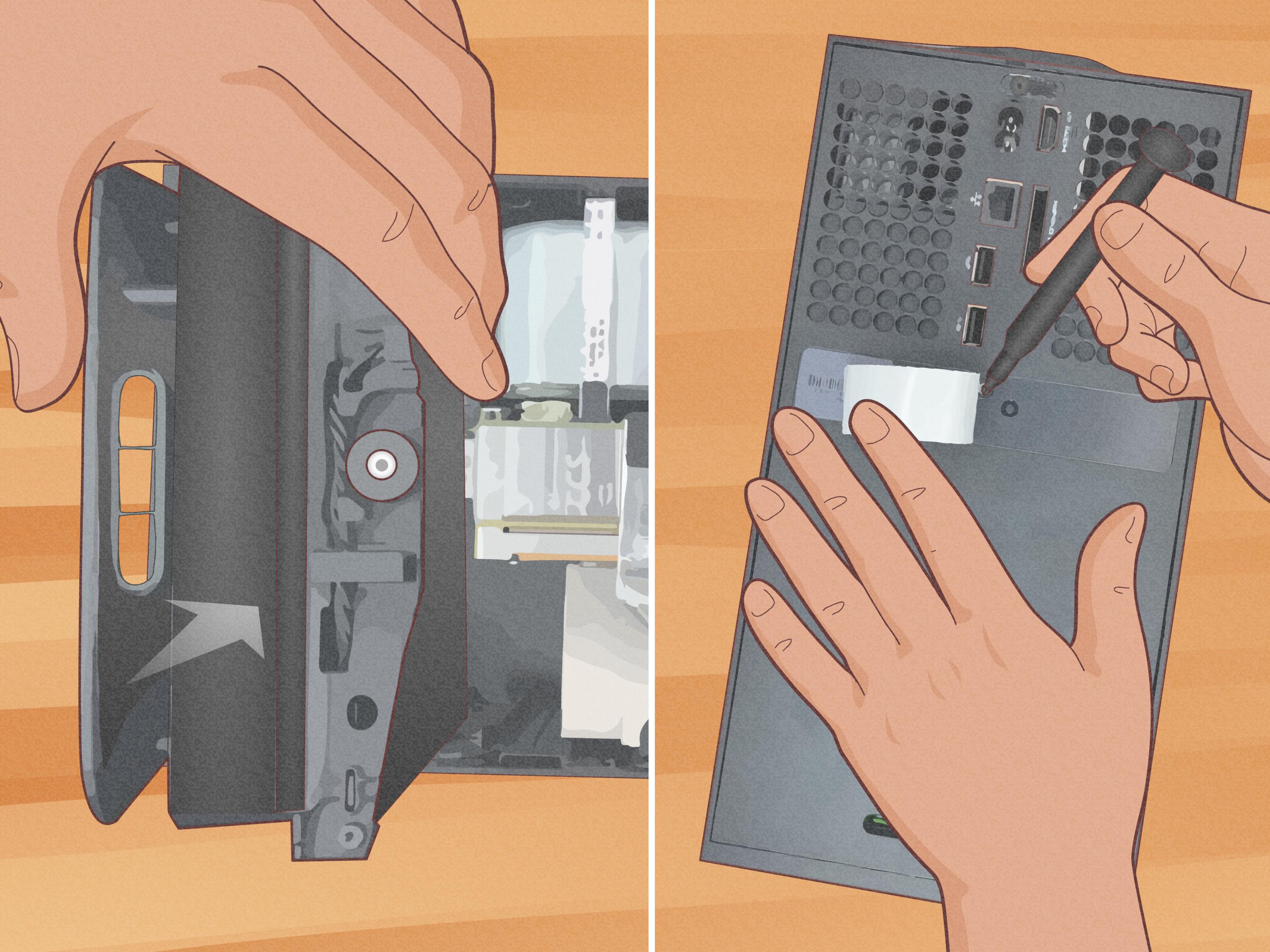
If you decide to open the Xbox Series X, go in knowing this is an advanced cleaning job, not a casual five-minute chore. You should work on a clean, stable surface, keep track of screws, and stop immediately if you see anything damaged, burnt, melted, or just plain cursed.
Once the console is opened, focus on the places that usually matter most: the rear vent path, the fan blades, the fan housing, and the heatsink fins. These are the areas where dust buildup can actually interfere with cooling. Use a dust blower, soft brush, or light compressed air to remove loose debris. If the fan blades have a film of grime, clean them gently and sparingly with a cloth or swab that is only slightly damp, keeping all liquid well away from the board and power components.
Do not flood the inside with cleaner. Do not scrub aggressively. Do not dig at components with metal tools like you are mining for treasure. And if you are cleaning the fan directly, keep the blades steady instead of letting them spin wildly from the air blast. Free-spinning a fan at high speed is not the flex people think it is.
Also, know when to stop. If the buildup is sticky, unusually heavy, or packed deep into the heatsink, that is your cue to consider a professional repair or an authorized service route instead of escalating into a full home-lab adventure.
What not to do
- Do not spray water, alcohol, or cleaner directly onto the console
- Do not use a regular household vacuum inside the system
- Do not use rough paper towels, abrasive pads, or harsh chemical cleaners
- Do not jam cotton swabs deep into ports
- Do not block vents with walls, cabinets, blankets, or clutter
- Do not open the console unless you are comfortable with advanced electronics work
How often should you clean your Xbox Series X?
A light exterior cleaning every few weeks is a solid habit. A more thorough clean every three to six months is a smart baseline for most homes. If you have pets, carpeting, a dusty room, or a console that lives near the floor, you may need to clean it more often. In other words, if your home produces enough floating fuzz to qualify as weather, do not wait half a year.
Signs your Xbox Series X needs cleaning right now
- The fan is louder than it used to be
- The console feels unusually hot during normal gaming
- You can see dust packed around vent openings
- The system complains about ventilation or shuts down unexpectedly
- The console is sitting in a cramped or dusty location
What to do if cleaning does not solve the problem
If your Xbox still runs poorly after a good cleaning, dust may not be the only issue. Try a full power cycle by shutting it down, unplugging it for a couple of minutes, and restarting it. If the console is acting sluggish, some owners also have luck clearing persistent storage or doing a soft reset that keeps games and apps in place.
Still having trouble? That is when cleaning stops being the hero of the story. A failing fan, deeper internal blockage, or hardware fault may be involved. At that point, the smart move is to use Microsoft support, consult official repair resources, or hand the job to an authorized service provider instead of forcing a DIY fix that could turn “slightly dusty” into “expensively educational.”
Common real-world experiences after cleaning an Xbox Series X
One of the most common experiences people report is simple embarrassment. They start with the idea that their console is “not that dusty,” then wipe the vent rims once and discover enough lint to knit a tiny sweater for a hamster. Usually, the Xbox looked fine from across the room. Up close, though, the vent edges told the truth. A quick exterior clean alone often makes owners realize they should have done this months earlier.
Another common experience is the cabinet problem. Plenty of Xbox Series X owners place the console on a media shelf because it looks neat, organized, and adult. Then the fan gets louder, the console runs warmer, and everyone acts shocked that a high-performance machine does not love living in a glorified shoebox. After cleaning the vents and moving the console into a more open area, many people notice the system sounds calmer during long gaming sessions. The Xbox did not become magical. It just finally got a chance to breathe like a machine instead of a prisoner.
Pet owners have a very specific version of this story. The console sits low, the room looks normal, and yet somehow the Xbox begins collecting enough hair to form opinions. A lot of that debris gathers where you cannot fully appreciate it until you look closely at the intake and vent areas. Once the outside is cleaned and the console is moved farther from the floor, the difference is usually obvious. Less fuzz goes in. Less grossness builds up. Life improves. The cat remains innocent, at least legally.
There is also the viral-photo panic experience. Someone sees an alarming image online of an Xbox vent packed with dust and immediately assumes their own console is one sneeze away from doom. Then they check the top vent and find a little dust around the edges, but nothing catastrophic. This is actually useful. It reminds people to inspect the console without assuming that every speck means disaster. Light dust on the vent openings is common. Thick buildup deep in the airflow path is the real issue. Cleaning helps you tell the difference between “routine maintenance” and “okay, this thing clearly needs help.”
Another real-world pattern is that cleaning reveals other problems. Sometimes a person cleans the Xbox, moves it into better airflow, and still notices crashes, heat warnings, or strange behavior. That can be frustrating, but it is also valuable information. It means dust was part of the story, not the whole plot. A restart, cache clear, system update, or professional inspection may be the next step. In that sense, cleaning is not just maintenance. It is diagnostic. It helps separate airflow problems from hardware problems.
And finally, there is the best experience of all: the “I stopped before I made it worse” moment. A smart owner opens the console just far enough to realize the buildup is heavier than expected, the cleaning path is tighter than expected, or the job is simply beyond their comfort level. So they stop, reassemble, and hand it off to someone qualified. That is not failure. That is judgment. In the world of electronics maintenance, good judgment is often the difference between a cleaned console and a very expensive life lesson.
Final thoughts
Cleaning your Xbox Series X inside and out is not glamorous, but it is one of the simplest ways to protect a pricey console that works hard every time you fire up a game. The outside cleaning is easy, low-risk, and absolutely worth doing on a regular basis. The inside cleaning can be helpful too, but only when handled with patience and respect for the fact that this is still a real electronic device, not a Lego set with better frame rates.
Keep the shell clean, the vents clear, the room around it breathable, and your dust levels slightly less chaotic than usual. Do that, and your Xbox Series X has a much better shot at staying cool, quiet, and ready for the next gaming marathon without sounding like it is trying to escape the house.