Note: Facebook changes menu names more often than a cat changes sleeping spots, so the wording on your phone or desktop may vary slightly. The core idea stays the same: to delete a Facebook like, you usually need to unlike the original item or remove the reaction from your Activity Log.
Want to clean up old Facebook likes? Maybe you liked a meme in 2014 that has aged like milk in a hot car. Maybe you accidentally reacted to your boss’s vacation photo with a heart instead of a thumbs-up. Or maybe you simply want your Facebook activity to look less like a digital attic full of dusty opinions, abandoned hobbies, and Pages you followed during a three-week smoothie phase.
The good news: Facebook gives you several ways to delete likes, remove reactions, unlike Pages, manage group interactions, and review your past activity. The slightly annoying news: there is no magical “delete every like I have ever made” button in the standard Facebook interface. You can, however, use Activity Log filters to find and remove old likes much faster than scrolling through your entire timeline like an internet archaeologist.
This guide explains how to delete likes on Facebook from posts, photos, comments, Pages, groups, videos, and other activity areas. It also covers the difference between deleting a like, removing a reaction, unfollowing a Page, hiding reaction counts, and cleaning up related privacy signals.
What Does “Delete Likes on Facebook” Actually Mean?
On Facebook, “deleting a like” usually means removing your like or reaction from someone else’s post, photo, comment, video, Page, or group item. Facebook may label this action as Unlike, Remove Reaction, or simply let you tap the active Like button again.
That matters because Facebook reactions are broader than the old thumbs-up. A like, love, care, haha, wow, sad, or angry reaction can all show up in your Activity Log. So if you are trying to clean up your Facebook activity, do not search only for the word “Like.” Look for Likes and reactions, Interactions, or Page likes.
Can You Delete Other People’s Likes on Your Posts?
No, not directly. If someone likes your post, you cannot individually delete that person’s like the way you can delete a comment. You can delete the post, change the post’s audience, block the person, restrict the person, or hide reaction counts in some places, but you cannot open a list of likes and remove selected people like you are editing a wedding guest list.
How to Delete a Like Directly from a Facebook Post
The fastest way to remove a Facebook like is to go back to the post, photo, or comment and tap or click the active reaction.
- Find the Facebook post, photo, video, or comment you liked.
- Look for the blue Like button or your active reaction icon.
- Tap or click it once to unlike the item.
- If you used a reaction such as Love, Haha, Wow, Sad, or Angry, press and hold the reaction on mobile or hover over it on desktop.
- Choose a different reaction or remove the reaction entirely.
Example: If you accidentally liked a friend’s old profile picture while browsing at midnight, open the photo and tap the highlighted Like button again. Congratulations, you have survived the classic “accidental deep-scroll like” crisis. We have all been there. Some of us still wake up thinking about it.
How to Delete Facebook Likes Using Activity Log
Activity Log is the best place to find old likes because it organizes your Facebook actions by category. Instead of trying to remember whose post you liked during a lunch break in 2021, you can review your interactions in one place.
Delete Likes on Facebook Mobile App
- Open the Facebook app.
- Tap the Menu icon.
- Tap your name to open your profile.
- Tap the three-dot menu near your profile controls.
- Select Activity Log.
- Look for Your Facebook activity, Interactions, or a similar section.
- Tap Likes and reactions.
- Scroll through your liked posts, photos, comments, and videos.
- Tap the three dots beside an item.
- Select Unlike or Remove Reaction.
If you see filters, use them. Filtering by date, category, or activity type can turn a one-hour cleanup into a ten-minute digital spa treatment.
Delete Likes on Facebook Desktop
- Open Facebook in your browser.
- Click your profile picture in the top-right corner.
- Select Settings & privacy.
- Click Activity Log.
- Choose Interactions.
- Select Likes and reactions.
- Find the item you want to remove.
- Click the three-dot menu beside it.
- Choose Unlike or Remove Reaction.
This is the cleanest method if you want to review lots of old likes. It is also less emotionally dangerous than scrolling through your timeline and rediscovering every questionable haircut, expired friendship, and enthusiastic comment from your early Facebook years.
How to Unlike a Facebook Page
Facebook Page likes are different from post likes. When you like a Page, you create a connection with that Page. Depending on Facebook’s current design and your account settings, you may see buttons such as Liked, Following, or Follow.
Unlike a Page Directly
- Search for the Page you want to unlike.
- Open the Page.
- Look for Liked, Following, or a three-dot menu.
- Choose Unlike if available.
- If you only want to stop seeing updates, choose Unfollow instead.
Unliking a Page removes your like. Unfollowing a Page usually stops its posts from appearing in your Feed while keeping some connection intact. Think of it as the difference between leaving a party and staying at the party while hiding behind a large houseplant.
Find Old Page Likes in Activity Log
If you cannot remember every Page you have liked, use Activity Log:
- Open Activity Log.
- Look for Connections or Page likes.
- Review the list of Pages.
- Use the menu beside a Page to unlike it when the option is available.
This is useful if you once liked dozens of Pages for contests, local restaurants, old hobbies, college clubs, giveaway posts, or bands you swore would “definitely become huge.”
How to Remove Likes and Reactions from Facebook Comments
Comment likes work much like post likes. If you can find the comment, tap or click your active reaction to remove it. If you cannot find the comment, use Activity Log.
- Go to Activity Log.
- Open Interactions.
- Select Likes and reactions or Comments and reactions, depending on what your interface shows.
- Find the comment interaction.
- Open the three-dot menu.
- Choose Unlike or Remove Reaction.
Removing a reaction from a comment does not delete the comment itself. If you wrote the comment and want it gone, look for your comment activity and choose Delete instead.
How to Delete Likes and Reactions in Facebook Groups
Facebook groups can hold years of reactions, comments, posts, questions, polls, and “I’m interested” replies. If you want to remove likes or reactions from group posts, the easiest path is usually Activity Log.
- Open your profile.
- Go to Activity Log.
- Choose Your Facebook activity.
- Tap or click Groups if available.
- Review group posts, comments, and reactions.
- Use the menu beside an item to delete, unlike, or remove a reaction.
This is especially handy for old community groups, buy-and-sell groups, neighborhood groups, and hobby groups where your past reactions may no longer match your current interests. Yesterday you were into sourdough starters. Today you are emotionally unavailable to dough.
How to Remove Likes from Facebook Reels and Videos
Facebook video likes and reel reactions may appear under interactions or video-related activity. If you liked a reel and want to remove it, try opening the reel and tapping the active Like button. If you cannot find it, use Activity Log and search through likes, reactions, saved videos, or video activity.
For a practical cleanup, start with the broadest category first: Interactions. Then narrow down by date. If your Facebook interface includes a search or filter tool inside Activity Log, use it to avoid endless scrolling.
Can You Delete All Facebook Likes at Once?
Facebook does not currently provide a simple native button that removes every like from posts, photos, comments, videos, and Pages in one click. Some third-party tools advertise bulk deletion, but they may require access to your account, browser session, or personal data. Be careful. A cleanup tool that asks for broad account access should be treated like a raccoon offering to organize your pantry: maybe useful, but definitely suspicious.
The safest approach is to use Facebook’s built-in Activity Log, remove likes in batches, and focus on the categories that matter most. Start with Page likes, then old post reactions, then group activity. This gives you control without handing your account keys to a mystery app.
Why Delete Facebook Likes?
People remove Facebook likes for many reasons, and not all of them involve panic. Sometimes it is about privacy. Sometimes it is about updating your interests. Sometimes it is about reducing unwanted recommendations. And sometimes it is simply because you no longer want your profile connected to a Page, post, or opinion from another chapter of your life.
1. Clean Up Your Digital Footprint
Your likes help tell a story about your interests. Cleaning them up can make your public and semi-public activity feel more current, intentional, and professional.
2. Improve Your Feed
Facebook uses your interactions as signals. Removing likes from Pages or posts you no longer care about may help reduce similar content over time.
3. Reduce Awkward Discoverability
Some likes may be visible depending on privacy settings, Page settings, mutual connections, or the content’s audience. If you do not want a like associated with your name, removing it is often better than hoping nobody notices.
4. Separate Past Interests from Current Identity
People change. Your Facebook account should not be a museum where every old like is preserved behind glass. It is okay to tidy up.
How to Hide Reaction Counts Instead of Deleting Likes
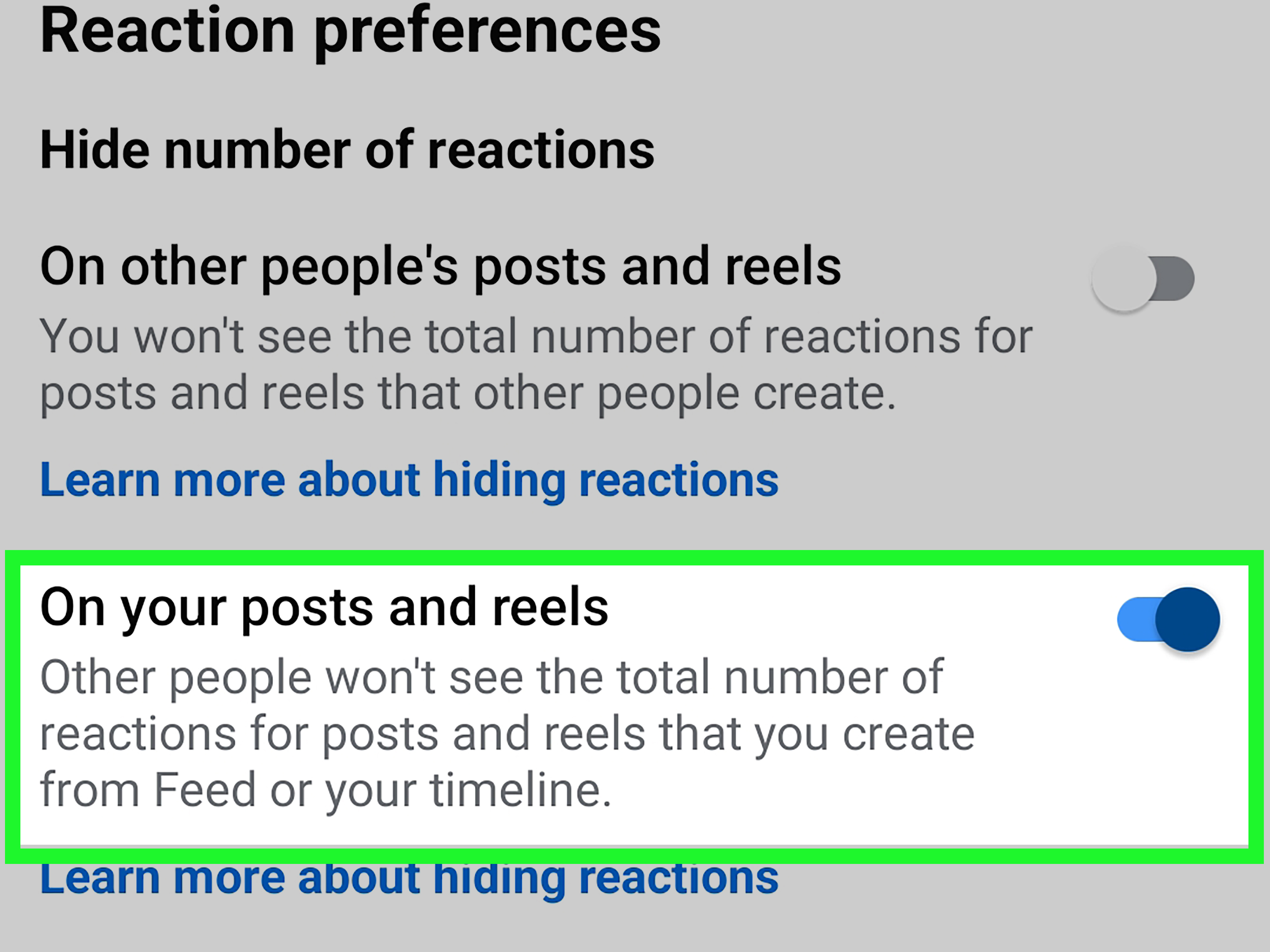
If your goal is not to remove your own likes but to reduce how visible reaction numbers are, use Facebook’s reaction preferences. Facebook may let you hide the total number of reactions on your own posts or on posts from others, depending on the version you use.
- Open Settings & privacy.
- Go to Settings.
- Look for Reaction Preferences.
- Choose whether to hide reaction counts on your posts or on posts from others.
This does not delete likes. It only changes how reaction counts appear. The reactions still exist, but the scoreboard becomes less loud.
What to Do If You Cannot Remove a Facebook Like
Sometimes Facebook likes do not disappear as expected. Before blaming the app, your phone, your Wi-Fi, Mercury retrograde, or your neighbor’s suspiciously powerful router, check these common causes.
The Post Was Deleted or Hidden
If the original post is gone, you may not be able to open it normally. Try Activity Log. If the item still appears there, use the menu to remove the reaction.
The Page Changed or Was Removed
Some Pages merge, rebrand, become unavailable, or change their layout. Search the Page name, open it, and check whether the Liked or Following menu still appears.
You Are Using an Older App Version
Update the Facebook app, close it, reopen it, and try again. On desktop, clear your browser cache or try another browser if the menu refuses to behave.
You Are Looking in the Wrong Activity Category
Likes may appear under Interactions, while Page likes may appear under Connections. Group activity may have its own section. If one category does not show the item, check another.
Extra Privacy Cleanup After Removing Likes
Deleting Facebook likes is a strong first step, but it is not the only way to clean up your account. For a more complete reset, consider reviewing these areas too:
- Search history: Remove old searches from Activity Log if you do not want them stored in your account activity.
- Saved items: Unsave posts, videos, reels, and links you no longer need.
- Followed Pages: Unfollow Pages you do not want in your Feed, even if you do not unlike them.
- Groups: Leave inactive groups or remove old group posts and comments.
- Off-Meta activity: Review or disconnect activity that businesses and apps share with Meta.
- Downloaded information: Export a copy of your Facebook information if you want a record before making big changes.
Privacy cleanup is less about disappearing from the internet and more about reducing digital clutter. Think of it as cleaning your closet, except the closet occasionally recommends videos based on a shirt you touched in 2018.
Best Strategy for Cleaning Up Old Facebook Likes
If you have years of Facebook activity, do not try to remove everything in one sitting. That is how people end up staring into the middle distance while whispering, “Why did I like so many cupcake Pages?”
Use this simple cleanup plan:
- Start with Page likes. These are often the most visible and easiest to review.
- Move to Likes and reactions. Use Activity Log filters to review posts, photos, comments, and videos.
- Check group activity. Remove old reactions, comments, or posts from groups you no longer use.
- Review saved and followed items. These can influence your Feed even when they are not public likes.
- Adjust reaction preferences. Hide reaction counts if you want a quieter Facebook experience.
Real-Life Experience: What It Feels Like to Delete Facebook Likes
Cleaning up Facebook likes feels simple at first. You open Activity Log with the confidence of someone who believes the internet is organized. Then you see a list of reactions stretching back years, and suddenly you are confronting every version of yourself who ever clicked Like before coffee.
The first surprise is how many likes are completely harmless but oddly nostalgic. A friend’s graduation photo. A cousin’s new puppy. A local bakery that made one heroic cinnamon roll. These are easy to keep. They are the digital equivalent of finding a movie ticket in an old jacket pocket.
The second surprise is how many likes no longer make sense. You may find Pages connected to old jobs, abandoned hobbies, expired trends, closed restaurants, random giveaways, and brands you followed because they promised a discount code that never arrived. Removing these feels refreshing. It is not dramatic. It is more like deleting old screenshots from your camera roll: small, satisfying, and slightly embarrassing.
The third surprise is that Facebook cleanup works best when you treat it like maintenance, not a personality trial. You do not need to judge every past click. People like things quickly. A like can mean “I support you,” “I saw this,” “That dog is excellent,” or “I am trying to end this conversation politely.” Removing a like does not mean the old you was wrong. It means present-you is organizing the room.
One useful experience is to clean by category instead of emotion. Start with Pages because they are easier to evaluate. If you no longer want updates from a Page, unfollow it. If you no longer want the connection at all, unlike it. Then move to posts and reactions. Use date filters if available. Pick one year, one month, or one category at a time. This keeps the process from becoming a doom-scroll through your own history.
Another practical lesson: do not rush. If you remove too many items quickly, the interface may lag, fail to update, or ask you to refresh. Take breaks. Facebook cleanup is not a competitive sport, and there is no trophy for deleting 900 likes before lunch. Also, if you are using mobile data, switch to Wi-Fi. Activity Log can be image-heavy, and nobody wants to spend a data plan deleting reactions from 2016.
The most satisfying part comes after the cleanup. Your profile feels lighter. Your Feed may gradually feel more relevant. Your old Page likes stop looking like a scrapbook curated by a stranger with your face. You may not notice a dramatic change immediately, but you will know that your account better reflects who you are now.
In short, deleting likes on Facebook is not about pretending your past never happened. It is about taking control of the signals you leave behind. A few minutes in Activity Log can turn years of random clicks into a cleaner, calmer, more intentional Facebook presence. And if you find a like from 2012 that makes you cringe, be kind to yourself. We all had a phase. Some of us had several, and Facebook kept receipts.
Conclusion
Learning how to delete likes on Facebook from posts, Pages, comments, groups, and videos is mostly about knowing where to look. For one item, go directly to the post or Page and tap the active Like or reaction. For older activity, use Activity Log and review Interactions, Likes and reactions, Connections, Page likes, and Groups. If your goal is privacy rather than removal, adjust reaction preferences, review followed Pages, clear search history, and check Off-Meta activity settings.
You do not need to erase your entire Facebook past in one dramatic sweep. Start with the likes that no longer represent you, remove outdated Page connections, and keep the interactions that still feel meaningful. A cleaner Facebook account is not just tidier; it is easier to manage, easier to understand, and less likely to surprise you with a dusty old thumbs-up from another lifetime.