Few gaming moments feel as painful as finishing a Grand Theft Auto mission, watching the results screen, and realizing you missed Gold by one tiny mistake. Maybe you took too long. Maybe you scratched the getaway car. Maybe you forgot the mission had a “don’t alert anyone” objective until the entire city was already having a very loud conversation with you. Good news: in modern GTA games, especially Grand Theft Auto V and GTA Online, replaying missions is not only possible, it is one of the smartest ways to improve your score, unlock medals, revisit favorite story moments, and practice tricky objectives without starting the whole game again.
This guide explains 4 ways to replay missions in GTA, covering Story Mode mission replay, Strangers and Freaks missions, GTA Online jobs, and manual save strategies for players who want more control. Whether you are chasing the “Solid Gold, Baby!” achievement, replaying a heist for nostalgia, or simply trying to prove that the last mistake was definitely the controller’s fault, here is how to jump back into the action.
Why Replay Missions in GTA?
Mission replay is useful for more than bragging rights. In GTA V, missions are scored with objectives such as completion time, accuracy, stealth, vehicle condition, or special task requirements. You do not always need a perfect first attempt. Replaying gives you a second, third, or tenth chance to polish the run.
Players commonly replay missions for four main reasons: earning Gold Medals, experiencing alternate outcomes, practicing mission routes, and enjoying favorite story sequences again. Some missions are cinematic, some are chaotic, and some are just plain fun. Replaying them turns GTA from a one-and-done campaign into a flexible sandbox where you can sharpen your skills without sacrificing your main save file.
Before you begin, remember one important rule: mission replay usually does not rewrite your current story progress. In GTA V, replaying a completed mission lets you revisit it separately, while your main world state remains safe. That means you can replay an early mission, finish it, and return to your existing save instead of accidentally time-traveling your entire campaign back to square one.
Way 1: Replay Story Missions from the Pause Menu
The easiest and most direct method is using the built-in mission replay feature in GTA V Story Mode. This is the option most players want when they ask how to replay missions in GTA. It is simple, fast, and available once you have completed missions in the campaign.
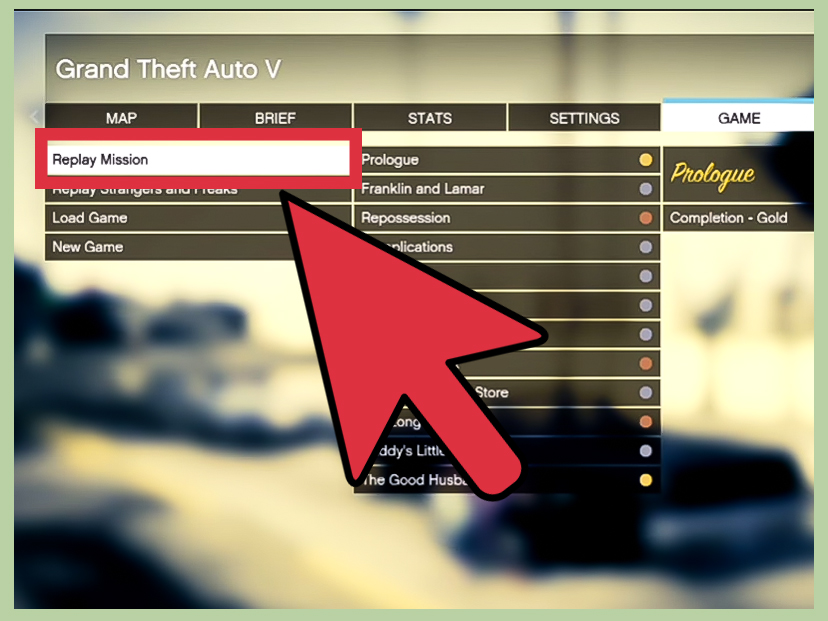
How to replay a GTA V Story Mode mission
- Load into GTA V Story Mode.
- Open the pause menu.
- Go to the Game tab.
- Select Replay Mission.
- Choose a mission you have already completed.
- Confirm and start the replay.
This method works well when you want to improve a mission score or relive a specific part of the story. Completed missions appear in a list, so you can scroll through earlier chapters and pick the one you want. For example, you might replay an early Franklin mission to improve your driving time, or revisit a Michael mission because you missed one of the optional objectives.
The most important advantage is convenience. You do not need to create a new game, reload an old save, or replay hours of setup. The mission is pulled from the completed mission list, and when the replay ends, the game returns you to your regular progress. It is like renting a time machine, but without the headache of explaining it to Lester.
Best uses for Story Mode mission replay
Story Mode replay is ideal for Gold Medal attempts. Many GTA V missions include multiple scoring requirements, and some can be completed across separate attempts. For example, one run might focus on finishing quickly, while another focuses on accuracy or avoiding damage. This makes mission replay much less stressful because you can approach each requirement with a plan instead of trying to perform a perfect symphony of chaos in one take.
It is also useful for learning mission layouts. GTA missions often reward players who know where to drive, where to turn, when to switch characters, and how to avoid wasting time. Your first attempt is usually a sightseeing tour with explosions. Your replay can be a clean, confident route.
Way 2: Replay Strangers and Freaks Missions
Story missions are not the only missions worth replaying. GTA V also includes Strangers and Freaks, the side missions connected to colorful characters scattered across Los Santos and Blaine County. These missions often have their own objectives and can count toward overall completion goals.
How to replay Strangers and Freaks missions
- Open the pause menu in Story Mode.
- Go to the Game tab.
- Select Replay Strangers and Freaks, if available.
- Choose the completed side mission you want to replay.
- Start the mission and aim for a better result.
This method is perfect for players chasing 100% completion or trying to earn more Gold Medals. Strangers and Freaks missions can be shorter than major story missions, but that does not mean they are always easy. Some require sharp driving, careful timing, or specific choices. Replaying them lets you learn the mission rhythm without having to wait for the character marker to appear again in the open world.
Because these side missions vary heavily in style, they are also great practice. Some focus on vehicles, some on timing, and others on exploration or character-specific tasks. If you want to become more comfortable with how GTA structures mission objectives, side mission replay is a surprisingly useful training ground.
Tips for getting better scores
Read the mission objectives carefully before you rush in. GTA loves to hide score requirements behind small details. A mission may ask you to finish within a certain time, keep a vehicle in good condition, complete a task with high accuracy, or avoid unnecessary mistakes. If you replay without checking the objectives, you may finish faster but still miss Gold because you ignored a second requirement.
A smart approach is to choose one goal per run. If a mission has three objectives, do not always try to master all three at once. First, learn the route. Next, focus on speed. Then replay again for accuracy or cleaner execution. This turns a frustrating challenge into a checklist, and checklists are much easier to defeat than panic.
Way 3: Replay GTA Online Missions Through Jobs
GTA Online handles mission replay differently from Story Mode. Instead of using the Story Mode replay list, you access missions through the Online menu, Jobs, contact missions, playlists, invites, or activity markers. This is the main method for players who want to replay GTA Online missions for money, RP, weekly bonuses, or simple co-op fun.
How to replay GTA Online missions from the Jobs menu
- Enter GTA Online.
- Open the pause menu.
- Go to Online.
- Select Jobs.
- Choose Play Job or Host Job.
- Select Rockstar Created.
- Choose a mission category, then pick the mission you want to replay.
This method is especially helpful when a mission is part of a weekly event, bonus payout, or challenge. GTA Online often encourages players to replay certain jobs because rewards can change over time. If a contact mission or special job is paying extra, replaying it can be a practical way to earn cash and RP while learning the mission flow.
Unlike Story Mode, GTA Online missions may involve matchmaking, lobby settings, difficulty choices, and other players. That means replaying a mission can feel different each time. One group may finish smoothly. Another group may spend five minutes arguing with a ramp, a door, or basic geometry. Such is the social magic of Los Santos.
Using Quick Job, invites, and playlists
You can also replay GTA Online missions through Quick Job, phone invites, or playlists. Quick Job is useful when you do not care which mission you play and simply want to jump into an activity quickly. Invites are useful when another player is hosting the mission you want. Playlists are great when you want to run several jobs in a row without returning to the menu each time.
If you want the most control, hosting the job yourself is usually the better choice. As host, you can choose the mission, difficulty, matchmaking options, and sometimes team settings. This is useful when you want to replay one mission repeatedly or practice it with friends.
Way 4: Use Manual Saves, Load Game, or a New Save Slot
The fourth method is less about the replay menu and more about smart save management. Manual saves are helpful when you want to experience branching choices, preserve a favorite point in the story, or replay missions in older GTA titles that do not have the same modern replay system.
How manual saves help with replaying missions
Before starting a major mission, create a manual save in a separate slot. After completing the mission, you can reload that save if you want to experience the mission again from its original place in the story. This is different from the built-in replay feature because it restores the world to the point before the mission happened.
This method is useful for major decision points, heists, or missions with different approaches. In GTA V, players often use separate saves before important choices so they can revisit outcomes later. If you only rely on autosave, you may overwrite the moment you wanted to preserve. A manual save is your insurance policy against future regret.
Best practices for save slots
Use multiple save slots and name them mentally by where they occur in the story. For example, you might keep one save before a major heist, one before the final stretch of missions, and one for general post-game exploration. Do not overwrite your only good save unless you enjoy living dangerously in ways even Trevor might call “a bit much.”
Manual saves are also valuable in older GTA games. Many classic entries do not allow mission replay from a modern pause menu. In those games, saving before a mission is the safest way to replay it later. It may feel old-school, but it works. Think of it as the gaming equivalent of putting a bookmark in a very chaotic novel.
How Mission Replay Affects Progress, Money, and Medals
One of the most common questions is whether replaying missions changes your main progress. In GTA V Story Mode, replayed missions are treated separately from your current story position. You can improve scores and medals, but the replay does not normally rewrite your campaign timeline or undo your current save.
Gold Medal progress is the big reason many players use replay. Some mission objectives can be completed over multiple attempts, which means you can gradually improve your final rating. However, certain missions or activities may require objectives to be completed in a single run, so always read the mission criteria carefully.
For personal bests and clean completion records, avoid using cheats, skips, or shortcuts that may prevent proper score tracking. GTA’s scoring system rewards clean runs, so if you are serious about leaderboard-style improvement, treat the replay like a real attempt rather than a casual test drive through a hedge.
Common Problems When Replaying Missions
The mission does not appear in the replay list
If a mission is missing, make sure you have completed it in the current save file. Some missions may not appear until enough story progress has been made. Also check whether you are looking under Story Missions or Strangers and Freaks, since they can be separated.
The replay does not start
If the game gets stuck or refuses to launch a replay, try reloading your save, restarting the game, or checking whether the platform has pending updates. On PC, mods or corrupted files can sometimes interfere with normal menu behavior. If you use mods, test the game without them before assuming Los Santos itself has betrayed you.
You cannot replay the exact GTA Online job immediately
In GTA Online, some missions rotate through voting screens, invites, or job lists. If you do not see the exact job after finishing it, return to Free Mode and start it again from the Jobs menu. Hosting the job yourself gives you the best chance of replaying the exact mission you want.
Pro Tips for Better Mission Replays
Study the objectives before starting
Do not treat the Gold Medal screen like decoration. Read the requirements and build your run around them. If the mission rewards speed, choose the fastest route. If it rewards accuracy, slow down and make cleaner decisions. If it rewards vehicle condition, maybe do not drive like every traffic light personally insulted you.
Use separate attempts for separate goals
When possible, split objectives across different runs. One replay can focus on time. Another can focus on accuracy. A third can focus on avoiding damage. This approach is less stressful and often more effective than trying to complete every objective perfectly in one attempt.
Learn shortcuts and mission triggers
Many GTA missions become easier once you know where the next objective appears. Learning when to switch characters, where to park, and which roads save time can make a huge difference. The first run teaches you what happens. The replay teaches you how to control it.
Keep your main save safe
Before experimenting heavily, make a manual save. It takes a few seconds and protects hours of progress. This is especially important near the end of the story or before missions with major choices.
Extra Experience: What Replaying Missions in GTA Actually Feels Like
Replaying missions in GTA is a little like rewatching a favorite action movie, except this time you are the stunt coordinator, the driver, the editor, and occasionally the reason everything goes wrong. The first playthrough of a mission is usually messy because you are reacting to surprises. You do not know where the next marker will appear, which road will be fastest, or whether the game is about to ask you to make a sharp turn while someone is yelling in your ear. The replay is where the mission starts to make sense.
One of the best experiences comes from replaying early Story Mode missions after you already understand the game’s controls. A mission that felt hectic the first time can feel smooth later. You brake earlier, turn cleaner, switch characters faster, and stop treating the minimap like a mysterious ancient artifact. It is satisfying because GTA rewards familiarity. The city becomes less confusing, the objectives become clearer, and your mistakes become easier to fix.
Gold Medal hunting adds another layer. At first, a missed Gold requirement can feel annoying. You finished the mission, so why is the game judging you like a disappointed driving instructor? But after a few replays, the scoring system becomes a challenge instead of a complaint. You begin to ask better questions. Where did I lose time? Did I take the wrong road? Could I have avoided damage? Did I panic during the final objective? This turns each mission into a small puzzle.
GTA Online mission replay has a different flavor. Story Mode replays are controlled and predictable. Online replays are social, which means they can be brilliant or ridiculous depending on the lobby. A clean group can make a mission feel efficient and professional. A chaotic group can turn a basic job into a comedy sketch with loading screens. Still, replaying missions online is a good way to learn teamwork, understand mission pacing, and farm rewards when the game highlights certain activities.
Manual saves create the most “classic GTA” experience. There is something satisfying about saving before a big mission, trying one approach, then reloading to test another. It gives you control over your own timeline. This is especially useful before heists or major story decisions. Instead of wondering what would have happened, you can replay and see for yourself.
The biggest lesson is that replaying missions makes GTA more enjoyable when you stop treating every mistake as failure. A bad run is information. A missed turn teaches the route. A failed time objective shows where you need to be faster. A damaged vehicle reminds you that sidewalks are not always the best shortcut, no matter what your inner chaos goblin says. Replay enough times, and the mission that once felt impossible becomes routine.
For web players, achievement hunters, and casual fans alike, mission replay is one of GTA’s most underrated features. It extends the life of the campaign, gives completionists a fair path to better scores, and lets players revisit favorite moments without restarting from the beginning. Whether you use the pause menu, Strangers and Freaks replay, GTA Online Jobs, or manual saves, the result is the same: more control, more practice, and more reasons to return to Los Santos.
Conclusion
Learning how to replay missions in GTA is essential if you want better scores, more Gold Medals, cleaner runs, or another chance to enjoy standout missions. The four best methods are using the Story Mode replay menu, replaying Strangers and Freaks missions, launching GTA Online jobs, and managing manual saves for maximum control. Each method serves a different type of player. Completionists should focus on replay menus and medal objectives. Online players should master the Jobs menu. Story fans should keep manual saves before major moments.
The best part is that replaying missions does not have to feel like homework. Treat each attempt as practice, learn the route, focus on one objective at a time, and keep your main save protected. Los Santos is built for second chances, even if the traffic signs strongly suggest otherwise.