Citing sources in MLA format can feel like assembling furniture with instructions written by a very polite librarian. You know all the parts are important: author, title, publisher, date, page number, URL, and that mysterious thing called a “container.” But where does everything go? Why does one citation use quotation marks while another gets italics? And why does your teacher care so much about a tiny period at the end?
The good news is that MLA citation is not a secret academic handshake. It is a practical system for showing where your information came from, helping readers verify your research, and giving credit to the writers, scholars, journalists, artists, and organizations whose work helped you build your own argument. In plain English: MLA keeps your paper honest, organized, and less likely to be haunted by plagiarism warnings.
This guide explains 3 ways to cite sources in MLA format: in-text citations, Works Cited entries, and citation tools or templates. You will also see specific examples for books, websites, journal articles, videos, and sources without authors. By the end, MLA format should feel less like a grammar trap and more like a reliable recipe: gather the right ingredients, put them in the right order, and do not garnish with random commas.
What Is MLA Format?
MLA format is a writing and citation style created by the Modern Language Association. It is widely used in English, literature, language studies, cultural studies, film studies, and other humanities courses. MLA style helps writers document research clearly through brief citations in the text and a full Works Cited list at the end of the paper.
The current MLA system is flexible because it is built around core elements instead of hundreds of separate rules for every possible source. That matters because students no longer cite only books and printed journals. They cite online articles, e-books, streaming videos, podcasts, digital archives, social media posts, images, and sometimes a PDF downloaded at 1:13 a.m. while questioning every life choice. MLA is designed to handle all of that.
Why MLA Citations Matter
MLA citations do three big jobs. First, they give credit to the original creator. Second, they help readers find the source. Third, they protect your credibility. A paper without citations is like a group project where one person did all the work and nobody wrote their name on the slide deck. Not ideal.
Citations also make your writing stronger. When you quote a critic, summarize a study, or paraphrase a historian, you are showing that your ideas are connected to a larger conversation. MLA format helps readers move from your sentence to the source behind it without getting lost in a jungle of footnotes.
Way 1: Use MLA In-Text Citations
What an In-Text Citation Does
An MLA in-text citation is a short reference placed inside the body of your paper. It points readers to the matching entry in your Works Cited list. Most MLA in-text citations include the author’s last name and the page number, with no comma between them.
Basic format:
Example:
This tells the reader that the information came from page 27 of a source by Morrison. The full details of that source will appear alphabetically under “Morrison” in the Works Cited list.
Parenthetical Citations
A parenthetical citation places the source information in parentheses at the end of the sentence. It is the classic MLA move.
Example:
Notice the period comes after the citation, not before it. The citation is part of the sentence. Think of it as the sentence’s academic seatbelt.
Narrative Citations
A narrative citation names the author in the sentence itself. When you do this, you usually only need the page number in parentheses.
Example:
Do not repeat the author’s name in both places unless there is a real need. MLA values clarity, not echoes.
In-Text Citations for Sources Without Page Numbers
Many online sources do not have page numbers. In MLA format, do not invent page numbers, paragraph numbers, or mystical coordinates. If the source has no page number, use the author’s name alone.
Example:
If there is no author, use a shortened version of the title.
Example:
Use quotation marks for short works such as articles, pages, and essays. Use italics for longer works such as books, films, websites, and journals.
In-Text Citations for Two Authors
For a source by two authors, include both last names.
In a sentence, it would look like this:
In-Text Citations for Three or More Authors
For three or more authors, MLA uses the first author’s last name followed by et al., which means “and others.” It sounds fancy because Latin has a way of making even shortcuts wear a tie.
How to Cite Quotes in MLA Format
When you quote directly, copy the words exactly and include the page number if available.
If the author’s name appears in the sentence, place only the page number in parentheses.
Use direct quotations when the exact wording matters. If the wording is not special, paraphrase instead. Your paper should not become a museum of other people’s sentences.
Way 2: Create a Correct MLA Works Cited Page
What Is a Works Cited Page?
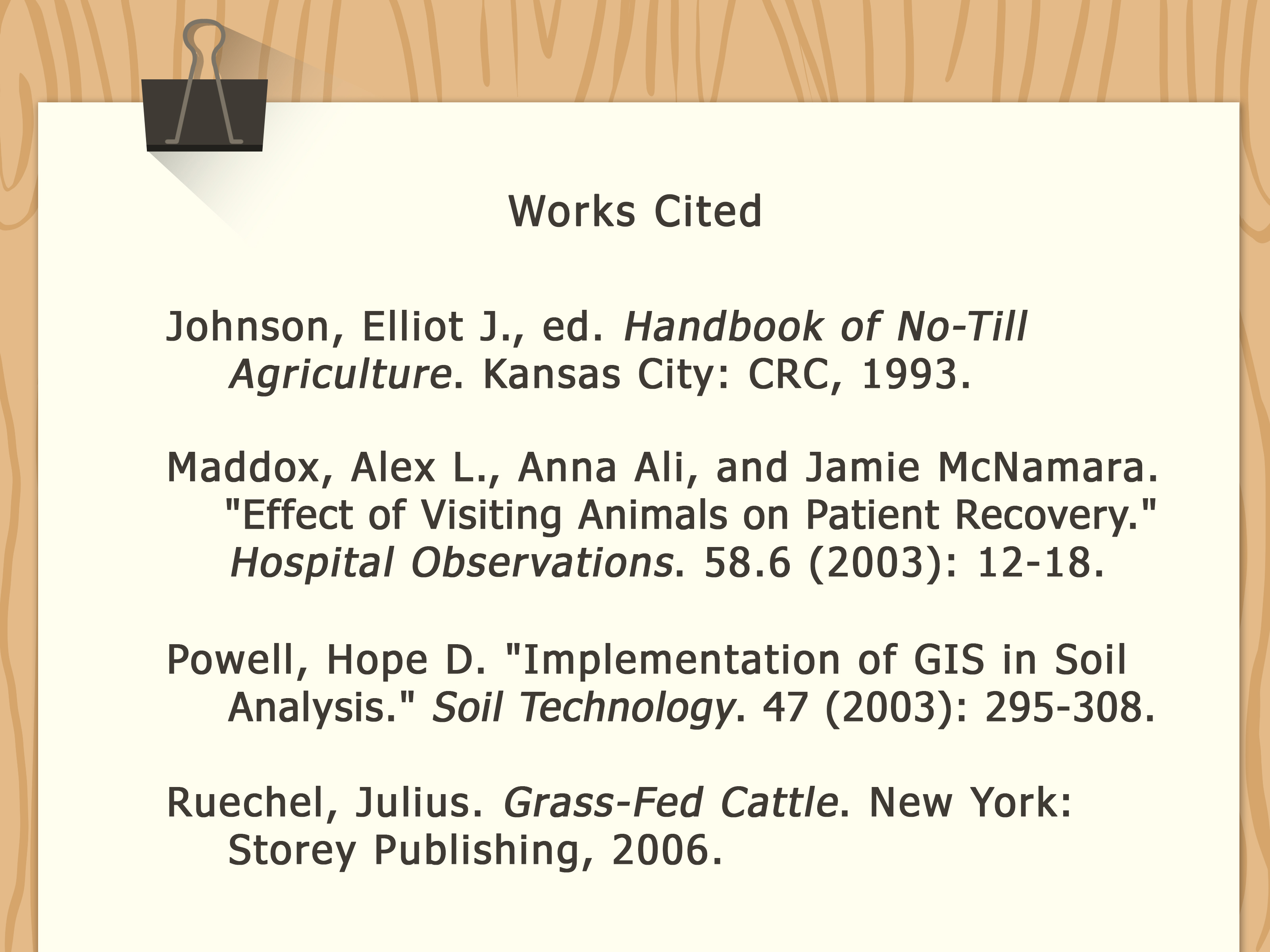
The Works Cited page is the list of all sources you actually cited in your paper. It appears at the end of the paper on a separate page. Every source mentioned in your in-text citations should have a matching Works Cited entry, and every Works Cited entry should connect to a citation in the paper.
In MLA format, the page title is simply:
Center the title. Do not bold it, italicize it, underline it, put it in quotation marks, or decorate it like a birthday cake. MLA likes clean formatting.
Basic MLA Works Cited Formatting Rules
Follow these basic rules for the Works Cited page:
- Start it on a new page at the end of your paper.
- Title the page Works Cited.
- Alphabetize entries by the first word of each entry, usually the author’s last name.
- Double-space the entire list.
- Use a hanging indent, meaning the first line begins at the left margin and later lines are indented.
- End each entry with a period.
The MLA Core Elements
MLA Works Cited entries are built from core elements. Not every source has every element, but the usual order is:
- Author.
- Title of source.
- Title of container,
- Other contributors,
- Version,
- Number,
- Publisher,
- Publication date,
- Location.
The “container” is the larger work that holds the source. For example, an article may be inside a journal, a poem may be inside an anthology, and a video may be on a website. The container is not trying to be confusing. It is just MLA’s way of saying, “Where does this thing live?”
MLA Book Citation Example
Basic format for a book by one author:
Example:
In-text citation:
MLA Website Citation Example
Basic format for a web page:
Example:
In-text citation:
If no author is listed, begin with the title of the page.
In-text citation:
MLA Journal Article Citation Example
Basic format for a scholarly journal article:
Example:
In-text citation:
MLA Video Citation Example
Videos can include creators, performers, channels, platforms, publishers, dates, and URLs. Use the details that help readers find the exact source.
In-text citation:
MLA Citation for a Source in a Container
Here is how the container idea works. Suppose you cite an essay from an edited collection. The essay is the source; the book is the container.
In-text citation:
Way 3: Use MLA Citation Tools, Templates, and Checklists Wisely
Why Citation Tools Help
MLA citation tools can save time, especially when you are juggling ten sources, three tabs, a half-finished outline, and a snack that somehow became dinner. Citation generators and templates can help you collect source details and arrange them in MLA order.
However, tools are helpers, not final judges. Citation generators can make mistakes when source information is missing, mislabeled, outdated, or pulled from a messy web page. Always review the final citation before submitting your paper.
Use the MLA Template Method
The best way to avoid panic is to think like MLA. Ask these questions:
- Who created the source?
- What is the title of the source?
- Is the source inside a larger container?
- Are there editors, translators, directors, or performers to name?
- Is there a version, volume, issue, or edition?
- Who published it?
- When was it published or updated?
- Where can readers find it?
Once you answer those questions, place the elements in MLA order. Skip elements that do not apply. The goal is not to fill every slot; the goal is to give readers enough accurate information to locate the source.
Use Citation Generators Carefully
Popular citation tools can format MLA citations quickly, but you should still check for common errors:
- Missing authors or incorrect author order
- Wrong capitalization in titles
- Missing publication dates
- URLs with unnecessary tracking codes
- Website names confused with article titles
- Incorrect italics or quotation marks
- Entries not alphabetized correctly
A citation generator is like autocorrect: useful, fast, and occasionally convinced that you meant something ridiculous.
Build Your Own MLA Citation Checklist
Before turning in your paper, use this quick MLA checklist:
- Every quote, paraphrase, and summary has an in-text citation.
- Every in-text citation matches a Works Cited entry.
- Every Works Cited entry is actually cited in the paper.
- The Works Cited list is alphabetical.
- The page uses hanging indents.
- Book and website titles are italicized.
- Article, poem, essay, and page titles are in quotation marks.
- Page numbers use “p.” for one page and “pp.” for multiple pages.
- URLs, DOIs, or stable links are included when needed.
- Your instructor’s special rules are followed.
Common MLA Citation Mistakes to Avoid
Mistake 1: Citing the Homepage Instead of the Exact Page
If you used a specific article, cite that article, not just the website homepage. “I found it somewhere on the internet” is not a citation strategy; it is a cry for help.
Mistake 2: Forgetting the Works Cited Entry
An in-text citation is only half the job. Readers need the full source information in the Works Cited list. If your paper says (Nguyen 48), your Works Cited page must include a source beginning with Nguyen.
Mistake 3: Over-Citing Common Knowledge
You do not need to cite widely known facts, such as “William Shakespeare wrote plays.” But you should cite specific interpretations, statistics, unusual claims, and information taken from a source. When in doubt, cite. It is better to be slightly overprepared than academically mysterious.
Mistake 4: Dropping Quotes Without Context
Do not drop a quotation into a paragraph and run away. Introduce it, cite it, and explain why it matters. A good quote should support your point, not do your thinking for you.
Mistake 5: Mixing MLA With APA or Chicago
MLA uses author-page citations, not author-date citations. That means (Smith 42) is MLA, while (Smith, 2022, p. 42) is APA. Mixing styles makes your paper look like it got dressed in the dark.
How to Cite Sources in MLA Format: Quick Examples
Book
Essay in a Collection
Website Page
Journal Article
Video
500-Word Experience Section: What Learning MLA Citations Feels Like in Real Life
Learning MLA format is one of those student experiences that seems small until you are staring at a Works Cited page at midnight, wondering whether a comma has personally betrayed you. The first time many students cite sources in MLA format, they usually focus on the visible details: parentheses, periods, italics, quotation marks, and the famous hanging indent. At first, it feels like formatting gymnastics. But after a few assignments, the deeper purpose starts to make sense.
One common experience is the “author-page awakening.” A student may begin by writing a sentence like, “Studies show that reading improves vocabulary,” then realize the reader will ask, “Which studies?” MLA forces the writer to answer that question. Adding a citation such as (Lopez 34) may look tiny, but it changes the sentence from vague to traceable. The paper suddenly has a trail of evidence instead of a cloud of confidence.
Another real-life lesson is that not all sources are equally easy to cite. A printed book is usually calm and predictable. Author, title, publisher, year: done. A website, however, can behave like a squirrel in a keyboard factory. The author might be missing. The date might be hidden. The publisher might be the same as the website title. The URL may stretch across the screen like a jump rope. This is where MLA’s core elements become useful. Instead of panicking, you gather what is available and arrange it logically.
Students also learn that citation is part of the writing process, not something to sprinkle on at the end like academic parsley. The best experience is to collect citation information while researching. Copy the title, author, publication date, URL, and page numbers as soon as you decide a source might be useful. Waiting until the final draft often leads to detective work, browser-history archaeology, and dramatic sighing.
Teachers and tutors often see the same breakthrough moment: once students understand that in-text citations and Works Cited entries are partners, MLA becomes easier. The in-text citation is the quick signpost. The Works Cited entry is the full address. One says, “Go look under this name.” The other says, “Here is exactly where the source lives.” That partnership is the heart of MLA format.
The most practical advice from experience is simple: cite as you go, use reliable models, and double-check the final list. Do not rely blindly on citation generators, but do not avoid them either. They are useful when paired with human attention. MLA citation is not about perfection for its own sake. It is about respect: respect for sources, respect for readers, and respect for your own argument. Once that clicks, MLA stops feeling like a punishment invented by English teachers and starts feeling like a tool that helps your writing stand upright.
Conclusion
MLA format becomes much easier when you break it into three practical habits. First, use clear in-text citations that point readers to your sources. Second, build a complete Works Cited page with accurate entries in MLA order. Third, use templates, citation generators, and checklists wisely, but always review the results yourself.
The goal of MLA citation is not to make students suffer over punctuation, although it may occasionally feel that way. The real goal is to make research transparent. When readers can see where your evidence came from, your argument becomes stronger, your writing becomes more trustworthy, and your paper looks polished instead of patched together five minutes before the deadline.
Note: This article is based on current MLA 9 citation principles and reputable U.S. academic writing resources. Always follow your instructor’s specific assignment requirements when they differ from general MLA guidance.