Gaming has a funny way of exposing every weak link in your home internet setup. Your streaming app may forgive a shaky connection, your smart fridge may quietly accept its fate, and your phone will simply hop to cellular like a tiny coward. But an online match? It will call you out immediately. One lag spike, one rubber-band teleport, one suspiciously late hit marker, and suddenly your modem becomes the household villain.
The best modems for gaming are not magic boxes that turn a 50 Mbps plan into a fiber-grade esports pipeline. What they can do is give your cable internet connection a cleaner, faster, more stable path into your router. For serious players, that matters. A good gaming internet modem should support DOCSIS 3.1, handle gigabit or multi-gig speeds, offer a strong Ethernet port, work with your cable provider, and avoid becoming a bottleneck when your household is gaming, streaming, downloading patches, and pretending that a 90GB update is “just a quick install.”
This guide focuses on cable modems for gaming, not fiber ONTs, DSL modems, or 5G home internet gateways. If your provider is Xfinity, Spectrum, Cox, Optimum, Mediacom, or another cable ISP, these models are the ones worth knowing. Some are pure standalone modems, which are best for gamers who want to pair them with a powerful gaming router. Others are modem-router combos for people who want fewer boxes, fewer cables, and fewer mysterious blinking lights.
Quick Picks: Best Gaming Internet Modems
- Best overall: ARRIS SURFboard S34
- Best for high-split and multi-gig gaming: NETGEAR Nighthawk CM3000
- Best budget DOCSIS 3.1 modem: Hitron CODA56
- Best proven all-around pick: ARRIS SURFboard S33
- Best simple multi-gig modem: Motorola MB8611
- Best for standard gigabit plans: ARRIS SURFboard SB8200
- Best for Xfinity Voice users: NETGEAR Nighthawk CM2050V
- Best modem-router combo for gaming households: ARRIS SURFboard G54
What Makes a Modem Good for Gaming?
Gamers often chase download speed, but the bigger story is stability. A 2 Gbps plan sounds impressive, but a stable 400 Mbps connection with low latency can feel better in actual gameplay than a faster plan that suffers from congestion, weak equipment, or poor signal levels. Your modem does not create low ping by itself, but it can help prevent avoidable slowdowns.
DOCSIS 3.1 Is the Sweet Spot
For cable internet, DOCSIS 3.1 is the standard most gamers should target. It supports higher downstream capacity, better efficiency, and modern features such as OFDM channels. In plain English: it is built for faster, busier internet connections. DOCSIS 3.0 can still work for lower-speed plans, but buying one today for gaming is like showing up to a LAN party with a flip phone. Technically bold, emotionally questionable.
A 2.5GbE Port Helps Prevent Bottlenecks
If your internet plan is faster than 1 Gbps, a modem with only a 1GbE Ethernet port can cap the speed before it even reaches your router. A 2.5GbE port is ideal for gigabit-plus and multi-gig plans. Even if your current plan is not that fast, a 2.5GbE modem gives you room to upgrade later without replacing hardware again.
Separate Modem and Router Is Usually Better
Most competitive gamers should choose a standalone modem and a separate router. That gives you more control over Wi-Fi settings, Quality of Service, wired backhaul, mesh upgrades, and router placement. Modem-router combos can be convenient, but they are harder to upgrade piece by piece.
The 8 Best Modems for Gaming
1. ARRIS SURFboard S34 – Best Overall Gaming Modem
The ARRIS SURFboard S34 is one of the strongest choices for gamers who want a modern, compact, no-drama DOCSIS 3.1 cable modem. It supports cable internet speed plans up to 2.5 Gbps and includes both a 2.5GbE Ethernet port and a 1GbE port. That makes it a great match for high-speed cable plans and powerful Wi-Fi 6E or Wi-Fi 7 routers.
For gaming, the S34 hits the sweet spot: it is fast enough for multi-gig service, modern enough for upgraded cable networks, and simple enough that you are not stuck babysitting a complicated gateway. There is no built-in Wi-Fi, which is actually a benefit if you already own a quality gaming router from ASUS, NETGEAR, TP-Link, Eero, Ubiquiti, or another brand.
Best for: gamers who want the best balance of speed, compatibility, and future readiness.
Skip it if: you need built-in Wi-Fi or phone service.
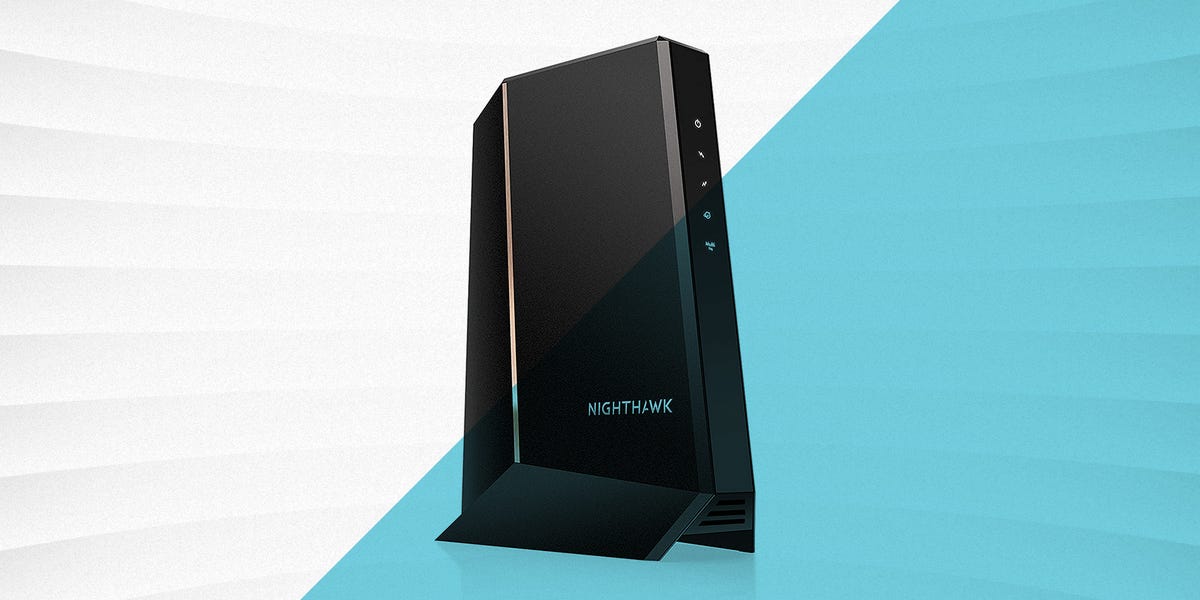
2. NETGEAR Nighthawk CM3000 – Best for High-Split and Multi-Gig Gaming
The NETGEAR Nighthawk CM3000 is built for gamers and power users who want to prepare for faster cable networks. It is a DOCSIS 3.1 modem with a 2.5GbE connection and mid/high-split support, making it especially interesting for households on upgraded cable systems where upload speed matters more than it used to.
Why should gamers care about upload speed? Because gaming is not only about downloading huge updates. Your system also sends constant data back to game servers. Streaming on Twitch, joining Discord calls, backing up clips, and running cloud saves all use upload capacity. A modem that supports stronger upstream performance can help keep the connection smoother when multiple devices are active.
The CM3000 is not the cheapest option, but it is one of the most forward-looking standalone cable modems available. Pair it with a strong router and wired Ethernet to your console or gaming PC, and you have a setup that feels ready for the next few years of cable internet upgrades.
Best for: competitive gamers, streamers, and multi-gig cable subscribers.
Skip it if: your plan is under 500 Mbps and you do not expect to upgrade.
3. Hitron CODA56 – Best Budget DOCSIS 3.1 Gaming Modem
The Hitron CODA56 is the modem for people who want modern performance without paying “new GPU launch day” prices. It is a DOCSIS 3.1 modem with a 2.5GbE Ethernet port, and it is designed for multi-gig cable internet plans. It has also earned attention because it can be a cost-effective option for users who want faster uploads on supported networks.
For gaming, the CODA56 is appealing because it focuses on the essentials: modern cable standard, fast Ethernet, and no unnecessary extras. It does not have built-in Wi-Fi, so you will need a separate router. That is usually the better route anyway, especially if you care about router features such as device prioritization, gaming modes, mesh expansion, and wired Ethernet performance.
The biggest reason to consider the CODA56 is value. It gives you many of the features gamers should want in a modern modem while often costing less than premium alternatives. That leaves more budget for a better router, longer Ethernet cable, or, let’s be honest, another controller after someone “accidentally” drops one during overtime.
Best for: gamers who want DOCSIS 3.1 and 2.5GbE at a sensible price.
Skip it if: your ISP does not list it as compatible for your exact plan.
4. ARRIS SURFboard S33 – Best Proven All-Around Gaming Modem
The ARRIS SURFboard S33 has been one of the most popular DOCSIS 3.1 modems for good reason. It supports multi-gig cable plans, includes a 2.5GbE port plus an additional 1GbE port, and works with major U.S. cable providers. It is compact, clean-looking, and widely used by people who prefer a standalone modem instead of renting an ISP gateway.
For gamers, the S33 is a dependable pick because it avoids gimmicks. No built-in Wi-Fi. No overloaded app ecosystem. No giant spaceship antenna design. Just a capable modem that pairs nicely with the router of your choice. If you already have a serious router and want a modem that will not hold it back, the S33 remains a strong option.
The one thing to check is whether your ISP supports this model for the exact speed tier you want, especially if you are chasing enhanced upload speeds. Compatibility can vary by provider and region, so verify before buying.
Best for: gamers who want a reliable, widely respected DOCSIS 3.1 modem.
Skip it if: another newer model is specifically recommended for your provider’s upgraded upload tiers.
5. Motorola MB8611 – Best Simple Multi-Gig Modem
The Motorola MB8611 is a straightforward DOCSIS 3.1 cable modem with a 2.5GbE Ethernet port. It is designed for fast cable internet plans and pairs with any Wi-Fi router, which makes it a flexible choice for gaming households. It is also backward compatible with DOCSIS 3.0 networks, so it can still work in areas where the cable network has not fully moved into its next era.
What makes the MB8611 attractive is its simplicity. It is not trying to be your router, your phone adapter, your smart home hub, or your emotional support device. It is a modem. It connects your cable line to your router and gets out of the way. That is exactly what many gamers want.
The MB8611 is especially worth a look if your provider supports it for your speed tier and you want a clean single-port setup. For the best experience, connect it to a router with a 2.5GbE WAN port; otherwise, you may lose some of the benefit of the modem’s faster Ethernet connection.
Best for: gamers who want a no-nonsense 2.5GbE modem.
Skip it if: you need multiple Ethernet ports on the modem itself.
6. ARRIS SURFboard SB8200 – Best for Standard Gigabit Plans
The ARRIS SURFboard SB8200 is not the newest flashiest modem in the room, but it remains a respected DOCSIS 3.1 option for standard gigabit cable plans. It includes two 1GbE Ethernet ports and has built a reputation for reliability over time.
For gaming, the SB8200 makes sense if your internet plan is around 1 Gbps or below and you do not need a 2.5GbE port. It can be a smart buy when priced well, especially for users who want to stop paying monthly modem rental fees without overbuying. Not every gamer needs multi-gig internet. Most online games use surprisingly little bandwidth once you are in a match; they just need the connection to be stable.
Where the SB8200 falls behind newer models is future-proofing. If your plan is above 1 Gbps, or if you expect to upgrade soon, choose a modem with a 2.5GbE port instead.
Best for: standard gigabit gamers who want proven reliability.
Skip it if: you are paying for speeds above 1 Gbps.
7. NETGEAR Nighthawk CM2050V – Best for Xfinity Voice Users
The NETGEAR Nighthawk CM2050V is a specialized modem for a specific type of user: someone who has Xfinity internet and voice service but does not want to rent an Xfinity gateway. It supports DOCSIS 3.1, offers a 2.5GbE Ethernet port, and includes telephone ports for Xfinity Voice service.
For gaming, the CM2050V is not necessarily better than a CM3000 or S34 if all you need is internet. Its advantage is that it lets certain Xfinity households keep voice service while still using their own modem and separate router. That can reduce rental fees and give you more control over your network.
If you do not use Xfinity Voice, you probably do not need this model. But if your household still relies on a home phone line, this modem solves a very real problem without forcing you into an ISP-owned gateway.
Best for: Xfinity internet customers who also need voice support.
Skip it if: you do not have Xfinity Voice.
8. ARRIS SURFboard G54 – Best Modem-Router Combo for Gaming Households
The ARRIS SURFboard G54 is the premium all-in-one option in this list. It combines a DOCSIS 3.1 cable modem with a Wi-Fi 7 router, making it one of the most advanced modem-router combos available for cable internet users. It includes a 10GbE port plus four 1GbE ports, and its Wi-Fi 7 capability makes it attractive for households with many modern devices.
For serious competitive gaming, a standalone modem plus a separate high-end router is still usually the cleaner upgrade path. However, the G54 makes sense if you want one device, strong Wi-Fi coverage, and fewer boxes on your desk. It is especially useful in homes where gaming is only one part of the traffic mix: 4K streaming, remote work, video calls, smart TVs, phones, tablets, and that one laptop that somehow needs an update every morning.
The G54 is expensive, so it is best for people who actually need a combined modem and premium router. If you already own a great router, buy a standalone modem instead.
Best for: households that want a powerful all-in-one cable gateway.
Skip it if: you prefer upgrading your modem and router separately.
Gaming Modem Buying Guide
Check ISP Compatibility First
Before buying any modem, check your internet provider’s approved modem list. This step is boring, but so is returning a modem after spending two hours wondering why activation failed. Xfinity, Spectrum, Cox, Optimum, and other cable providers may support different models depending on your location and plan. A modem can be technically excellent and still not be approved for your exact service tier.
Match the Ethernet Port to Your Plan
If your plan is 1 Gbps or less, a modem with a 1GbE port can be enough. If your plan is 1.2 Gbps, 2 Gbps, or faster, choose a modem with a 2.5GbE port or better. Also make sure your router has a matching 2.5GbE WAN port. Otherwise, the modem may be ready for multi-gig speeds while your router politely blocks the doorway.
Do Not Ignore Upload Speed
Download speed gets the marketing spotlight, but upload speed matters for gaming, livestreaming, cloud backups, video calls, and sending gameplay clips. If your cable provider offers enhanced upload tiers, look for modems that support mid-split or high-split features and are approved by your ISP for those speeds.
Use Ethernet for Your Main Gaming Device
A better modem helps, but wired Ethernet is still king for gaming. If possible, connect your console or gaming PC directly to your router with Ethernet. Wi-Fi has improved dramatically, especially with Wi-Fi 6E and Wi-Fi 7, but a cable connection is still the simplest way to reduce interference, signal drops, and random household chaos.
Remember That Modems Do Not Fix Every Lag Problem
A modem cannot fix bad game servers, overloaded Wi-Fi, poor router settings, weak coax signal, or your roommate downloading an entire game library during ranked play. Think of the modem as the foundation. It needs to be solid, but the rest of the network still matters.
Standalone Modem vs Modem-Router Combo for Gaming
A standalone modem is usually the better choice for gamers who want maximum control. You can pair it with a gaming router, mesh system, or prosumer network setup. When Wi-Fi standards improve, you can replace the router without touching the modem. When your cable provider changes speed tiers, you can upgrade the modem without replacing your whole Wi-Fi system.
A modem-router combo is better for simplicity. It reduces clutter and can be easier for families that do not want to manage multiple devices. The trade-off is flexibility. If the Wi-Fi side becomes outdated, you may need to replace the entire unit. For casual gaming households, that may be fine. For competitive players, separate gear is usually worth it.
My Practical Experience With Gaming Modems
After dealing with enough gaming network problems, I have learned that the modem rarely gets attention until something goes wrong. Everyone blames the router first. Then they blame the console. Then they blame the game. Then, after a dramatic speed test session and a suspicious number of unplug-replug rituals, someone finally looks at the modem sitting in the corner like a forgotten toaster.
The biggest lesson is that consistency beats headline speed. I have seen households upgrade to a much faster plan and still complain about lag because their modem, router, and cabling were not matched properly. A 1.2 Gbps plan connected through a modem or router port that tops out at 1GbE will never deliver the full speed to the network. It may still work, but you are paying for performance your equipment cannot fully pass along. That is like buying a sports car and only driving it in a parking lot.
The second lesson is that ISP compatibility is not optional. It is tempting to buy the modem with the biggest number on the box, but cable providers control activation and firmware support. A modem that looks perfect on paper can become a headache if it is not approved for your provider or your specific speed tier. Before buying, search your provider’s current compatible modem list, enter your address if the tool allows it, and confirm whether the modem supports your plan’s download and upload speeds.
The third lesson is that gamers should pay more attention to upload performance than they usually do. If you only play online games, upload usage is modest. But real gaming households rarely do just one thing. One person is playing, another is streaming Netflix, someone is in a video call, a phone is backing up photos, and a console is downloading a patch the size of a small planet. When upload bandwidth gets crowded, the whole connection can feel worse. A modem that supports modern upstream features on an upgraded cable network can make the experience smoother.
The fourth lesson is that modem placement and coax quality matter more than people think. A modem connected through old splitters, loose coax, or a weak signal path can create problems that look like router issues. If your connection drops, your modem reboots randomly, or your speed swings wildly throughout the day, check the coax line, remove unnecessary splitters, and ask your provider to verify signal levels. Sometimes the “best gaming modem” is the one connected to a clean line.
The fifth lesson is simple: do not rent forever if buying makes financial sense. Many cable providers charge monthly equipment fees. Buying your own modem can pay for itself over time, especially if you plan to keep the same provider. The exception is when your ISP includes equipment for free, requires its gateway for certain features, or offers support benefits you actually use. For many gamers, however, owning a modem and choosing a separate router creates a better long-term setup.
Finally, treat your network like gaming hardware. You would not pair a high-end graphics card with a weak power supply and hope for the best. In the same way, do not pair a fast internet plan with an outdated modem, a bargain-bin router, and a mystery Ethernet cable from 2009. Choose a DOCSIS 3.1 modem, match the Ethernet ports properly, wire your main gaming system when possible, and keep your router firmware updated. Your kill-death ratio may not instantly become heroic, but at least your modem will no longer be the easiest thing to blame.
Final Verdict
For most gamers, the ARRIS SURFboard S34 is the best overall gaming modem because it combines DOCSIS 3.1, 2.5GbE performance, broad cable-provider compatibility, and a clean standalone design. The NETGEAR Nighthawk CM3000 is the stronger premium pick for high-split and multi-gig users, while the Hitron CODA56 is the value champ for budget-conscious gamers who still want modern hardware.
If you already have a great router, buy a standalone modem. If you want one box and cutting-edge Wi-Fi, consider the ARRIS SURFboard G54. No matter which model you choose, confirm ISP compatibility before checkout, use Ethernet for your main gaming device, and remember that a good modem is not about bragging rights. It is about fewer lag spikes, smoother matches, and fewer moments where your character freezes in place like they just remembered they left the oven on.
Note: Always verify modem compatibility with your specific cable provider and speed tier before purchasing, because approved-device lists and upload-speed support can vary by location.