Getting locked out of Snapchat feels a little like showing up to your own birthday party and finding out your name is not on the guest list. Annoying? Absolutely. Permanent? Not always. The good news is that many Snapchat lockouts can be fixed with official recovery steps, a little patience, and a firm refusal to trust random “unlock experts” lurking in the corners of the internet.
This complete guide explains how to unlock your Snapchat account the right way, what different lock messages actually mean, how to recover access after suspicious activity, and how to keep your account from getting locked again. No sketchy shortcuts. No fake hacker nonsense. Just real, practical steps that work.
Why Snapchat Locks Accounts in the First Place
Before you can unlock a Snapchat account, it helps to know what probably triggered the lock. Snapchat does not usually lock accounts just for fun, unless its servers woke up on the wrong side of the bed. More often, the lock happens because its systems detect unusual activity, a security risk, or a possible violation of its rules.
Common reasons your Snapchat account may be locked
- Too many login attempts in a short time. Repeatedly entering credentials can trigger a temporary disablement.
- Using unauthorized third-party apps or plugins. If you connected Snapchat to unofficial tools, your account can be temporarily or permanently affected.
- Suspicious or compromised account activity. Unrecognized logins, spam, strange messages, or profile changes can lead Snapchat to lock the account for safety.
- Violations of Community Guidelines or Terms of Service. In more serious cases, Snapchat may permanently lock the account.
- Verification problems. Sometimes the issue is not a lock at all, but trouble getting a login or SMS code.
- Service or network problems. A login error can sometimes be caused by an outage or a network issue rather than a true account ban.
The biggest mistake people make is assuming every lockout means the account is gone forever. That is not always true. Snapchat treats temporary locks, permanent locks, compromised accounts, and login-code issues differently, so your fix depends on the message you see.
Temporary Lock vs. Permanent Lock: Know the Difference
This is the part where many users panic, Google seventeen different things, and somehow end up on a forum from 2019. Slow down. Start by identifying what kind of lock you are dealing with.
Temporary Snapchat lock
If Snapchat says your account is temporarily locked, you may be able to restore access yourself. In many cases, the official path is to log into the Snapchat Accounts Portal and choose the Unlock option. If the lock was caused by too many login attempts or another temporary security issue, Snapchat may also require you to wait before trying again.
In plain English: do not keep hammering the login button like it owes you money. Repeated attempts can make the situation worse.
Permanent Snapchat lock
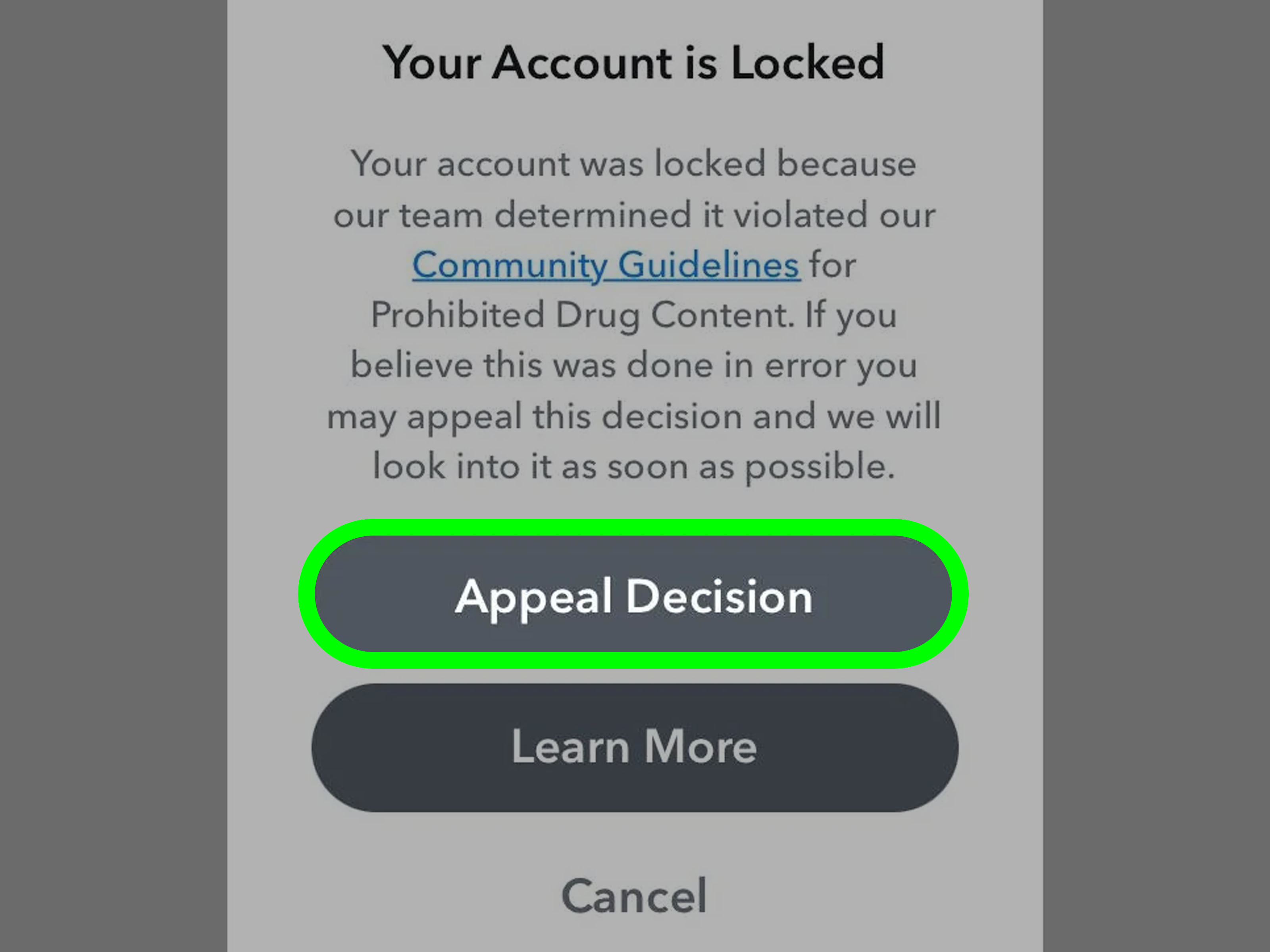
If Snapchat says your account is permanently locked, the situation is more serious. You usually cannot unlock it through the regular web portal. In some eligible cases, Snapchat shows an Appeal Decision option inside the app. If that option appears, use it. If it does not, your options are limited, and unofficial “recovery services” are not legitimate.
Compromised account lock
If Snapchat locked the account because it may have been hacked or accessed by someone else, the goal is not just to unlock it. The goal is to get it back safely. That means changing the password, checking sessions, verifying your email and phone number, and securing the account before the same problem happens again.
How to Unlock a Temporarily Locked Snapchat Account
If your Snapchat account is temporarily locked, follow these steps in order. That “in order” part matters. This is not a buffet.
Step 1: Remove anything unofficial
If you were using third-party Snapchat apps, plugins, tweaks, or anything that asked for your Snapchat login outside the official app, uninstall it first. Snapchat explicitly warns that unauthorized tools put accounts at risk. Even if the app promised harmless extras, like downloading content or special features, it may have triggered the lock.
Step 2: Update the Snapchat app
Make sure you are using the latest version of Snapchat. Old app versions can cause login issues, conflict with security checks, or make troubleshooting harder than it needs to be.
Step 3: Use the official unlock route
Go to the official Snapchat Accounts Portal and choose Unlock. If your account is eligible for self-service recovery, this is the fastest official method.
Step 4: Wait if Snapchat tells you to wait
If Snapchat says your access is temporarily disabled because of repeated login attempts or another short-term issue, wait before trying again. Snapchat support guidance commonly points to a 48-hour wait for some temporary access problems. It is not glamorous, but it beats getting stuck in a loop of failed logins.
Step 5: Try a stable network
If login errors continue, switch to a reliable Wi-Fi or mobile connection. Sometimes the problem is not your account. It is your network, the app, or a Snapchat-side service issue. If you see unusual errors and everything seems broken at once, consider the possibility that Snapchat is having an outage.
How to Appeal a Permanently Locked Snapchat Account
If your account is permanently locked, do not waste time hunting for magic words, backdoor forms, or “premium unlock” strangers. The official appeal process, when available, happens inside the Snapchat app.
What to do
- Open the Snapchat app.
- Attempt to log in.
- Look for the Appeal Decision button on the lock notice.
- Submit your appeal through the app.
Be honest and concise in any appeal. If the lock came from a misunderstanding, explain that clearly. If the lock followed suspicious activity, say so. If you used an unauthorized app and removed it, state that plainly. Dramatic speeches about how your streaks are your emotional support animals are unlikely to help.
What not to do
- Do not pay anyone claiming they can unlock the account.
- Do not use fake support pages.
- Do not create multiple duplicate tickets hoping one will hit the jackpot.
- Do not attempt unofficial workarounds for device-ban errors.
If Snapchat does not show the in-app appeal option, you may not have access to that recovery path. That is frustrating, but it is still safer than handing your account details to a scammer.
What to Do If Your Snapchat Account Was Hacked or Compromised
Sometimes the lock is actually a security seatbelt. If Snapchat noticed suspicious activity, it may have locked your account to stop further damage. In that case, getting back in is only half the job.
Signs your Snapchat account may be compromised
- You got a login alert you did not request.
- Friends received spam or strange messages from you.
- Your Story or Spotlight content changed without your permission.
- You see devices or sessions you do not recognize.
- Your email, phone number, or other account information was changed.
Recovery checklist for a hacked Snapchat account
- Reset your password immediately. Use a new, unique password or passphrase.
- Sign out of unknown sessions. Review Session Management and remove unfamiliar devices or browsers.
- Verify your email and mobile number. Make sure both are current and belong to you.
- Turn on stronger protection. Enable two-factor authentication and generate a recovery code.
- Add a passkey if available on your device. This gives you another secure sign-in option.
- Do not share login codes with anyone. Not with a “support agent,” not with a “friend helping you,” not with that suspicious message using twelve red siren emojis.
If you clicked a suspicious link before the problem started, treat that as a red flag. Consumer and cybersecurity guidance recommends changing passwords immediately, signing out of other sessions, and being extra cautious about phishing follow-ups. Attackers love the sequel almost as much as Hollywood does.
How to Fix Snapchat Login Code and Verification Problems
Not every failed login means your account is locked. Sometimes the real issue is the verification step.
If you are not receiving an SMS code
- Wait a few minutes and request a new code.
- Check that your phone has signal.
- Make sure SMS from unknown senders is not blocked.
- Try the call option if Snapchat offers it.
If you see “Too many requests”
Snapchat says this usually happens when too many verification codes are requested in a short period. The official advice is to wait 24 hours before trying again. It is irritating, yes, but refreshing the request button twenty more times is not the plot twist you want.
If you lost access to your 2FA method
If you turned on two-factor authentication and no longer have access to the phone number or authenticator app you used, a Recovery Code can help you log back in. The catch is that the code must have been created before the problem happened. If you use a recovery code to sign in, Snapchat may turn off 2FA automatically, so go back into settings and re-enable it afterward.
How to Keep Your Snapchat Account from Getting Locked Again
Once you are back in, do not just celebrate and wander off. Lockouts often come back when the original cause was never fixed. A smart recovery plan includes prevention.
Best ways to protect your Snapchat account
- Use a unique password. Do not recycle the same password across Snapchat, email, and six other apps.
- Turn on two-factor authentication. An authenticator app is generally stronger than SMS-only protection.
- Generate and store a recovery code safely. Not in a random screenshot folder named “stuff.”
- Add a passkey if your device supports it. This can make sign-in both easier and more secure.
- Keep your email and phone number current. Old contact info creates recovery headaches.
- Review active sessions regularly. If you do not recognize a device, sign it out.
- Avoid third-party apps and plugins. This is one of the fastest ways to get relocked.
- Be suspicious of urgency. Real security messages do not need you to panic first and think later.
Why stronger login security matters
Security experts consistently recommend stronger sign-in methods because password-only protection is fragile. If someone steals or guesses your password, that should not be the end of the story. Two-factor authentication, passkeys, verified contact details, and recovery options give you a much better chance of keeping control of the account.
Quick Troubleshooting Checklist
If you want the short version, here it is:
- Confirm whether the issue is a temporary lock, permanent lock, compromised account, or code problem.
- Remove unauthorized third-party Snapchat apps or plugins.
- Update Snapchat.
- Use the official Unlock option if available.
- Wait 48 hours for some temporary lockouts.
- Reset your password if you suspect hacking.
- Review Session Management and log out unrecognized devices.
- Verify your email and phone number.
- Use the in-app appeal option if Snapchat offers it for a permanent lock.
- Set up 2FA, a recovery code, and a passkey once you regain access.
Real-World Experiences: What Locked Snapchat Accounts Usually Look Like
Here is where the topic gets very human. Most people do not discover Snapchat account security while sipping tea and reading support pages for fun. They discover it at the exact worst moment: when they are traveling, switching phones, trying to reply to a message, or waking up to a login alert that makes their stomach drop.
One common experience starts with something innocent: a user forgets a password, guesses wrong a few times, resets it on one device, then tries to log in on another. Suddenly Snapchat says access is temporarily disabled. Panic begins. The user assumes they were hacked, but the issue is often just repeated login attempts. In cases like that, the boring solution wins: wait, use the official account portal, and stop rapid-fire retries.
Another familiar story involves third-party apps. A user downloads a tool that promises extra filters, easier saving, analytics, or some mystery feature that sounds cooler at midnight than it does in daylight. Then the account gets locked. By the time they search for help, they realize the “helpful” app was exactly the problem. The lesson is painfully consistent: unofficial Snapchat add-ons are not clever shortcuts. They are account-risk accelerators.
Then there is the hacked-account experience, which feels very different. Users often describe getting a login code they did not request, noticing messages they never sent, or seeing weird changes to their profile. Some find unfamiliar devices in their session list. In those moments, the lock can actually be a blessing in disguise. It forces a reset before more damage is done. The smartest users act fast: they change the password, sign out unknown sessions, check their recovery info, and turn on better protection immediately.
A surprisingly frustrating category involves phone numbers and verification. Someone changes carriers, loses access to an old number, or cannot receive SMS codes during a device upgrade. Suddenly 2FA becomes less “extra protection” and more “tiny digital bouncer blocking the door.” This is exactly why recovery codes, verified email addresses, and backup sign-in methods matter. Nobody plans to lose access to a phone number until they do.
And finally, there is the outage experience. A user cannot log in, the app throws a weird error, and they assume the account has been banned forever. Ten minutes later they discover Snapchat itself is having service trouble. Moral of the story: not every lock-feeling moment is a personal catastrophe. Sometimes the app is just having a dramatic episode on a much larger stage.
Across all these experiences, the same pattern shows up again and again. The safest path is the official one. The fastest-looking path is often the riskiest one. And the people who recover best are usually the ones who pause, verify what type of problem they actually have, and follow the real recovery steps instead of internet folklore.
Final Thoughts
If you need to unlock your Snapchat account, the key is matching the solution to the actual problem. A temporarily locked Snapchat account may respond to the official unlock option and a waiting period. A permanently locked account may require an in-app appeal, if Snapchat offers it. A compromised account needs a full security cleanup, not just a new password. And a code issue may be solved by fixing verification settings, using a recovery code, or simply waiting out a request limit.
The bottom line is simple: use official Snapchat recovery tools, avoid third-party apps, never share login codes, and lock down your account once you are back in. Your future self will thank you. Probably with a Snap.