PC speakers are supposed to be simple. Plug them in, turn the volume knob, enjoy music, games, podcasts, and the occasional accidental Windows sound at a volume loud enough to frighten the household pet. Yet many dessk surprisingly annoying: turning them off without losing the perfect volume setting.
That is the charm of an auto-sleep PC speaker hack. Instead of manually clicking a volume knob off every time you leave your desk, a small controller listens for silence and places the amplifier into a low-power shutdown state after a chosen delay. When audio returns, the speakers wake up automatically.
It sounds like a tiny convenience project, but it touches several useful engineering ideas: audio signal detection, microcontroller programming, amplifier standby pins, power-saving modes, wake-up latency, and the eternal battle against the mysterious thump that appears whenever electronics change state.
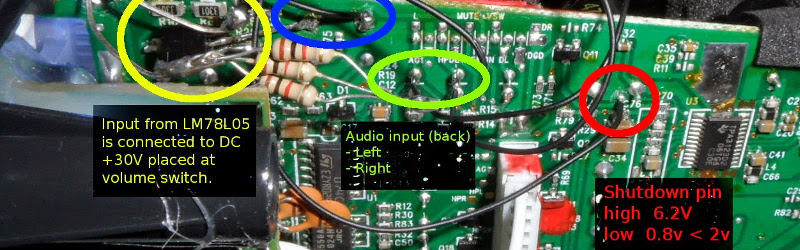
The original concept behind this type of modification was demonstrated on a pair of Creative T20 computer speakers. A compact ATtiny45 microcontroller monitored the rear audio input, waited for a sustained period of silence, and then controlled the amplifier’s shutdown function. The result was a speaker system that could preserve the preferred volume setting while acting a little smarter around an idle desk.
What Does an Auto-Sleep Hack for PC Speakers Actually Do?
An auto-sleep modification does not necessarily turn the entire speaker system completely off at the wall. Instead, it usually places the audio amplifier into a low-power state when no meaningful sound is detected.
Think of it as giving your speakers a tiny desk assistant. The assistant listens for music, video sound, game effects, conference calls, or notification noises. When nothing happens for a while, it tells the amplifier, “You can take a nap now.” When audio activity returns, the assistant wakes the amplifier before the next playlist, meeting, or dramatic movie trailer begins.
This is different from putting the computer itself to sleep. Windows, macOS, and Linux can manage system power states, but many powered speakers have their own independent amplifier circuits. A desktop PC may be fully awake while its speakers are idling, quietly consuming power and waiting for a sound signal that may not arrive for hours.
For some people, that idle behavior is harmless. For others, it is one more glowing LED in a home office that already resembles a tiny airport runway.
Why Add Auto-Sleep to Desktop Speakers?
The biggest reason is convenience. Many older PC speakers place the physical power switch inside the volume control. To turn the speakers off, you rotate the knob until it clicks. The problem is that the knob no longer remembers the preferred listening level. The next time you power up, you may need to hunt for the right volume again.
That is not a tragedy, of course. Nobody is writing a sad country song called “I Lost My Perfect Volume Setting”. Still, it becomes irritating when it happens every day.
An auto-sleep speaker modification can solve several practical problems:
- It keeps the physical volume setting in the same place.
- It reduces idle power use when the desk is unattended.
- It avoids repeated manual switching through a volume knob.
- It creates a more polished “smart speaker” experience for older hardware.
- It can add a visual status indicator, such as an LED that changes brightness during sleep mode.
Low-power design is not just a trendy sticker on a product box. Consumer electronics can draw energy even when they are not performing their main task. In a single speaker system, the savings may be modest, but the principle is useful: shut down what is not needed, keep only the minimum control circuitry awake, and wake quickly when real work returns.
The Clever Part: Detecting Silence Without Being Fooled
The central challenge in an automatic speaker standby circuit is deciding whether the audio signal is genuinely inactive. That sounds easy until you remember that audio is not a simple on-or-off signal.
Music can include quiet passages. Podcasts can contain pauses. Movies love suspenseful silence. Some game soundtracks go nearly silent for several minutes, apparently because the composer wants you to feel emotionally abandoned in a virtual forest.
If the circuit reacts too aggressively, the speakers may sleep during quiet audio. If it reacts too slowly, the system stays awake long after the user has left the desk. The trick is to detect meaningful signal activity while ignoring tiny electrical noise.
Monitoring the Audio Input
In the original Creative T20-style project, a small microcontroller monitored the left and right channels from the rear audio input. The controller used analog-to-digital conversion to observe changing audio levels. When the incoming signal remained below a threshold for a long enough period, the controller treated that as silence.
This approach is more flexible than using a simple fixed analog timer because software can decide how much silence is required. A maker can change the timeout from one minute to five minutes, ten minutes, or longer without rebuilding the entire circuit.
It also allows more intelligent logic. For example, the controller can require repeated low-level readings before triggering sleep mode. That helps prevent a speaker from shutting down because of one short quiet moment between songs.
Thresholds Matter More Than They Look
Every audio source has a different output level. A laptop headphone jack, USB DAC, Bluetooth receiver, game console, and desktop motherboard may all send different signal strengths into the same speaker system.
That means a threshold that works perfectly with one device may behave badly with another. A speaker auto-sleep circuit tuned for a loud desktop PC might assume a quiet smartphone is silent. Suddenly, the speaker begins nodding off halfway through an audiobook. Not ideal.
The best designs use adjustable thresholds or software values that can be tuned during testing. A practical setup may involve playing quiet music, normal music, podcasts, and movie dialogue while observing whether the controller correctly identifies activity.
Hysteresis Prevents the Sleep-Wake Wiggle Dance
Good auto-sleep designs often use hysteresis. This means the signal level required to wake the amplifier is slightly different from the signal level that allows it to sleep.
Without hysteresis, a weak audio signal near the threshold could make the system rapidly switch between active and standby states. The speaker may repeatedly wake, sleep, wake again, and generally behave like it has had too much espresso.
Using separate wake and sleep thresholds helps create stable behavior. A stronger signal wakes the amplifier. A much lower sustained level permits standby. The difference gives the circuit breathing room.
Using the Amplifier’s Shutdown or Mute Function
Many audio amplifier chips include control pins for functions such as mute, standby, or shutdown. These functions are not interchangeable, even though they may sound like they are all different ways of telling the speaker to be quiet.
Mute usually stops the audio output while leaving more of the amplifier circuitry active. Shutdown or standby typically reduces power consumption more aggressively, but it may require extra time to wake up.
That creates a tradeoff:
- Mute mode: Faster response, but usually less energy savings.
- Shutdown mode: Better power savings, but possibly slower wake-up.
- Full power disconnect: Maximum savings, but often more complex and more likely to create pops, clicks, or startup delays.
For a desktop speaker project, shutdown mode is often attractive because it reduces idle consumption while allowing the controller to remain active. However, the wake-up delay must be tested carefully. If the amplifier takes several seconds to recover, short Windows alerts, game notifications, and incoming call tones may be missed entirely.
That problem is common enough to be frustrating: speakers wake up just in time to play the last syllable of a notification. Congratulations, your PC has become a professional spoiler.
Why a Microcontroller Works So Well
A tiny microcontroller such as an ATtiny45 is a natural fit for this project. It is small, inexpensive, programmable, and capable of reading analog input levels while controlling a digital output.
Its job is simple:
- Read the audio activity level.
- Compare it with a configured threshold.
- Reset the silence timer whenever meaningful audio appears.
- Trigger standby after the timeout expires.
- Wake the amplifier when audio returns.
- Update an LED or button state for user feedback.
Microcontrollers can also use their own low-power modes. That means the controller does not need to run at full speed while the speakers are asleep. It can wake periodically, sample the input, and make a decision while consuming very little power itself.
This is the delightful irony of the project: a small chip stays awake so the larger amplifier can sleep.
The Multi-Input Problem: Rear Input Versus Front AUX
One of the most practical lessons from the original speaker hack is that input selection matters. The controller monitored the rear audio input, but the speakers also had a front AUX port.
If a phone or music player was connected only to the front AUX input, the controller would not see activity on the rear input. From the controller’s point of view, the system was silent. From the user’s point of view, the speakers were playing music and suddenly decided to take a nap in the middle of a song.
The solution was a manual override switch. When the front input was in use, the user could disable auto-sleep detection.
This is an excellent reminder for anyone designing a DIY PC speaker standby system: monitor the signal path that is actually active. If the speaker has multiple inputs, Bluetooth, USB audio, or an internal mixer, the sensing design must account for all relevant sources.
Safety First: Do Not Treat Every Speaker PCB the Same
Speaker modifications can be rewarding, but powered speakers are not beginner-friendly toys. Some systems contain mains-voltage sections, large capacitors, switching power supplies, and amplifier rails that can be much higher than the voltage used by a microcontroller.
Before connecting a controller to any amplifier control pin, verify the voltage range, logic behavior, grounding arrangement, and startup sequence. Do not assume that a pin is safe simply because it is labeled “shutdown” or “mute.” The original project involved a speaker amplifier control point that needed careful voltage consideration before interfacing it with a 5-volt microcontroller.
A safer design typically uses a proper interface stage, such as a transistor or other level-shifting method, instead of directly connecting a low-voltage microcontroller pin to an unknown amplifier control line.
Also, do not bypass thermal protection, over-current protection, power-supply safeguards, or other safety circuits. The goal is to manage idle behavior, not to convince the speaker it is immortal.
Better Alternatives for People Who Do Not Want to Open a Speaker
Not every solution requires soldering, reverse engineering, and the emotional roller coaster of dropping a tiny resistor into a carpet.
Use a Smart Power Strip
A smart power strip can cut power to accessories when the main computer or monitor turns off. This is useful for desks where speakers, chargers, USB hubs, and displays all remain powered after the PC is shut down.
The downside is that a smart strip does not usually respond to audio activity. It reacts to the state of another device, such as the PC or monitor.
Use Software-Based Audio Keep-Alive Tools Carefully
Some users keep speaker systems awake by playing a very low-level audio signal in the background. This can prevent aggressive factory standby modes from activating.
It may work, but it is not ideal for everyone. A constant signal can affect power use, interfere with audio routing, or create unexpected behavior with headphones, Bluetooth devices, recording software, and pets that hear frequencies humans barely notice or cannot hear at all.
Software workarounds are best viewed as temporary convenience fixes, not universal magic spells.
Choose Speakers With Configurable Standby Settings
If you are shopping for new desktop speakers, look for models that clearly state whether auto standby can be disabled, adjusted, or controlled through a physical switch. That small product detail can save a surprising amount of annoyance later.
For people who use speakers for gaming, remote work, accessibility alerts, and communications, a long wake-up delay can be more than a minor inconvenience. Missing the beginning of an alarm or call notification is not exactly premium audio behavior.
Testing an Auto-Sleep Speaker Modification
Once an auto-sleep circuit is installed, testing should be slow and methodical. Do not declare victory because the LED blinks once. LEDs are excellent at looking confident while the rest of the circuit is quietly plotting rebellion.
Test with several real-world situations:
- Music at low, medium, and high volume.
- Podcasts with pauses between sentences.
- Movies with quiet scenes.
- Game menus with soft background audio.
- Short system notifications.
- Different audio sources, including a PC, phone, and USB DAC.
- Both rear and front inputs, if the speaker has more than one source.
Measure the actual idle power draw if possible. A modification is most satisfying when it improves the user experience and reduces real power consumption rather than merely adding a blinking LED with a very confident personality.
Experience: Living With an Auto-Sleep PC Speaker Hack
A practical auto-sleep speaker setup changes the rhythm of a desk more than people expect. Before the modification, a typical workday may begin with the volume knob set exactly where it needs to be: loud enough for a podcast, quiet enough not to broadcast every Slack notification to the entire apartment. At the end of the day, the user either leaves the speakers powered on or turns the knob until it clicks off. The next morning, the knob has moved, the volume is wrong, and the first notification arrives with the energy of a small fireworks show.
With an auto-sleep controller, that routine becomes smoother. The speakers remain ready while work is happening, then quietly enter standby after the desk has been inactive for a while. There is no need to touch the knob. The volume remains familiar. The speaker LED can provide a soft visual clue that the system is asleep instead of broken, which is useful because people tend to assume technology has failed whenever it behaves differently for three seconds.
The first surprise is how often silence happens during a normal day. There are meetings with long pauses while someone searches for a screen-share button. There are lunch breaks. There are moments when the user leaves the desk “for one minute” and returns forty-five minutes later holding coffee, a package, and absolutely no memory of the original task. During all of that, an auto-sleep circuit can keep the amplifier from idling unnecessarily.
The second surprise is how much tuning matters. A timeout that is too short becomes annoying during quiet movies, ambient music, or slow podcasts. A threshold that is too high can mistake soft dialogue for silence. A threshold that is too low may never allow sleep because the circuit keeps detecting electrical noise. The most satisfying setup is rarely the first setup. It usually comes after several days of small adjustments and a few moments of wondering why a nearly silent soundtrack suddenly became an electronics test bench.
Wake-up speed becomes the final personality test. If the amplifier wakes in a fraction of a second, the modification feels invisible. That is the ideal result. If it takes several seconds, short alerts can disappear before the speaker is ready. In that case, increasing the timeout, choosing mute instead of deep shutdown, or adding a small wake delay strategy may produce a better balance between convenience and responsiveness.
Overall, the experience is less about saving a dramatic amount of electricity and more about improving how old hardware fits into modern daily life. A good auto-sleep hack makes a speaker feel intentional rather than forgotten. It preserves the preferred volume, reduces unnecessary idle behavior, and adds a little bit of intelligence to a device that normally knows only two moods: loud and louder.
Note: This article is for educational discussion. Powered speakers can contain hazardous voltages even after unplugging. Use proper measurement tools, confirm circuit voltages, and consult a qualified electronics technician when working with mains-powered equipment.
Conclusion
An auto-sleep PC speaker hack is a smart example of practical DIY electronics. It does not need flashy screens, wireless apps, or a subscription plan that charges extra for the privilege of turning off an LED. It simply listens for audio activity, waits through silence, and places the amplifier into standby when the speakers are no longer needed.
The best designs use adjustable signal detection, a sensible timeout, stable threshold logic, safe amplifier control interfacing, and a manual override for alternate inputs. When done carefully, the result is a speaker system that keeps its volume setting, wastes less idle energy, and behaves more like a thoughtful piece of desktop equipment.