Retro gaming gifts are usually designed to trigger two reactions: “I remember this!” and “Where did I put the batteries?” For hardware enthusiasts, however, there is an irresistible third reaction: “What happens if I remove these screws?”
That question becomes especially interesting when the gifts are the Basic Fun The Oregon Trail handheld and the Bandai Namco Flashback Blast, two nostalgia-powered devices that package classic games in inexpensive modern hardware. One resembles a tiny beige school computer. The other hides inside an HDMI dongle and sends familiar 8-bit characters marching across a high-definition television.
Opening these devices reveals more than circuit boards. It shows how manufacturers preserve old gaming experiences, separate save data from program code, and build affordable products around flash memory, embedded processors, and emulation. It also demonstrates why retro gaming hardware is such a welcoming playground for learning electronics and firmware analysis.
Why Classic Gaming Gifts Are So Appealing
Mini consoles and dedicated handheld games succeed because they remove nearly every obstacle between the player and the memory. There are no installation wizards, enormous updates, season passes, or 85-gigabyte downloads. You press a button, hear a familiar sound, and suddenly it is 1992 againexcept your knees now make noises when you stand up.
The Basic Fun Oregon Trail handheld turns a famous educational computer game into a self-contained toy. Its shell imitates the beige desktop machines that once occupied school computer labs, complete with a miniature screen, directional controls, labeled keys, and a satisfyingly mechanical power switch.
The Bandai Namco Flashback Blast follows a different formula. Its compact HDMI unit connects directly to a television, receives power through USB, and communicates with a wireless controller. The original model includes eight home-console versions of Bandai Namco games and outputs the menu and gameplay at up to 720p.
From the outside, both products are cheerful nostalgia dispensers. Inside, they are compact embedded systemsand that makes them considerably more interesting.
Gift One: Inside The Oregon Trail Handheld
A Large Shell Around a Small Computer
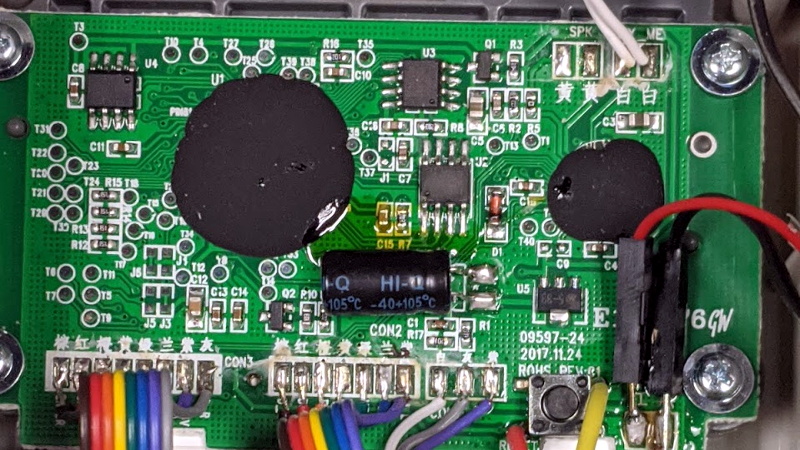
Removing the back of the Oregon Trail handheld reveals an unexpectedly spacious enclosure. The exterior was designed to resemble an old desktop computer rather than to minimize size, so much of the interior is open space. The main circuit board, display, speaker, controls, and battery compartment occupy only part of the available room.
That unused space is excellent news for hardware modders. A small single-board computer, replacement display, rechargeable battery, audio amplifier, or additional controls could potentially fit inside. The shell is therefore useful even when the original electronics are eventually retired.
The controls are also refreshingly straightforward. A membrane keypad connects the labeled buttons to the main board, while the power control uses a physical latching switch. Compared with modern products assembled from glue, microscopic clips, and pure hostility, this handheld is almost welcoming.
Two Memory Chips With Two Different Jobs
The most important discoveries are two small memory devices mounted on the board: a 24C04-family I2C EEPROM and a GigaDevice GD25Q80 SPI NOR flash chip.
Although both chips store data, they serve different purposes. The I2C EEPROM holds a relatively small amount of information and appears to contain saved-game progress. The larger SPI flash stores the game software and related assets. This division is practical: frequently changing save data can live in a small EEPROM, while the much larger program remains in nonvolatile flash storage.
The GD25Q80 is an 8-megabit device, equivalent to approximately one megabyte. That sounds almost comically small beside modern games, but it is spacious territory for an 8-bit title. A contemporary game might use more storage for one character’s shoelaces.
Reading the Main Firmware
To study the SPI flash, the chip can be connected to a compatible programmer. In the documented teardown, an FT2232H-based interface and the open-source flashrom utility were used. Reading the chip more than once and comparing the resulting files confirmed that the extraction was consistent.
That verification step is essential. A firmware file may look perfectly respectable while containing errors caused by unstable wiring, incorrect voltage, bus interference, or poor solder joints. Comparing repeated dumpsor checking cryptographic hasheshelps distinguish a reliable image from a digital casserole.
In-circuit reading was inconsistent in this case, so the chip was removed and connected through a breakout board. Desoldering is more invasive, but it isolates the memory from other components that may interfere with communication.
Following the I2C Save Data
I2C is a two-wire communication protocol commonly used for short-distance communication between integrated circuits. One line carries data and the other provides the clock signal. Each peripheral responds to an address, allowing multiple devices to share the same bus.
The Oregon Trail EEPROM exposes its storage through multiple I2C addresses that correspond to internal pages. A BeagleBone Black and standard Linux utilities such as i2cdetect and i2cdump can identify those addresses and read their contents.
Analysis showed that part of the EEPROM contained save-state information while other pages appeared unused. That is a useful lesson for beginners: not every byte in a memory chip must contain meaningful data. Manufacturers often choose readily available components with more capacity than a product strictly needs.
A Hidden Diagnostic Menu
The extracted firmware also contained clues about an internal test mode. Holding the appropriate buttons during startup opens a diagnostic screen used to check the controls and EEPROM.
Watching the EEPROM’s clock and data lines with a logic analyzer revealed the test procedure. The software wrote a sequence of known values to a particular address range and then read them back. Matching values indicated that the memory was responding correctly.
This is the embedded equivalent of asking, “Can you repeat that back to me?” It is simple, effective, and much less dramatic than the handheld’s usual method of informing players that half their traveling party has developed a terrible disease.
Gift Two: Inside the Bandai Namco Flashback Blast
A Tiny Console Built Into an HDMI Device
The Bandai Namco Flashback Blast looks simpler than the Oregon Trail handheld because the television supplies its display and audio system. Inside the dongle are a main processor, SRAM, flash memory, a wireless antenna, an HDMI connection, and a USB power connector.
The examined board used a processor marked “MonkeyKing,” an external memory device, and parallel flash storage. The hardware is compact and purpose-built: power on the system, load a menu, receive controller input, run an emulator, and send the resulting picture to the television.
The included game collection consists of NES-format versions of Dig Dug, Galaga, Galaxian, Mappy, Pac-Man, Sky Kid, Xevious, and The Tower of Druaga. These are not merely modern games wearing pixel-art costumes. The firmware contains recognizable Nintendo Entertainment System ROM images.
Using an ESP32 as a Flash-Reading Tool
Instead of relying exclusively on a commercial programmer, the teardown used an ESP32-based project to read the Flashback Blast’s memory. The ESP32 is inexpensive, widely available, and capable of communicating with external flash devices through its peripheral interfaces.
This illustrates an important point about hardware reverse engineering: specialized equipment is useful, but it is not always mandatory. Development boards, open-source software, inexpensive logic analyzers, and careful wiring can perform jobs that once required laboratory-grade tools.
Official ESP32 documentation provides functions for reading, writing, erasing, and mapping external flash memory. A custom tool can build on those capabilities to retrieve data from a target chip and transfer it to a computer for analysis.
Letting Binwalk Search the Firmware
A raw firmware dump usually looks like an enormous wall of hexadecimal numbers. Somewhere inside may be executable code, compressed archives, images, text strings, certificates, configuration data, and game files. Finding each section manually would be possible, but so would mowing a football field with nail clippers.
Binwalk automates much of the initial inspection. It scans binary data for known signatures and can identify or extract embedded files. In the Flashback Blast image, the tool detected compressed menu data, a 1280-by-720 bitmap, checksums, copyright strings, a certificate, and compressed NES files.
After extraction, the game files could be tested in a compatible NES emulator. Their successful operation confirmed that they were conventional ROM images rather than a proprietary format understood only by the original device.
Could the Games Be Replaced?
Discovering standard NES files naturally leads to another question: could the firmware be rebuilt with a different game collection?
Technically, the possibility is plausible. A replacement image would need to preserve the expected file structure, offsets, compression method, menu information, and any checksums or size limits enforced by the software. The modified image would then have to be written back without corrupting the boot code.
In practice, extraction is much safer than modification. Reading a chip leaves the original contents intact. Writing introduces the possibility of erasing critical data, supplying the wrong voltage, losing power halfway through the operation, or discovering that the only backup was saved to a folder named “New Folder (7)” and subsequently deleted.
Copyright must also be considered. Examining firmware from hardware you own is not the same as downloading or distributing commercial game ROMs. United States exemptions for game preservation are limited and apply under specific conditions, particularly to eligible libraries, archives, and museums. A hobbyist should work with legally obtained software, retain original backups, and avoid sharing copyrighted images.
What These Classic Gaming Teardowns Teach Us
Low-Cost Products Can Be Excellent Learning Platforms
Neither device was designed as a development kit, yet both expose useful embedded-system concepts. The Oregon Trail handheld demonstrates I2C EEPROM communication, SPI flash extraction, membrane controls, and diagnostic routines. The Flashback Blast introduces parallel flash, wireless input, firmware carving, compression, and emulation.
Firmware Is Usually a Collection, Not a Mystery Blob
A firmware image may initially look opaque, but recognizable structures often emerge. File signatures, readable strings, graphics dimensions, compression headers, and repeated patterns provide landmarks. Tools such as Binwalk accelerate discovery, while a hex editor helps verify what automated tools report.
Reliable Dumps Matter More Than Exciting Dumps
One successful read is encouraging; two matching reads are evidence. Careful reverse engineering means documenting pin connections, checking voltage requirements, saving multiple copies, comparing hashes, and keeping an untouched original image. The glamorous part may be finding hidden ROMs, but disciplined verification is what keeps the project from turning into electronic archaeology performed on a brick.
Documentation Extends the Life of Hardware
A teardown becomes much more valuable when the researcher records chip markings, signal names, memory maps, tool commands, photographs, and unsuccessful attempts. That documentation allows others to reproduce the work, correct mistakes, and adapt the method to similar devices. It also preserves knowledge about inexpensive products that manufacturers may discontinue after only a few years.
Hands-On Experiences When Exploring Classic Gaming Gifts
The most memorable part of opening a retro gaming device is often the contrast between emotional expectation and physical reality. The enclosure may reproduce a beloved computer or console, but the inside rarely resembles the original machine. Instead of a collection of large socketed chips, there may be one compact processor, a small memory package, a printed antenna, and several black epoxy blobs guarding their identities like extremely unhelpful security personnel.
A good exploration begins before the first screw is removed. Play every built-in game, test each button, examine the menus, and note how the system behaves during startup and shutdown. This baseline matters later. When a modified or reassembled device behaves strangely, you need to know whether that delay, flicker, or audio pop was already present.
Next comes the screw hunt. Some fasteners are obvious, while others may hide beneath labels, rubber feet, or battery-compartment stickers. Photograph each stage and arrange screws in the pattern in which they were removed. A classic gaming gift can contain three screw lengths that differ by barely a millimeter, because apparently every teardown requires at least one tiny practical joke.
Once the case opens, resist the urge to start pulling cables. Identify the power section, main processor, memory chips, display connector, speaker wires, controller traces, and test pads. Writing down chip markings is often more productive than immediately attaching equipment. A readable part number can lead to a datasheet that explains voltage limits, capacity, pin assignments, and supported commands.
The Oregon Trail handheld offers a particularly satisfying experience because its construction is easy to understand. The spacious case makes the board accessible, the keypad traces are visible, and the separate memory devices suggest a logical path for investigation. Finding save-state data in the smaller EEPROM creates a direct connection between an action in the game and changing bytes on the chip. Save the journey, dump the memory, make another decision, save again, and compare the files. The differences help reveal where progress, supplies, names, or settings may be stored.
The Flashback Blast provides a different kind of reward. Its firmware contains layers that can be peeled apart on a computer. A first scan may reveal compressed blocks and image headers. Extracting those blocks can expose menu graphics and game filenames. Loading a recovered file in an emulator then provides a gratifying confirmation that the analysis was correct. The familiar title screen appears, and a random section of binary data suddenly becomes a recognizable piece of gaming history.
Not every session ends with a dramatic discovery. Sometimes the memory cannot be read in-circuit. Sometimes a logic analyzer captures noise because the ground connection is poor. Sometimes a promising test pad leads absolutely nowhere. These failures are still useful because they narrow the possibilities and improve troubleshooting habits.
The best practical habit is to make the project reversible. Save multiple verified firmware dumps before changing anything. Label wires, use temperature-controlled soldering equipment, avoid applying five volts to a 3.3-volt component, and keep the original parts. A successful teardown should finish with more knowledge and, ideally, a device that still works.
There is also value in knowing when to stop. A functioning nostalgic toy does not have to become a custom Linux computer simply because there is room inside. Sometimes identifying the chips, capturing the firmware, and documenting the architecture is enough. The hardware can be reassembled, returned to the shelf, and enjoyed for what it isa small portal to an earlier era, now carrying a few fingerprints and considerably fewer secrets.
Conclusion
Poking around inside these two classic gaming gifts reveals two distinct approaches to selling nostalgia. The Oregon Trail handheld wraps a compact embedded platform in a playful imitation of a school computer, while the Bandai Namco Flashback Blast condenses an NES-style game collection into a television dongle.
Both devices demonstrate that useful reverse-engineering lessons can come from inexpensive consumer hardware. By identifying memory chips, capturing reliable firmware images, observing communication buses, and examining embedded files, curious owners can move from simply replaying old games to understanding how those games were packaged for a new generation.
The result is a hobby that combines gaming history, electronics, software analysis, and the timeless human desire to open a perfectly functional object just to see what is inside.