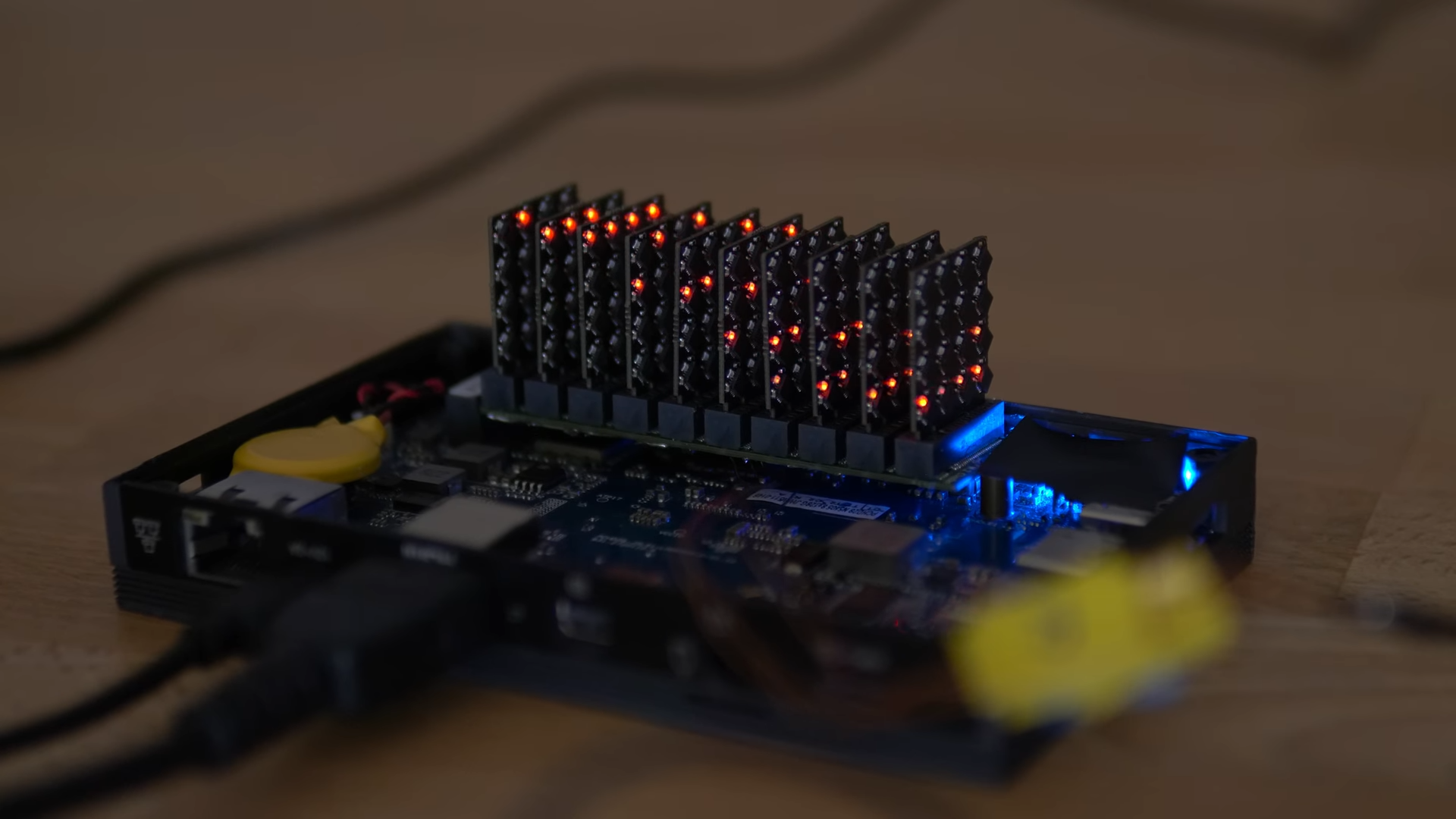
Every so often, a hardware project appears that looks like it escaped from a cyberpunk garage, tripped over a soldering iron, and landed directly in the “I absolutely do not need this, but I desperately want it” category. The 160-core RISC-V M.2 coprocessor board is exactly that kind of machine. It is tiny, strange, impractical in the best possible way, and surprisingly educational.
At first glance, it resembles an SSD that had a stressful week. Look closer and the joke becomes the story: this compact M.2 board carries a small army of RISC-V microcontrollers arranged as a miniature parallel computing cluster. Instead of one big processor flexing like a gym influencer, it relies on 160 modest cores doing small jobs together. That is not just fun hardware theater. It is a practical lesson in embedded systems, parallel processing, signal integrity, power delivery, and why communication bottlenecks are the party poopers of high-core-count computing.
The board, made by creator Matthias “bitluni” Balwierz, is not trying to replace a modern GPU or server CPU. Nobody is sliding this into a workstation and rendering the next Hollywood dragon before lunch. Its value is different. It shows what happens when open instruction set architecture, inexpensive microcontrollers, PCIe connectivity, and maker stubbornness collide inside the cramped real estate of an M.2 form factor.
What Is a 160-Core RISC-V M.2 CoProcessor?
A coprocessor is a secondary processor designed to assist a main CPU. In older computers, math coprocessors handled floating-point calculations. In modern systems, GPUs, neural processing units, video encoders, and security chips all play coprocessor-like roles. The idea is simple: let the main processor do general computing while specialized hardware handles tasks that can be accelerated.
This 160-core RISC-V board revives that spirit with maker-grade flair. It uses many small WCH CH32V003 RISC-V microcontrollers, each running at up to 48 MHz, combined into one dense cluster. Individually, each microcontroller is humble. Each chip has limited memory and limited performance. Together, however, they form a parallel playground where workloads can be divided into small pieces and distributed across many cores.
The board communicates with a host computer through the M.2 slot using a WCH CH382 PCIe-to-serial interface. That matters because M.2 is usually associated with NVMe storage, Wi-Fi cards, and compact expansion modules. Here, the form factor becomes a launchpad for a tiny many-core experiment. It is like inviting 160 ants to move a picnic table. The ants are not impressive alone, but once they organize, the picnic starts looking nervous.
Why RISC-V Makes This Project So Interesting
RISC-V is an open standard instruction set architecture, often described as a flexible foundation for designing processors without being locked into a proprietary ISA. That openness is one reason RISC-V has become popular in microcontrollers, embedded systems, research projects, custom silicon, and educational hardware.
For makers and engineers, RISC-V is attractive because it lowers the psychological barrier to experimentation. You can study it, implement it, modify compatible cores, build software toolchains around it, and explore processor design without needing a corporate badge and a secret handshake. That does not mean every RISC-V chip is open-source hardware, but the architecture itself encourages a more open ecosystem than traditional closed instruction sets.
In this board, RISC-V is not presented as a buzzword slapped on a box. It is the glue that makes the project feel modern. The use of inexpensive RISC-V microcontrollers shows how far low-cost embedded computing has come. A few years ago, a 160-core board sounded like lab equipment. Now someone can build one that resembles a slightly cursed stick of storage.
The Hardware: Tiny Cores, Big Personality
The heart of the design is not one monster chip. Instead, the board uses many small microcontrollers placed in a dense arrangement. Each microcontroller is simple, affordable, and power-efficient. The magic is in quantity. With 160 cores, the board becomes a distributed system in miniature.
The challenge is that 160 cores also means 160 opportunities for routing headaches, power issues, firmware coordination, and debugging sessions that make coffee nervous. A single microcontroller project can already become messy when power rails sag, clocks misbehave, or serial output vanishes into the void. Multiply that by 160 and you are no longer debugging a board. You are negotiating with a tiny silicon parliament.
The M.2 Form Factor
M.2 is compact, standardized, and widely available in modern computers. Its appeal is obvious: it gives hardware designers a convenient way to connect expansion devices without using a chunky add-in card. For storage and wireless modules, M.2 is ordinary. For a 160-core RISC-V cluster, it becomes delightfully odd.
The form factor also creates severe design constraints. There is not much room for generous copper pours, wide power traces, big connectors, or luxurious debugging headers. The board must fit into a tight physical envelope while carrying many chips and traces. That is where the project becomes less “look at all these cores” and more “please respect the laws of electrical engineering.”
The PCIe-to-Serial Bottleneck
The board talks to the host through a WCH CH382 serial interface over PCIe. This is clever because it makes the cluster accessible from a normal computer, but it also creates a bottleneck. The cores may be able to compute faster than the host can feed them data or collect results.
This is one of the most important lessons in parallel computing: performance is not just about how many cores you have. It is about memory, communication, scheduling, synchronization, power, and software. A thousand workers cannot build a house efficiently if only one person is allowed through the front door carrying one brick at a time.
What Can 160 Tiny RISC-V Cores Actually Do?
The obvious question is whether this board is useful or just a spectacular conversation starter. The honest answer is both. It is not a general-purpose computing monster. You would not use it to run a browser, edit video, or train a large AI model. But for certain kinds of experiments, it is fascinating.
Parallel workloads are the natural fit. A task like raymarching, where many independent calculations contribute to an image, makes sense as a demonstration. Each core can handle a small portion of the work, then return results to the host. That does not mean the final speed will beat a GPU. It means the workload teaches the same architectural concepts that show up in serious high-performance computing: split the job, distribute the work, collect the output, and try not to let communication overhead ruin your day.
Potential Use Cases
For education, this board is excellent. Students can learn about distributed computing, embedded firmware, task scheduling, serial communication, and hardware limits. Unlike cloud computing, where the cluster is abstracted behind dashboards, this cluster is physically visible. You can point to the chips. You can imagine the data moving. You can also imagine the board muttering, “please improve your protocol.”
For experimentation, it could run low-bandwidth compute-heavy tasks. Examples include cellular automata, procedural graphics, brute-force toy problems, parallel simulations, signal experiments, checksum calculations, or embedded rendering demos. The key phrase is “low-bandwidth.” If the host must constantly move large data in and out, the serial interface becomes the traffic jam.
For professional deployment, the board is more inspiration than product. It proves ideas, reveals trade-offs, and invites better versions. A polished commercial coprocessor would likely need stronger interconnects, shared memory, better power distribution, richer software tools, and a more robust programming model.
Why This Is Not a GPU Killerand Why That Is Fine
Some people see 160 cores and immediately compare the board to a GPU. That is understandable but unfair. Modern GPUs have thousands of highly optimized execution units, massive memory bandwidth, mature software stacks, advanced scheduling, and years of driver engineering behind them. This M.2 RISC-V board is not trying to win that race. It showed up on a bicycle wearing goggles, and somehow that is more charming.
The better comparison is not “Can it beat RTX?” but “What can it teach us about parallel architecture?” In that department, the board shines. It makes the invisible visible. It demonstrates that core count alone is not enough. It reveals the importance of interconnect design. It shows how power delivery can become a limiting factor. It also reminds us that hardware projects are often less like building with Lego and more like persuading electrons to behave while they laugh at your optimism.
The Engineering Lessons Hidden in the Chaos
The board’s most valuable feature may be its imperfection. Highly polished commercial hardware hides its scars. Maker hardware often leaves them proudly on display. Bodge wires, revised routing, power fixes, and firmware experiments are not signs of failure. They are the fingerprints of real engineering.
1. Power Delivery Matters More Than Core Count
When many chips switch at once, current demand changes quickly. Thin traces, limited copper area, and tight board geometry can create voltage drops and noise. Even low-power microcontrollers become demanding when multiplied by 160. A design that works for one chip may become unstable when scaled across a crowd.
2. Communication Is Often the Real Bottleneck
Parallel computing sounds easy until data movement enters the room. If each core must wait for commands or results must trickle back through a narrow interface, total performance suffers. This is true whether the system is a homemade RISC-V cluster, a data center, or a GPU pipeline. Compute is glamorous; bandwidth pays the rent.
3. Software Must Match the Hardware
A many-core board needs more than firmware blinking politely. It needs a programming model. How are jobs assigned? How are failures detected? How are results collected? How does the host know which core is alive, busy, idle, or sulking? Without good software, 160 cores are just 160 tiny ways to get confused.
4. Physical Layout Is a Feature
PCB layout is not merely packaging. It is part of the circuit. Trace length, ground return paths, decoupling capacitors, thermal behavior, connector placement, and routing density all affect whether the board works reliably. The smaller the board and the higher the density, the less forgiveness exists. Electrons are not sentimental.
Why Makers Love Projects Like This
The 160-core RISC-V M.2 coprocessor is exactly the sort of project that makes hardware communities light up. It is ambitious without pretending to be practical. It is educational without being boring. It takes a familiar objectan M.2 boardand uses it in a way that makes people stop scrolling.
That sense of surprise matters. Good maker projects do not merely solve problems. They create new questions. Could this be scaled? Could the interconnect be improved? What if the board used a small FPGA as a traffic controller? What if the microcontrollers shared memory? What if the host interface exposed a better job queue? What if the next version had fewer cores but more bandwidth? These are the questions that turn a cool build into a learning platform.
The Bigger Picture: RISC-V and the Future of Custom Compute
This board arrives at a moment when custom computing is becoming more important. AI accelerators, embedded processors, smart sensors, robotics controllers, storage processors, and security chips all benefit from hardware tuned to specific workloads. RISC-V fits naturally into that world because it allows designers to build around an open instruction set and customize designs for their use case.
Not every RISC-V device will be exotic. Many will quietly sit inside appliances, industrial controllers, drives, sensors, and IoT devices. But projects like this 160-core board show the playful edge of the ecosystem. They remind us that innovation does not only happen in giant semiconductor companies. Sometimes it happens when a maker looks at an M.2 slot and thinks, “What if this held a tiny compute swarm?”
Should You Build One?
If you are new to electronics, probably not as your first project. Start with one microcontroller. Then two. Then maybe a small cluster. Learn power, programming, debugging, and PCB basics before you attempt a board that looks like a silicon apartment complex.
If you are an experienced maker, this kind of project is a gold mine of lessons. Study the architecture. Review the routing challenges. Think about the host protocol. Consider how you would improve power distribution, add diagnostics, or build a more efficient communication fabric. The value is not only in copying the board. The value is in understanding why it works, where it struggles, and what a version two might become.
Experience Notes: Living With a Tiny Many-Core Beast
Working with a board like this feels less like using a normal computer and more like managing a very small, very opinionated factory. A desktop CPU behaves like a professional chef: give it ingredients and it prepares the meal. A 160-core microcontroller cluster behaves like 160 interns with tiny knives: impressive potential, but only if the instructions are clear, the workspace is organized, and nobody is waiting in the hallway for permission to chop an onion.
The first experience is usually awe. Seeing so many cores packed into an M.2 shape triggers the same reaction as seeing a ship in a bottle. You know it is possible because it is right there, but your brain still asks, “Who hurt the person who made this?” Then the practical questions arrive. How do you address each core? How do you flash firmware? What happens when one chip does not respond? How do you tell the difference between a software bug, a power problem, a bad solder joint, and a timing issue? The board becomes a puzzle box with voltage rails.
The second experience is humility. Parallelism sounds powerful in theory, but the moment you try to use it, you discover that dividing work is work. A good demo must be designed around the hardware. Sending huge data streams through a narrow serial path is like ordering 160 race cars and giving them one driveway. The best workloads are those where each core receives a compact instruction, performs plenty of local computation, and returns a small result. That design pattern appears everywhere, from graphics to scientific simulation to distributed systems.
The third experience is appreciation for boring engineering. Decoupling capacitors, ground planes, trace width, connectors, reset lines, boot modes, and test pads are not glamorous, but they decide whether the fun part happens. Many beginners imagine hardware design as choosing cool chips. Experienced builders know the cool chip is only the headline. The supporting cast determines whether the show opens or catches fire during rehearsal.
The fourth experience is creative temptation. Once you understand the limitations, you start imagining upgrades. Maybe a smarter controller could queue jobs. Maybe a higher-bandwidth interface could reduce idle time. Maybe fewer but faster RISC-V cores would outperform the swarm. Maybe status LEDs could return if power routing improved. Maybe the board could become a classroom tool where students watch parallel tasks complete in real time. Every limitation becomes an invitation.
That is why this project sticks in the mind. It is not merely a novelty board. It is a compact reminder that computers are physical things. Bits move through traces. Chips need power. Software must respect hardware. Architecture is a negotiation between ambition and reality. And sometimes, if you are brave enough, that negotiation fits into an M.2 slot.
Conclusion
The 160-core RISC-V M.2 coprocessor is not the device you buy because you need practical acceleration tomorrow morning. It is the device you study because it makes modern computing concepts tangible. It combines open-standard processor ideas, low-cost microcontrollers, compact expansion hardware, and many-core architecture into one delightfully excessive board.
Its real achievement is not raw speed. Its real achievement is clarity. It shows that parallel computing is powerful but difficult, that bandwidth can matter more than core count, that power delivery is never optional, and that RISC-V is giving makers and engineers fresh room to experiment. In a world full of sealed black-box hardware, a weird little M.2 compute swarm is a welcome reminder that curiosity still belongs on the motherboard.
Note: This article is based on publicly available technical information, maker documentation, and current RISC-V ecosystem knowledge. Source links are intentionally not inserted to keep the article ready for publication.